
- Catalogs
- ZEALUX France
- R290 SERIES

- Company
- Products
- Catalogs
- News & Trends
- Exhibitions
R290 SERIES
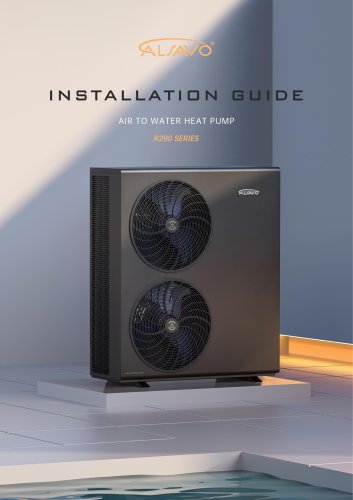
R290 SERIES
This section provides detailed guidelines for installing and maintaining a heat pump system using R290 refrigerant, which is flammable and explosive. It emphasizes the necessity of reading the manual thoroughly and ensuring that only authorized and trained personnel perform installation and maintenance tasks. Following manufacturer instructions is crucial to avoid voiding the warranty and preventing injury or damage.
The heat pump should be transported and stored in its original packaging in a vertical position to prevent damage. If improperly stored, the unit should not be powered on for at least 24 hours.
Only qualified professionals should conduct installation and maintenance. The heat pump must remain powered during winter to prevent freezing. Proper disposal of packaging materials is necessary to avoid injury, and the unit should be mounted on a stable base to allow for proper drainage and withstand environmental factors like strong winds.
Electrical installations must comply with current guidelines and regulations. It is important to disconnect power before any intervention, ensure proper grounding, and secure terminal connections to prevent fires and electric shocks.
Operators must ensure personnel are certified and knowledgeable about regulations concerning fluorinated greenhouse gases. Regular leak checks and proper record-keeping are mandatory. The document warns against allowing refrigerant gas to escape into the atmosphere and emphasizes the need for proper ventilation when working on the refrigerant circuit.
Using glycol in the water circuit and installing antifreeze valves is recommended to protect against freezing. Keeping the heat pump on during winter and draining it during power cuts is advised to prevent damage.
Users should not touch internal parts during operation and ensure children are supervised around the equipment. The use of original spare parts is recommended to meet technical requirements.
There are risks of electric shock and fire if installation guidelines are not followed. Protective circuit breakers must be installed, and all electrical work should be conducted by qualified personnel. The document advises against self-installation and stresses the importance of using manufacturer-supplied parts.
Various installation schematics are included for different system configurations, such as single circulation, dual circulation with low loss header, buffer tank, swimming pools, and underfloor heating.
Details on installation location, space requirements, and mounting bracket positions are provided.
Guidelines for protecting devices, cable specifications, and flow rate considerations are outlined.
The document introduces the TUYA APP for controlling the heat pump, including instructions for downloading, connecting, and sharing the app. It also covers the main functions of the controller keypad, mode selection, and temperature adjustments.
Details single and dual circulation pump configurations for various heating and cooling models, including domestic water tanks and swimming pools. Wiring instructions are provided for connecting circulator pumps, backup heaters, and heat pumps.
Specifies installation location and space requirements to ensure proper operation and avoid noise issues. Dimensions and mounting bracket positions are outlined for different ALSAVO HEAT models.
Provides guidelines for protecting devices, cable specifications, and primary pipework sizing. Expansion vessel and buffer tank selection criteria are included based on system volume and head height.
Instructions for downloading and connecting the TUYA app to the heat pump are provided. Features include device sharing, operating mode control, and timer setup.
Main functions of the keypad and mode introductions are explained. Controller operations such as ON/OFF, temperature adjustment, and mode selection are detailed.
Lists standard accessories.
Provides detailed parameter settings for various operational modes.
Outlines warranty and disclaimer information.
To enter parameter settings, long press the designated buttons for 3 seconds. Use the buttons to select and adjust the P value settings.
Manual defrosting is necessary when the machine is frosty due to low ambient temperatures. Activate by holding the mode selection button for 3 seconds.
The clock and timer settings automatically exit after 10 seconds of inactivity. Timer settings can be canceled by restarting the controller.
Hold the up and down buttons for 5 seconds to reset parameters to default values.
Adjust electric heating settings for the domestic water tank through parameter settings.
Recommended temperatures for equipment: Floor heating (30°C), Fan coil (40°C), Heating radiator (50°C). Weather compensation mode adjusts water inlet temperature based on outdoor temperature.
Prioritize DHW tank heating with specific parameter settings. Sterilization mode heats water to a target temperature for safety.
Activate pool heating by setting parameter P26 to 1, which adjusts operation frequency for optimal heating.
Includes wiring diagrams for setup.
Activate by pressing specific keys for 3 seconds. Limits maximum operating frequency and fan speed.
Provides a list of parameters for system diagnostics, including frequency, temperature, and pressure readings.
Lists error codes with definitions, reasons, and solutions for issues like water flow protection, sensor failures, and communication errors.
- Electronic Expansion Valve Issues: Check if the valve rotates manually. If pressure reaches 4.2Mpa immediately upon power-up, inspect the PCB and pressure switch for damage or looseness.
- Excessive Temperature Difference: Address insufficient water flow, sensor resistance drift, or reversed sensors. Clean filters and check system components.
- WiFi Connection Failure: Ensure connection under 2.4Ghz frequency, use WiFi5 protocol, and authorize necessary smartphone permissions. Replace controller if needed.
- Heating Failure: Verify CN1 port connection for linkage switch signal.
- Water Pump Jam: Refer to the pump clogging repair guide if the unit has been inactive for long periods.
- SG-Ready Logic: Describes operation modes based on SG and EVU signal states, affecting heating and hot water modes.
- SG-Ready Wiring: Details connections for various ALSAVO HEAT models.
Lists standard accessories including controllers, cables, and installation bases.
Provides a comprehensive list of parameters for temperature settings, defrost modes, pump control, and more, with factory defaults.
- General Warranty: 3-year warranty covering defects in materials and components.
- Detail Policy: Covers manufacturing defects, excludes transportation damage, improper use, and modifications.
- Spare Parts and Repairs: Offers spare parts for warranty and non-warranty defects.
- Procedure: Instructions for making warranty claims, requiring proof of purchase and problem description.
Catalog excerpts
Read the instructions before installation. The appliance contains gas R290 • Please read this manual carefully before installing, modifying, or adjusting the heating system. This manual contains all the information you need to use and install the heat pump. The installer must read the manual and carefully follow the operating and maintenance instructions. • R290 is a flammable and explosive refrigerant. During the installation and maintenance of the unit, it is necessary to stay away from open flames to ensure safety. • The installer is responsible for the installation of the product and must...
Open the catalog to page 3
Connect the device to earth, in compliance with local laws and regulations. Do not connect the earth cable to the gas or water pipe, or to the lightning protection cable. This could cause a fire. Incomplete grounding may result in electric shock. • When wiring the power supply, ensure that the terminal block is securely fastened. If the terminal block is not tightened sufficiently, the terminals may overheat and cause a fire. HFC Gaseous Refrigerant comply with standards and regulation (EU) No 517/2014 • Training and certification, the operator of the relevant application shall ensure that the...
Open the catalog to page 4
• Risk of electric shock due to incorrect connection to the mains supply. Non-compliance with the rules of the art when making electrical connections can lead to the risk of electric shock and material damage. • Be sure to install protective circuit breakers in accordance with local laws and regulations. Failure to install a protective device may result in a risk of electric shock and fire. • Before working on the heat pump, switch off the power supply via the circuit breaker. • When the service panels are removed, the user must take all necessary precautions to avoid any incident. • Never leave...
Open the catalog to page 5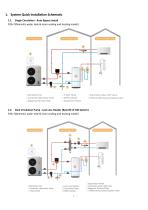
P20=7(Domestic water tank & room cooling and heating model) Monobloc Unit 2.Controller (Monobloc Unit) Magnetic Particle Filter 7,Aotumatic water refill valve 8 Differential pressure bypass valve 1.2. Dual Circulation Pump - Low Loss Header (Retrofit of Old System) P20=7(Domestic water tank & room cooling and heating model) Expansion Vessel Monobloc Unit Aotumatic water refill valve Circulation Pump Controller (Monobloc Unit) Magnetic Particle Filter Differential pressure bypass valve
Open the catalog to page 8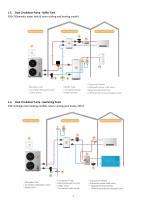
Monobloc Unit Controller (Monobloc Unit) 7 3 Way Valve 4.Buffer Tank 8.Aotumatic water refill valve 1 Circulation Pump Magnetic Particle Filter 6.DHW Cylinder 10.Differential pressure bypass valve 2. Controller (Monobloc Unit) 5. Heat Exchangerfor pool 6.3 Way Valve Circulation water pump 9. Aotumatic water refill valve 10. Magnetic Particle Filter 11 Differential pressure bypass valve
Open the catalog to page 9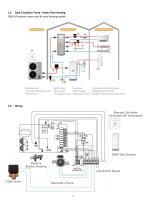
1.5. Dual Circulation Pump - Under Floor Heating P20=3( Domestic water tank & room heating model) Monobloc Unit > Controller (Monobloc Unit) 3 Way Valve ^ Buffer Tank . Controller 10.Aotumatic water refill valve : Mixer Valve DHW Cylinder .Magnetic Particle Filter 6 Circulation Pump 9.Expansion Vessel 12.Differential pressure bypass valve 3 Way Valve Remote Controller (included with heat pump) CN16 Pipeline Electric Heating XT1 I I I xt; I I I Secondary Pump DHW Tank Sensor Link Switch Signal 3
Open the catalog to page 10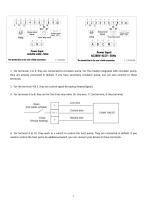
1. For terminals 1 to 3, they are connected to circulator pump. For the models integrated with circulator pump, they are already connected in default. If you have secondary circulator pump, you can also connect to these terminals. 2. For the terminal 4 & 5, they are control signal for backup heater(Signal). 3. For terminals 6 to 8, they are for the three way valve. (6: Live wire, 7: Control wire, 8: Neutral wire) 4. For terminal 9 to 10, they work as a switch to control the heat pump. They are connected in default. If you need to control the heat pump by additional switch, you can connect your...
Open the catalog to page 11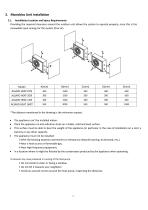
Providing the required clearance around the outdoor unit allows the system to operate properly, since this is the renewable input energy for the system (free air). *The distance mentioned in the drawing is the minimum request. • The appliance can't be installed indoor. • Place the appliance on anti-vibration studs on a stable, solid and level surface. • This surface must be able to bear the weight of the appliance (in particular in the case of installation on a roof, a balcony or any other support). • The appliance must not be installed: >With the blowing towards a permanent or temporary obstacle...
Open the catalog to page 12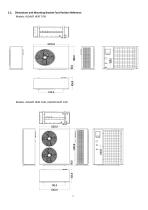
2.2. Dimensions and Mounting Bracket Foot Position Reference Models: ALSAVO HEAT 07i9 Models: ALSAVO HEAT 10i9, ALSAVO HEAT 12i9
Open the catalog to page 13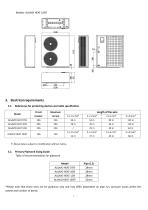
Models: ALSAVO HEAT 16i9T 3.1. References for protecting devices and cable specification *Please note that these sizes are for guidance only and may differ dependent on pipe run, pressure losses within the system and number of bends.
Open the catalog to page 14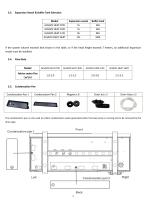
Expansion Vessel & Buffer Tank Selection Model ALSAVO HEAT 07i9 ALSAVO HEAT 10i9 ALSAVO HEAT 12i9 ALSAVO HEAT 16i9T If the system volume exceeds that shown in the table, or if the head height exceeds 7 meters, an additional expansion vessel must be installed. 3.4. Flow Rate Model Advise water flux (m3/h) The condensation pan is only used to collect condensation water generated when the heat pump is running and to be removed by the drain pipe.
Open the catalog to page 15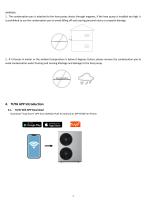
1. The condensation pan is attached to the heat pump chassis through magnets, if the heat pump is installed too high, it is prohibited to use the condensation pan to avoid falling off and causing personal injury or property damage. 2. If it freezes in winter or the ambient temperature is below 0 degrees Celsius, please remove the condensation pan to avoid condensation water freezing and causing blockage and damage to the heat pump. TUYA Wifi APP Download Download "Tuya Smart" APP from GOOGLE PLAY for Android or APP STORE for iPhone.
Open the catalog to page 16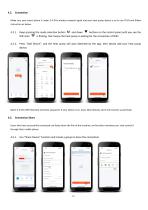
Make sure your smart phone is under 2.4 GHz wireless network signal and your heat pump device is on to use TUYA and follow instruction as below. 4.2.1. Keep pressing the mode selection button and down buttons on the control panel until you see the WIFI icon is flicking, that means the heat pump is waiting for the connection of WIFI. 4.2.2. Press "Add Device", and the heat pump will auto detected by the app, then please add your heat pump device. Select 2.4 GHz WIFI Network and enter password. If your device is on, press Next directly, and it will connect successfully. Connection Share Users who...
Open the catalog to page 17All ZEALUX France catalogs and technical brochures
 Inverter Dehumidifier
2 Pages
 Fan coil units
17 Pages
 Inverboost
6 Pages
 Pool & SPA Heat Pumps
47 Pages
 Multi-funtion Heat Pumps
24 Pages
 AIR TO WATER HEAT PUMP
77 Pages
 POOL HEAT PUMP
20 Pages
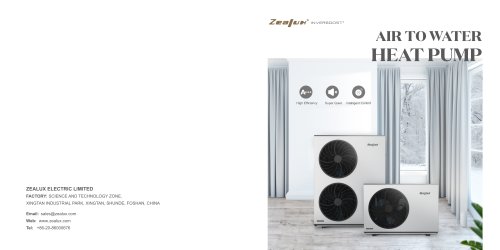 RESIDENTIAL HEAT PUMP
8 Pages
 House catalog
24 Pages
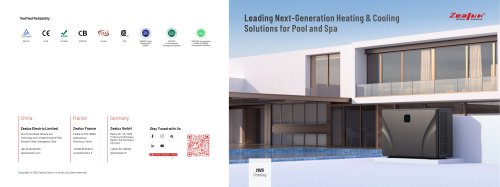 2025-zealux-pool-catalog
17 Pages
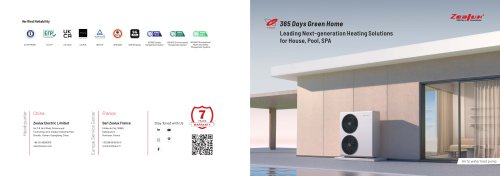
- Residential heat pump
- Air source heat pump
- Outdoor heat pump
- Inverter heat pump
- Air/water heat pump
- Energy rating heat pump
- Industrial dehumidifier
- Smart heat pump
- Split heat pump
- Commercial heat pump
- Monobloc heat pump
- Class A+++ heat pump
- Reversible heat pump
- Hot water heat pump
- Mobile dehumidifier
- Floor dehumidifier
- WiFi heat pump
- Wall-mounted fan coil