- Catalogs
- Vitrum Design
- Vitrum On-Off Classic


Vitrum On-Off Classic

Vitrum On-Off Classic
The Vitrum system is designed for a 240V power supply and must be installed by a qualified electrician. Ensure the power is disconnected before installation. Follow the circuit diagrams provided, especially if connecting without an earth wire. Avoid installing near heat sources or in high humidity. Use a rapid-acting fuse suitable for the load.
Connect the live wire to terminals marked “L”, “C1...C3”, and the neutral wire to “N”. The relays function as switches with normally open contacts. The device can operate as a “Button” or a “Switch”. Ensure correct wire positioning and use the supplied screws with a maximum torque of 0.8 nm.
Align the glass panel tabs with the anchor holes and press evenly. After fitting, buttons are inactive for 10 seconds while sensors recalibrate. To remove, gently lever the edge.
Vitrum can operate as an on/off switch or a button. To configure, remove the glass panel and hold the service touch keys for 8 seconds. LEDs will flash blue (switch) or red (button). The default mode is “switch”.
To reset, remove the unit from the wall and press the hidden reset button for 3 seconds. The unit will flash red and sound a signal to confirm reset.
Power supply: 240V/50Hz. Energy consumption: <1W. Operating temperature: 0-40°C. Relay load capacity: up to 2400W. Protection rating: IP 40.
Vitrum units comply with European directives B.T.2006/95/CE and E.M.C.:2004/108/CE. The manufacturer is not responsible for unauthorized use. Product specifications may change without notice.
Catalog excerpts
HOME CONTROL Vitrum On-Off Clossic
Open the catalog to page 1
INDEX 0. Before starting. . . . . . . . . . . . . . . . . 3 1. Electrical connections. . . . . . . . . . . . 4 2. Positioning the glass decor panel . . . 8 3. Configuration of the type of switch. 10 4. Factory reset. . . . . . . . . . . . . . . . . . 13 5. Compliance with ec directives . . . . 15 Main technical specifications. . . 14
Open the catalog to page 2
0. BEFORE STARTING The Vitrum system that you have purchased is designed for connection to your existing 240V power supply circuit. Before commencing installation, ensure that the mains power supply had been disconnected by setting the main switch on your electricity meter to OFF. Do not re-connect the power supply and start using Vitrum until all connections have been correctly completed and the Vitrum unit has been inserted into the wall-mounting box. Vitrum must be installed by a professional electrician who is qualified to operate on electrical power circuits in full compliance with all current...
Open the catalog to page 3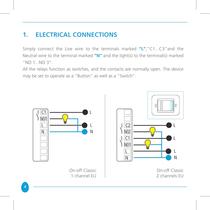
1. ELECTRICAL CONNECTIONS Simply connect the Live wire to the terminals marked “L”,”C1...C3”and the Neutral wire to the terminal marked “N” and the light(s) to the terminal(s) marked “NO 1...NO 3”. All the relays function as switches, and the contacts are normally open. The device may be set to operate as a “Button” as well as a “Switch”. On-off Classic 1 channel EU 4 On-off Classic 2 channels EU
Open the catalog to page 4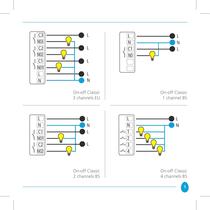
On-off Classic On-off Classic On-off Classic On-off Classic
Open the catalog to page 5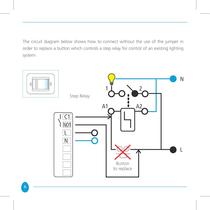
The circuit diagram below shows how to connect without the use of the jumper in order to replace a button which controls a step relay for control of an existing lighting system: Step Relay Button to replace 6
Open the catalog to page 6
IMPORTANT Fit a rapid-acting fuse with a high switching capacity that is suitable for the load applied to the device. Recommended fuse to put in series for each channel is: fastacting ceramic body cartridge fuse mod. F4AH250V (800W); F6,3AH250V (1500W); F12,5AH250V (2400W); F16AH250V (4x800W). Devices are built to fit italian “503” boxes, 3 modules, comply with the standard IEC/EN 60670-1 and dimensional tab A8 of standard CEI 23-74:2002; 1-gang British Standad boxes, 2 modules, comply with the standard 4662:2006. After connecting, check that the wires are correctly positioned inside the wallmounting...
Open the catalog to page 7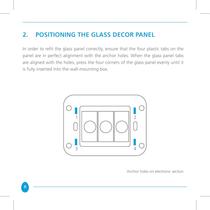
2. POSITIONING THE GLASS DECOR PANEL In order to refit the glass panel correctly, ensure that the four plastic tabs on the panel are in perfect alignment with the anchor holes. When the glass panel tabs are aligned with the holes, press the four corners of the glass panel evenly until it is fully inserted into the wall-mounting box. Anchor holes on electronic section 8
Open the catalog to page 8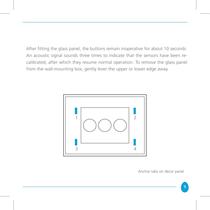
After fitting the glass panel, the buttons remain inoperative for about 10 seconds. An acoustic signal sounds three times to indicate that the sensors have been recalibrated, after which they resume normal operation. To remove the glass panel from the wall-mounting box, gently lever the upper or lower edge away. Anchor tabs on décor panel 9
Open the catalog to page 9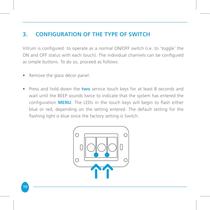
3. CONFIGURATION OF THE TYPE OF SWITCH Vitrum is configured to operate as a normal ON/OFF switch (i.e. to ‘toggle’ the ON and OFF status with each touch). The individual channels can be configured as simple buttons. To do so, proceed as follows: • Remove the glass décor panel. • Press and hold down the two service touch keys for at least 8 seconds and wait until the BEEP sounds twice to indicate that the system has entered the configuration menu. The LEDs in the touch keys will begin to flash either blue or red, depending on the setting entered. The default setting for the flashing light is blue...
Open the catalog to page 10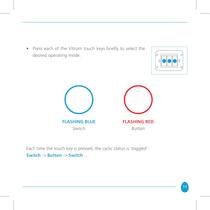
• Press each of the Vitrum touch keys briefly to select the desired operating mode. FLASHING BLUE Switch FLASHING RED Button Each time the touch key is pressed, the cyclic status is ‘toggled’: Switch -> Button -> Switch … 11
Open the catalog to page 11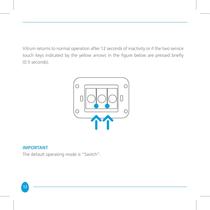
Vitrum returns to normal operation after 12 seconds of inactivity or if the two service touch keys indicated by the yellow arrows in the figure below are pressed briefly (0.5 seconds). IMPORTANT The default operating mode is “Switch”. 12
Open the catalog to page 12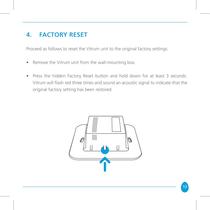
4. FACTORY RESET Proceed as follows to reset the Vitrum unit to the original factory settings: • Remove the Vitrum unit from the wall-mounting box. • Press the hidden Factory Reset button and hold down for at least 3 seconds. Vitrum will flash red three times and sound an acoustic signal to indicate that the original factory setting has been restored. 13
Open the catalog to page 13
MAIN TECHNICAL SPECIFICATIONS Vitrum On-off Classic
Open the catalog to page 14
5. CONFORMITà alle DIRETTIVE All Vitrum Classic units are built in compliance with the following European directives: B.T.2006/95/CE, E.M.C.:2004/108/CE, The manufacturer assumes no responsibility for any use not indicated in this manual. Think Simple reserves the right to modify its products at any time and without notice in order to better their quality and functionality. Therefore, all the information given in this datasheet is to be considered subject to possible modifications. For this reason we invite you to check for update of Vitrum users guide at www.vitrum.com/eng/content/download To...
Open the catalog to page 15
H O M E C O N T R O L by Think Simple SpA Head Office viale Lino Zanussi, 3 Tel +39 0434 516 216 33170 Pordenone Fax +39 0434 516 230 Sales Office corso Garibaldi, 86 Tel +39 02 655 600 29 20121 Milano Fax +39 02 454 982 95 www.thinksimple.it [email protected] I000109 - 07/2011 T H I N K S I M P L E
Open the catalog to page 16All Vitrum Design catalogs and technical brochures
 Vitrum design
72 Pages
 Catalogue 2014
52 Pages
Archived catalogs
 Vitrum MAster On-Off Wireless
20 Pages
 Vitrum II DIN On-Off Wireless
11 Pages
 Vitrum Scene Control Panel
20 Pages
 Roller Blind
28 Pages
 Warnings
4 Pages
 Home Master Remote Handset
24 Pages
 Vitrum Dimmer Classic
24 Pages
 Vitrum Dimmer Wireless
32 Pages
 Vitrum Satellite Wireless
28 Pages
 Vitrum On-Off Wireless
24 Pages