- Catalogs
- Vitrum Design
- Vitrum I and II DIN Dimmer Wireless


Vitrum I and II DIN Dimmer Wireless

Vitrum I and II DIN Dimmer Wireless
The document provides installation and operation instructions for the DIN Guide Module Dimmer Wireless by Think Simple. It is designed for integration with a 240V power supply and requires professional installation.
0. Before Starting
Ensure the power supply is disconnected before installation. Only qualified electricians should install the modules, following the circuit diagrams provided. Avoid installing near heat sources or in humid conditions.
1. Electrical Connections
Follow the wiring diagrams for correct installation. Incorrect connections can cause failures. Ensure wires are securely fastened.
2. Eco-Vitrum
The module features an Eco mode that initially powers lights at 65% to save energy. The LED indicators change color to show different power levels and modes.
3. Vitrum is Intelligent
The module uses Z-Wave wireless technology for network integration, allowing for remote control and scenario creation. Instructions are provided for adding the module to a network.
4. Type of Lamp
The module supports various lamp types but not low-voltage LED lamps or those with built-in dimmers. Configuration instructions are provided for different lamp types.
5. Disabling Eco Mode
Instructions are provided to disable the Eco mode if desired.
6. Advanced Functions
Control logic can be created to associate buttons across different modules. The process requires network integration and specific button presses.
7. Factory Reset
Two methods are provided for resetting the module to factory settings: using the HOME MASTER remote or the reset button.
8. Protective Devices
The module includes protective features against short circuits and overloads. It will attempt to correct incorrect settings automatically.
9. Supervision
The Home Master app for iPhone/iPad can be used for supervision, with an identification function for Vitrum units.
10. Compatibility
Vitrum devices are Z-Wave certified and can interact with other certified devices, allowing for system expansion.
11. Compliance with EC Directives
The devices comply with several European directives. The manufacturer reserves the right to modify products.
Main Technical Specifications
Specifications include power supply, energy consumption, operating temperature, and protection features. The module operates at 240V/50Hz with a Z-Wave frequency of 868.4 MHz.
Catalog excerpts
EN H O M E C O N T R O L DIN Guide module Dimmer Wireless INSTALLATION AND OPERATION
Open the catalog to page 1
DIN modules by Think Simple are a family of wireless products designed to simplify the work of both the designer and installer. They are particularly useful for installation in existing plants where actuators are installed in electric cabinets or, in case of new plant, when the designer prefers to site the electric power modules in a control cabinet. They can be controlled by creating associations with other Think Simple wireless products. In particular, they can be associated with Vitrum Satellite, with devices that only require a mains connection, with Vitrum Dimmer or On-Off. Also, if you...
Open the catalog to page 2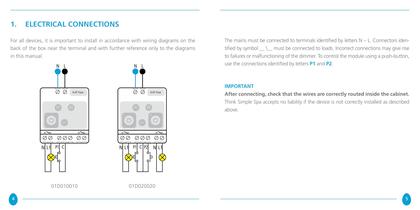
For all devices, it is important to install in accordance with wiring diagrams on the back of the box near the terminal and with further reference only to the diagrams The mains must be connected to terminals identified by letters N - L. Connectors iden- tified by symbol_\_must be connected to loads. Incorrect connections may give rise to failures or malfunctioning of the dimmer. To control the module using a push-button, use the connections identified by letters P1 and P2 After connecting, check that the wires are correctly routed inside the cabinet. Think Simple Spa accepts no liability if...
Open the catalog to page 3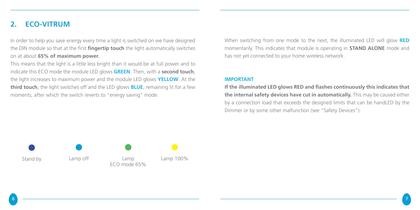
2. ECO-VITRUM In order to help you save energy every time a light is switched on we have designed the DIN module so that at the first fingertip touch the light automatically switches on at about 65% of maximum power. This means that the light is a little less bright than it would be at full power and to indicate this ECO mode the module LED glows green. Then, with a second touch, the light increases to maximum power and the module LED glows YELLOW. At the third touch, the light switches off and the LED glows BLUE, remaining lit for a few moments, after which the switch reverts to “energy saving”...
Open the catalog to page 4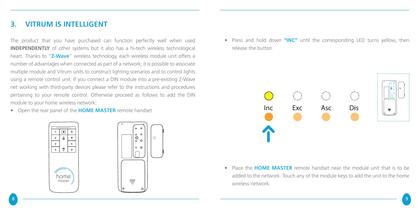
3. VITRUM IS INTELLIGENT The product that you have purchased can function perfectly well when used INDEPENDENTLY of other systems but it also has a hi-tech wireless technological heart. Thanks to “Z-Wave” wireless technology, each wireless module unit offers a number of advantages when connected as part of a network; it is possible to associate multiple module and Vitrum units to construct lighting scenarios and to control lights using a remote control unit. If you connect a DIN module into a pre-existing Z-Wave net working with third-party devices please refer to the instructions and procedures...
Open the catalog to page 5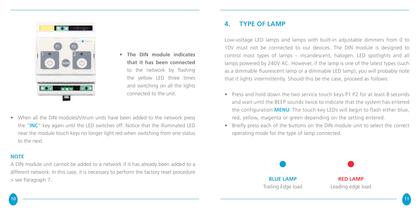
4. TYPE OF LAMP • The DIN module indicates that it has been connected to the network by flashing the yellow LED three times and switching on all the lights connected to the unit. • When all the DIN modules/Vitrum units have been added to the network press the “INC” key again until the LED switches off. Notice that the illuminated LED near the module touch keys no longer light red when switching from one status to the next. NotE A DIN module unit cannot be added to a network if it has already been added to a different network. In this case, it is necessary to perform the factory reset procedure...
Open the catalog to page 6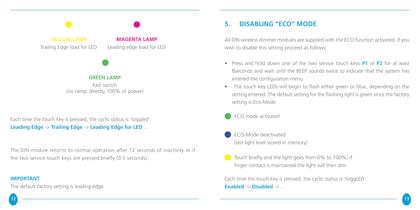
5. disabling “ECO” MODE YELLOW LAMP Trailing Edge load for LED MAGENTA LAMP Leading edge load for LED GREEN LAMP Fast switch (no ramp: directly 100% of power) Each time the touch key is pressed, the cyclic status is ‘toggled’: Leading Edge -> Trailing Edge -> Leading Edge for LED … All DIN wireless dimmer modules are supplied with the ECO function activated. If you wish to disable this setting proceed as follows: • Press and hold down one of the two service touch keys P1 or P2 for at least 8seconds and wait until the BEEP sounds twice to indicate that the system has entered the configuration...
Open the catalog to page 7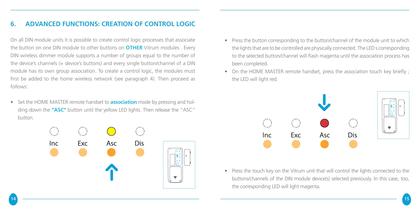
6. ADVANCED FUNCTIONS: CREATION OF CONTROL LOGIC On all DIN module units it is possible to create control logic processes that associate the button on one DIN module to other buttons on OTHER Vitrum modules . Every DIN wireless dimmer module supports a number of groups equal to the number of the device’s channels (= device’s buttons) and every single button/channel of a DIN module has its own group association. To create a control logic, the modules must first be added to the home wireless network (see paragraph 4). Then proceed as follows: • Press the button corresponding to the button/channel...
Open the catalog to page 8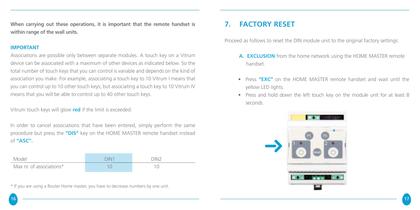
When carrying out these operations, it is important that the remote handset is within range of the wall units. 7. FACTORY RESET Proceed as follows to reset the DIN module unit to the original factory settings: IMPORTANT Associations are possible only between separate modules. A touch key on a Vitrum device can be associated with a maximum of other devices as indicated below. So the total number of touch keys that you can control is variable and depends on the kind of association you make. For example, associating a touch key to 10 Vitrum I means that you can control up to 10 other touch keys;...
Open the catalog to page 9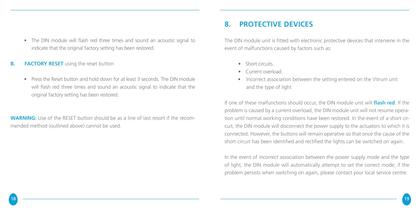
8. PROTECTIVE DEVICES • The DIN module will flash red three times and sound an acoustic signal to indicate that the original factory setting has been restored. B. The DIN module unit is fitted with electronic protective devices that intervene in the event of malfunctions caused by factors such as: FACTORY RESET using the reset button • Short circuits. • Current overload. • Incorrect association between the setting entered on the Vitrum unit and the type of light • Press the Reset button and hold down for at least 3 seconds. The DIN module will flash red three times and sound an acoustic signal...
Open the catalog to page 10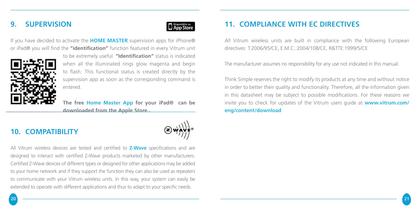
9. SUPERVISION 11. COMPLIANCE WITH EC DIRECTIVES If you have decided to activate the HOME MASTER supervision apps for iPhone® or iPad® you will find the “identification” function featured in every Vitrum unit to be extremely useful. “Identification” status is indicated when all the illuminated rings glow magenta and begin to flash. This functional status is created directly by the supervision app as soon as the corresponding command is entered. All Vitrum wireless units are built in compliance with the following European directives: T.2006/95/CE, E.M.C.:2004/108/CE, R&TTE:1999/5/CE The free Home...
Open the catalog to page 11All Vitrum Design catalogs and technical brochures
 Vitrum design
72 Pages
 Catalogue 2014
52 Pages
Archived catalogs
 Vitrum MAster On-Off Wireless
20 Pages
 Vitrum II DIN On-Off Wireless
11 Pages
 Vitrum Scene Control Panel
20 Pages
 Roller Blind
28 Pages
 Warnings
4 Pages
 Home Master Remote Handset
24 Pages
 Vitrum Dimmer Classic
24 Pages
 Vitrum Dimmer Wireless
32 Pages
 Vitrum Satellite Wireless
28 Pages
 Vitrum On-Off Classic
16 Pages
 Vitrum On-Off Wireless
24 Pages