- Catalogs
- Vitrum Design
- Vitrum Dimmer Classic


Vitrum Dimmer Classic

Vitrum Dimmer Classic
The Vitrum Dimmer Classic is designed for a 240V power supply. Ensure the power is disconnected before installation, which must be performed by a qualified electrician. Follow the circuit diagrams provided and avoid installation near heat sources or in humid conditions.
Electrical Connections
1.1 With Neutral Wire: Connect live wire to 'L', neutral to 'N', and lights to '1..3'.
1.2 Without Neutral Wire: For loads over 40W, connect using supplied jumpers.
1.3 Special Lamps: Some lamps may require a neutral wire for proper operation.
Positioning the Glass Decor Panel
Align the panel's tabs with anchor holes and press evenly. After installation, buttons are inactive for 10 seconds during sensor recalibration.
Eco-Vitrum
The Eco mode initially lights at 65% power, indicated by a green ring. A second touch increases to full power (yellow ring), and a third touch turns it off (blue ring). A red flashing ring indicates a safety device activation.
Type of Lamp
Vitrum supports most 240V AC lamps but not low-voltage LED lamps or those with built-in dimmers. Adjust settings for dimmable fluorescent or LED lamps using the configuration menu.
Disabling Eco Mode
Eco mode can be disabled through the configuration menu, toggling between enabled (green) and disabled (blue) states.
Factory Reset
To reset, remove the unit and press the hidden reset button for 3 seconds. The unit will flash red and emit a signal.
Protective Devices
Vitrum includes protections against short circuits, overloads, and incorrect settings. It will flash red if a malfunction occurs.
Compliance with EC Directives
Vitrum complies with European directives B.T.2006/95/CE and E.M.C.:2004/108/CE. The manufacturer is not responsible for misuse.
Main Technical Specifications
Power supply: 240V/50Hz
Operating temperature: 0-40°C
Total load capacity varies by channel configuration.
Protection rating: IP 40
For more information, visit www.vitrum.com.
Catalog excerpts
HOME CONTROL Vitrum Dimmer Clossic
Open the catalog to page 1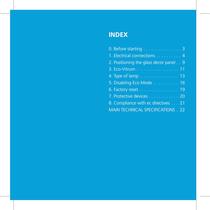
INDEX 0. Before starting . . . . . . . . . . . . . . . . 3 1. Electrical connections. . . . . . . . . . . 4 2. Positioning the glass decor panel. . . 9 3. Eco-Vitrum. . . . . . . . . . . . . . . . . . 11 4. Type of lamp. . . . . . . . . . . . . . . . . 13 5. Disabling Eco Mode . . . . . . . . . . . 16 6. Factory reset. . . . . . . . . . . . . . . . . 19 7. Protective devices. . . . . . . . . . . . . 20 8. Compliance with ec directives . . . . 21 Main technical specifications. . 22
Open the catalog to page 2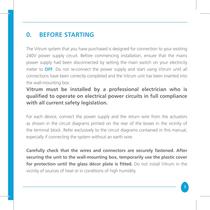
0. BEFORE STARTING The Vitrum system that you have purchased is designed for connection to your existing 240V power supply circuit. Before commencing installation, ensure that the mains power supply had been disconnected by setting the main switch on your electricity meter to OFF. Do not re-connect the power supply and start using Vitrum until all connections have been correctly completed and the Vitrum unit has been inserted into the wall-mounting box. Vitrum must be installed by a professional electrician who is qualified to operate on electrical power circuits in full compliance with all current...
Open the catalog to page 3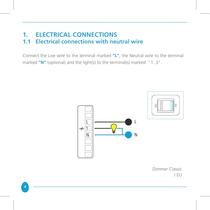
1. ELECTRICAL CONNECTIONS 1.1 Electrical connections with neutral wire Connect the Live wire to the terminal marked “L”, the Neutral wire to the terminal marked “N” (optional) and the light(s) to the terminal(s) marked “1..3”. Dimmer Classic I EU 4
Open the catalog to page 4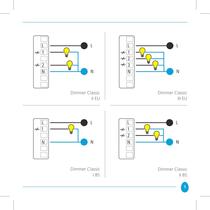
Dimmer Classic Dimmer Classic Dimmer Classic Dimmer Classic
Open the catalog to page 5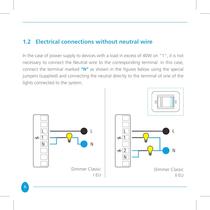
1.2 Electrical connections without neutral wire In the case of power supply to devices with a load in excess of 40W on “1”, it is not necessary to connect the Neutral wire to the corresponding terminal: in this case, connect the terminal marked “N” as shown in the figures below using the special jumpers (supplied) and connecting the neutral directly to the terminal of one of the lights connected to the system. Dimmer Classic I EU 6 Dimmer Classic II EU
Open the catalog to page 6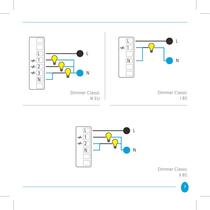
Dimmer Classic Dimmer Classic Dimmer Classic
Open the catalog to page 7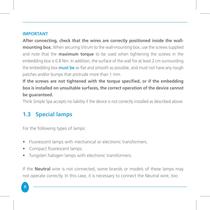
IMPORTANT After connecting, check that the wires are correctly positioned inside the wallmounting box. When securing Vitrum to the wall-mounting box, use the screws supplied and note that the maximum torque to be used when tightening the screws in the embedding box is 0.8 Nm. In addition, the surface of the wall for at least 2 cm surrounding the embedding box must be as flat and smooth as possible, and must not have any rough patches and/or bumps that protrude more than 1 mm. If the screws are not tightened with the torque specified, or if the embedding box is installed on unsuitable surfaces,...
Open the catalog to page 8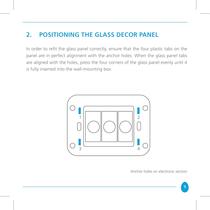
2. POSITIONING THE GLASS DECOR PANEL In order to refit the glass panel correctly, ensure that the four plastic tabs on the panel are in perfect alignment with the anchor holes. When the glass panel tabs are aligned with the holes, press the four corners of the glass panel evenly until it is fully inserted into the wall-mounting box. Anchor holes on electronic section 9
Open the catalog to page 9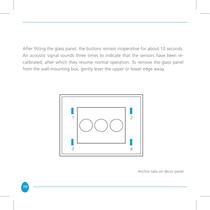
After fitting the glass panel, the buttons remain inoperative for about 10 seconds. An acoustic signal sounds three times to indicate that the sensors have been recalibrated, after which they resume normal operation. To remove the glass panel from the wall-mounting box, gently lever the upper or lower edge away. Anchor tabs on décor panel 10
Open the catalog to page 10
3. ECO-VITRUM In order to help you save energy every time a light is switched on, we have designed Vitrum so that, at the first fingertip touch, the light switches on at about 65% of maximum power. This means that the light is a little less bright than with a traditional switch; the illuminated ring on the Vitrum switch lights GREEN (ECO mode). Then, with a second touch, the light increases to maximum power and the illuminated ring on the Vitrum switch lights YELLOW. At the third touch, the light switches off; the illuminated ring lights BLUE, and remains lit for a few moments, after which the...
Open the catalog to page 11
IMPORTANT If the illuminated ring lights RED and flashes continuously, this indicates that the internal safety devices have cut in automatically. This may be caused by connection of loads that are in excess of the loads that can be handled by the Dimmer or by other malfunctions (see “Safety Devices”). 12
Open the catalog to page 12
4. TYPE OF LAMP Low-voltage LED lamps and lamps with built-in dimmers adjustable from 0 to 10V must not be connected to our devices. Vitrum is designed to control most types of lamps – incandescent, halogen, LED spotlights and all lamps powered by 240V AC. However, if the lamp is one of the latest types (such as a dimmable fluorescent lamp or a dimmable LED lamp), you will probably note that it lights intermittently. In this case, proceed as follows to modify the way in which the lamp is piloted: • Remove the glass décor panel. • Press and hold down the two service touch keys for at least 8 seconds...
Open the catalog to page 13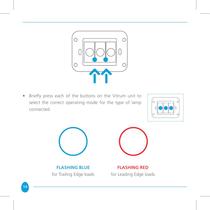
• Briefly press each of the buttons on the Vitrum unit to select the correct operating mode for the type of lamp connected. FLASHING BLUE for Trailing Edge loads 14 FLASHING RED for Leading Edge loads
Open the catalog to page 14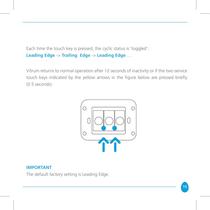
Each time the touch key is pressed, the cyclic status is ‘toggled’: Leading Edge -> Trailing Edge -> Leading Edge … Vitrum returns to normal operation after 12 seconds of inactivity or if the two service touch keys indicated by the yellow arrows in the figure below are pressed briefly (0.5 seconds). IMPORTANT The default factory setting is Leading Edge. 15
Open the catalog to page 15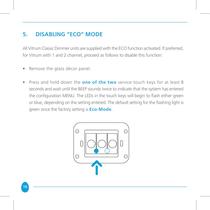
5. disabling “ECO” MODE All Vitrum Classic Dimmer units are supplied with the ECO function activated. If preferred, for Vitrum with 1 and 2 channel, proceed as follows to disable this function: • Remove the glass décor panel. • Press and hold down the one of the two service touch keys for at least 8 seconds and wait until the BEEP sounds twice to indicate that the system has entered the configuration menu. The LEDs in the touch keys will begin to flash either green or blue, depending on the setting entered. The default setting for the flashing light is green since the factory setting is Eco-Mode....
Open the catalog to page 16All Vitrum Design catalogs and technical brochures
 Vitrum design
72 Pages
 Catalogue 2014
52 Pages
Archived catalogs
 Vitrum MAster On-Off Wireless
20 Pages
 Vitrum II DIN On-Off Wireless
11 Pages
 Vitrum Scene Control Panel
20 Pages
 Roller Blind
28 Pages
 Warnings
4 Pages
 Home Master Remote Handset
24 Pages
 Vitrum Dimmer Wireless
32 Pages
 Vitrum Satellite Wireless
28 Pages
 Vitrum On-Off Classic
16 Pages
 Vitrum On-Off Wireless
24 Pages