


SU-R1 / Network Audio Control Player
SU-R1 / Network Audio Control Player
This document serves as the owner's manual for the Technics SU-R1 Network Audio Control Player, detailing its features, safety precautions, and operational guidelines.
The SU-R1 includes advanced audio features such as Technics Digital Link, Digital Noise Isolation Architecture, and Separated Analog/Digital Power Supply to ensure high-quality audio reproduction by minimizing signal degradation and noise.
Emphasizes the importance of following safety instructions to prevent hazards like electric shock and fire. Key points include keeping the unit away from water, ensuring proper ventilation, and using specified accessories only.
Instructions cover connecting to audio inputs and outputs, network settings, and using compatible devices like iPhones and USBs. Maintenance tips include cleaning with a soft cloth and avoiding solvents.
Provides a detailed guide to the front and rear controls, including the function of each button and port, and explains the use of the remote control for menu navigation and settings adjustment.
Covers basic operations like playing music files, adjusting sound settings, and using features like AirPlay. A troubleshooting section addresses common issues and solutions.
Includes technical specifications and warranty information for users in the U.S. and Canada.
Outlines steps for connecting the SU-R1 to other devices, emphasizing the use of category 7 or above LAN cables and providing instructions for connecting both analog and digital audio devices.
Describes operations such as turning the unit on, selecting input sources, adjusting volume, and using the Technics Music App for enhanced control.
Instructions for setting up network connections to stream music via AirPlay or DLNA, including configuring network settings like IP address and DNS.
Explains how to connect and use external devices such as iPhones, iPads, iPods, and USB devices for music playback and charging.
Details on turning the device on or off, power consumption, and the significance of the power indicator colors.
Supports various audio connections, recommending cables no longer than 3 meters and ensuring proper polarity for balanced audio cables.
Instructions for playing music files stored on a DLNA-certified media server, ensuring network settings are configured correctly.
Details on using the remote for random and repeat playback, and controlling music from a DLNA server.
Instructions for using AirPlay with iOS devices and PCs, ensuring network settings are configured and the device is on the same network.
Guidelines for playing music from USB devices, noting compatibility with FAT16 and FAT32 file systems.
Instructions for connecting a PC via USB for music playback, including supported OS versions and necessary software.
Options for enhancing sound quality, including Remastering, Direct Mode, and setting sampling frequency limits.
Details on using the sleep timer and auto power off function to minimize power consumption.
Instructions for updating firmware to enhance device functionality.
Solutions for common issues such as heat accumulation, no sound, and network connection problems.
Includes power supply details, dimensions, weight, and operating conditions.
Details on analog and digital inputs/outputs, USB ports, and Ethernet interface.
Supported audio file formats and their specifications.
Details on warranty coverage, exclusions, and options for repair, replacement, or refund.
Technics' commitment to delivering an emotive musical experience and supporting global musical cultures.
Catalog excerpts
Owner’s Manual Network Audio Control Player Manuel d’utilisa
Open the catalog to page 1
Music is borderless and timeless, touching people’s hearts across cultures and generations. Each day the discovery of a truly emotive experience from an unencountered sound awaits. Let us take you on your journey to rediscover music. Sans frontières, la musique est aussi intemporelle, touchant le coeur des gens en traversant les cultures et les générations. Tous les jours, nous attendons la révélation d'une expérience émotionnelle authentique à partir d'un son venu de nulle part. Permettez-nous d
Open the catalog to page 3
Thank you for purchasing this product. Please read these instructions carefully before using this product, and save this manual for future use. If you have any questions, visit: U.S.A.: www.panasonic.com/support Canada: www.panasonic.ca/english/support Register online at www.panasonic.com/register (U.S. customers only) This unit offers the following features: Technics has minimized the length of the signal path by enclosing the network audio player and input selector, which handle very weak signals, into the same chassis, and reduced noise entering weak signals as much as possible by using a...
Open the catalog to page 4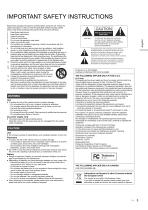
IMPORTANT SAFETY INSTRUCTIONS WARNING Unit ≥ To reduce the risk of fire, electric shock or product damage, – Do not expose this unit to rain, moisture, dripping or splashing. – Do not place objects filled with liquids, such as vases, on this unit. – Use only the recommended accessories. – Do not remove covers. – Do not repair this unit by yourself. Refer servicing to qualified service personnel. – Do not place heavy items on this unit. AC power supply cord ≥ The power plug is the disconnecting device. Install this unit so that the power plug can be unplugged from the socket outlet immediately....
Open the catalog to page 5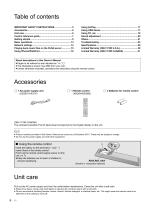
About descriptions in this Owner’s Manual ≥ Pages to be referred to are indicated as “@ ±±”. ≥ The illustrations shown may differ from your unit. ≥ Unless otherwise indicated, operations are described using the remote control. Accessories ∏ 1 AC power supply cord (K2CB2YY00107) ∏ 2 Batteries for remote control (ONLY FOR CANADA) The enclosed Canadian French label sheet corresponds to the English display on the unit. ≥ Product numbers provided in this Owner’s Manual are correct as of December 2014. These may be subject to change. ≥ Do not use AC power supply cord with other equipment. ∫ Using the...
Open the catalog to page 6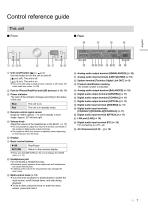
Control reference guide This unit ∫ Rear 1 Unit on/off button [ ] Use this button to turn the unit on and off. [ ] (off): The unit is off. [ ] (on): The unit is on. ≥ The unit is still using a small amount of power in off mode. Off mode uses less power. (> 26) : Analog audio output terminal [UNBALANCED] (> 10) ; Analog audio input terminals [LINE1]/[LINE2] (> 10) < System terminal [Technics Digital Link OUT] (> 9) = Product identification marking The model number is indicated. 2 Port for iPhone/iPad/iPod and USB devices (> 16, 17) > Analog audio output terminal [BALANCED] (> 10) 3 Power indicator...
Open the catalog to page 7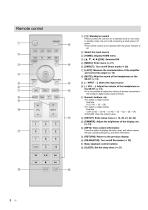
Press to switch the unit from on to standby mode or vice versa. In standby mode, the unit is still consuming a small amount of power. • The remote control do not operate when the power indicator is off. @ Select the input source © [HOME]: Display HOME menu @ [3, 4, 2,1]/[OK]: Selection/OK © [MENU]: Enter menu (O- 21) © [DIRECT]: Turn on/off Direct mode (^ 20) 7 [LAPC]: Measure the characteristics of the amplifier and correct its output (^ 12) © [MUTE]: Mute the sound of the headphones or the SE-R1 (^ 13) @ [> INPUT <]: Select the input source © [+ VOL —]: Adjust the volume of the headphones or...
Open the catalog to page 8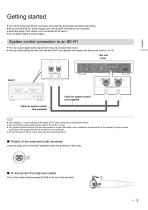
Getting started ≥ Turn off all equipment before connection and read the appropriate operating instructions. ≥ Do not connect the AC power supply cord until all other connections are complete. ≥ Insert the plugs of the cables to be connected all the way in. ≥ Do not bend cables at sharp angles. System control connection to an SE-R1 ≥ You can output digital audio signals from this unit and play back music. ≥ You can automatically link this unit with the SE-R1 and operate them easily with the remote control. (> 23) This unit (rear) Cable for system control (not supplied) Cable for system control...
Open the catalog to page 9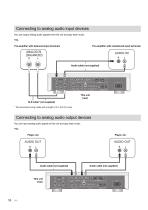
Connecting to analog audio input devices You can output analog audio signals from this unit and play back music. e.g., Pre-amplifier with balanced input terminals Pre-amplifier with unbalanced input terminals Audio cable (not supplied) This unit (rear) XLR cable* (not supplied) * We recommend using cables with a length of 3 m (9.9 ft) or less. Connecting to analog audio output devices You can input analog audio signals to this unit and play back music. e.g., Player, etc. Audio cable (not supplied) This unit (
Open the catalog to page 10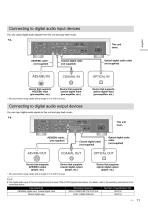
Connecting to digital audio input devices You can output digital audio signals from this unit and play back music. English e.g., This unit (rear) AES/EBU cable* (not supplied) Device that supports AES/EBU input (pre-amplifier, etc.) Optical digital audio cable (not supplied) Coaxial digital cable (not supplied) Device that supports coaxial digital input (pre-amplifier, etc.) Device that supports optical digital input (pre-amplifier, etc.) * We recommend using cables with a length of 3 m (9.9 ft) or less. Connecting to digital audio output devices You can input digital audio signals to this unit...
Open the catalog to page 11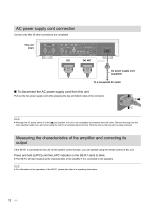
AC power supply cord connection Connect only after all other connections are completed. This unit (rear) AC power supply cord (supplied) ∫ To disconnect the AC power supply cord from this unit Pull out the AC power supply cord while pressing the top and bottom sides of the connector. ≥ Although the AC power switch is in the [ ] position, the unit is not completely disconnected from the mains. Remove the plug from the main electrical outlet if you will not be using the unit for an extended period of time. Place the unit so the plug can be easily removed. Measuring the characteristics of the amplifier...
Open the catalog to page 12All Technics catalogs and technical brochures
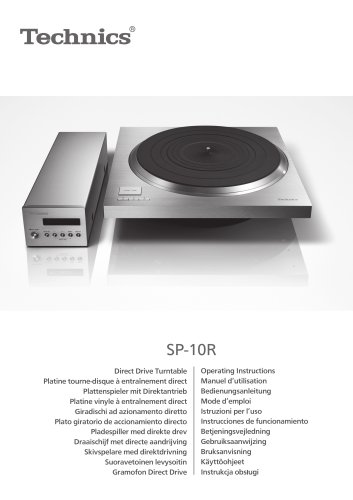 SP-10R / Direct Drive Turntable
272 Pages
 SB-R1 / Speaker System
128 Pages
 SE-R1 / Stereo Power Amplifier
36 Pages
Archived catalogs
 Hi-Fi Audio 2014/15
32 Pages
 SP-10R / Direct Drive Turntable
136 Pages
 SB-R1 / Speaker System
128 Pages
 SU-R1 / Network Audio Control Player
240 Pages
 SE-R1 / Stereo Power Amplifier
116 Pages

- Interior speaker
- Home speaker
- Black home theater
- Rectangular home theater
- White stereo speaker
- Multimedia speaker
- Round speaker
- Wooden audio system
- Audio amplifier
- Built-in audio system
- Wooden speaker
- Built-in speaker
- Commercial speaker
- Bluetooth speaker
- Tower audio system
- Tower speaker
- Wireless speaker
- Living room speaker
- Turntable