
- Catalogs
- SOREL GmbH Mikroelektronik
- BA CALEONboxClima

BA CALEONboxClima

BA CALEONboxClima
The manual stresses the importance of thoroughly reading the instructions before installation and operation, ensuring compliance with EU safety regulations such as low voltage, electromagnetic compatibility, RoHS, and WEEE directives. Installation and maintenance should be conducted by trained specialists.
The °CALEONbox Clima is an automatic heating circuit controller for surface heating and cooling, intended for installation in dry rooms under specified conditions. Adherence to accident prevention regulations and standards is emphasized.
Unauthorized modifications or additions are prohibited. Only original spare parts should be used, and damaged parts must be replaced immediately.
The unit includes a two-year statutory guarantee, excluding damages from improper use or non-compliance with the manual.
The unit complies with RoHS regulations and should not be disposed of with household waste but taken to appropriate collection points.
The °CALEONbox Clima is a universal controller for surface heating and cooling systems, capable of controlling up to 8 zones, featuring flexible input/output assignments, weather compensation, and CAN bus interfaces for network connectivity.
The controller operates on 230 VAC with a power consumption of 0.5-2.5W, supports up to 20 1-Wire temperature sensors, and includes multiple relay outputs and CAN bus interfaces.
The device can be mounted on a DIN rail or wall, with electrical connections made by specialists, ensuring separation of low and mains voltage cables.
Detailed instructions are provided for wiring terminal blocks and interpreting LED statuses for operational feedback.
Examples include room controller connections and 1-Wire sensor setups, emphasizing the use of terminating resistors in CAN networks.
The setup wizard guides users through initial configuration via the °CALEON Room Controller, covering room overview, operating modes, and menu navigation.
The document provides a guide on setting and managing operating modes for heating and cooling systems using the °CALEON Clima Room Controller, including setting operation hours, expert settings, and additional functions.
Users can define individual heating and cooling times for each room, with separate times for heating and cooling modes, recommended for energy efficiency.
The expert menu allows advanced configuration of devices, rooms, temperature, and humidity settings, including activation of additional functions like thermostats and dehumidifiers.
Steps to connect the °CALEON system to a WiFi network and configure it using the °CALEON app are outlined, including downloading the app and connecting the device.
Features include firmware updates, insulation factor adjustments, dew point protection, and modulation interval settings, enhancing system efficiency and adaptability.
The document concludes with a disclaimer regarding potential errors or technical changes, emphasizing the importance of verifying information.
SOREL GmbH Mikroelektronik provides contact details for further assistance.
Catalog excerpts

°CALEONbox Clima Heating circuit controller for surface heating and cooling Installation and operating instruction Read carefully before installation, commissioning and operat
Open the catalog to page 1
CONTENT Safety Instructions EU-Conformity General instructions Explanation of Symbols Changes to the Unit Warranty and Liability Disposal and Pollutants Description °CALEONbox Clima Description Specifications Scope of Supply Installation Wall Installation Electrical Connection Electrical Terminals LED status Connection Examples Room Controller Connection example apartment building Connection Examples 1-Wire Sensors 1-Wire ID overview Setup Wizard Room Overview Operating Mode Menu Set Operation Hours Set Operation Hours Expert Menu Settings Devices Rooms Temperature/Humidity Functions °CALEON...
Open the catalog to page 2
Safety Instructions EU-Conformity By affixing the CE mark to the unit the manufacturer declares that the°CALEONbox Clima conforms to the following relevant safety regulations: EU low voltage directive 2014/35/EU EU electromagnetic compatibility directive 2014/30/EU EU RoHS Directive 2011/65/EU EU WEEE Directive 2012/19/EU (Reg.nr. DE 23479719) conforms. Conformity has been verified and the corresponding documentation and the EU declaration of conformity are kept on file by the manufacturer. General instructions Please read carefully! These installation and operating instructions contain basic...
Open the catalog to page 3
Changes to the Unit l Changes, additions to or conversion of the unit are not permitted without written permission from the manufacturer. l It is likewise forbidden to install additional components that have not been tested together with the unit. l If it becomes clear that safe operation of the unit is no longer possible, for example because of damage to the hous l l l l ing, turn the Unit off immediately. Any parts of the unit or accessories that are not in perfect condition must be exchanged immediately. Use only original spare parts and accessories from the manufacturer. Markings made on...
Open the catalog to page 4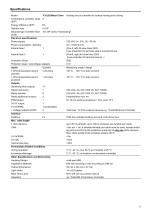
Specifications Model Temperature controller class (ErP) Energy efficiency (ErP) Standby loss Request type invertible heat pump Electrical specifications: Power supply Power consumption / standby Internal fuse 1 1 Internal fuse 2 Protection Class Protection class / overvoltage category Inputs 1-Wire temperature sensor parasitic 1-Wire temperature sensor powered Outputs Switching relay outputs Relay heat pump Relay actuator Relay additional function PWM output 0-10V output 0-10V/PWM + Voltage outputs 24VDC Interface Fieldbus Heating circuit controller for surface heating and cooling 230 VAC (+/-...
Open the catalog to page 5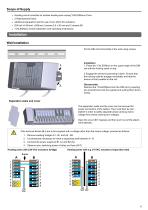
Heating circuit controller for surface heating and cooling°CALEONbox Clima 2 Replacement fuses additional separation wall for use of non-230V AC actuators DIN rail H=35mm L=280mm 2 screws 3,5 x 35 mm and 2 dowels S6 °CALEONbox Clima Installation and operating instructions Installation Wall Installation Fix the DIN rail horizontally to the wall using screws. Installation 1. Place the °CALEONbox on the upper edge of the DIN rail with the locking catch on top. 2 Engage the device by pressing it down. Ensure that the locking catches engage completely and that the device is firmly seated on the rail....
Open the catalog to page 6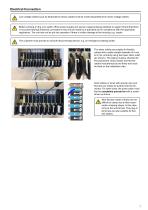
Electrical Connection Low-voltage cables such as temperature sensor cables must be routed separately from mains voltage cables. Before working on the unit, switch off the power supply and secure it against being switched on again! Check that there is no power flowing! Electrical connections may only be made by a specialist and in compliance with the applicable regulations. The unit may not be put into operation if there is visible damage to the housing, e.g. cracks. The customer must provide an all-pole disconnecting device, e.g. an emergency heating switch. The strain reliefs are suitable for...
Open the catalog to page 7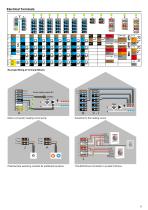
Electrical Terminals Example Wiring of Terminal Blocks Mains connection heating circuit pump Actuators for the heating zones Potential-free switching contacts for add
Open the catalog to page 8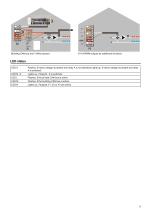
0-10V/PWM outputs for additional functions Flashes, if mains voltage is present and relay A is not switched Lights up, if mains voltage is present and relay A is switched. Lights up, if relay B - K is switched. Flashes, if the private CAN bus is active. Flashes, if the building CAN bus is active.
Open the catalog to page 9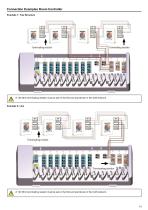
Connection Examples Room Controller Example 1: Tree Structure A 120 Ohm terminating resistor must be set on the first and last device in the CAN network. A 120 Ohm terminating resistor must be set on the first and last
Open the catalog to page 10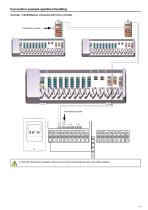
Connection example apartment building Example: °CALEONboxes connected with LHCC controller A 120 Ohm terminating resistor must be set on the first and last device in the CA
Open the catalog to page 11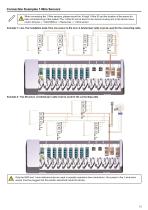
Connection Examples 1-Wire Sensors When connecting the 1-Wire sensors, please record the 16-digit 1-Wire ID and the location of the sensor for later commissioning of the system! The 1-Wire ID can be found in the device housing and in the device menu under: Devices -> °CALEONbox -> Resources -> 1-Wire sensor. Example 1: Line. The installation leads from one sensor to the next. A twisted pair cable must be used for the connecting cable. Example 2: Tree Structure. A twisted pair cable must be used for the connecting cable. Only the GND and 1-wire data terminals are used in parasitic operation (two...
Open the catalog to page 12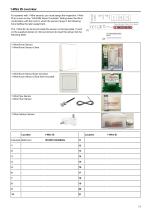
1-Wire ID overview For systems with 1-Wire sensors, you must assign the respective 1-Wire ID to a room on the °CALEON Room Controller. Writing down the IDs in combination with the room in which the sensor hangs in the following list simplifies the later assignment. The 1-Wire ID can be found inside the sensor on the type plate (1) and (1) on the supplied sticker (2). We recommend to insert the sticker into the following table. (2) 1-Wire Room Sensor 1-Wire Room Sensor Clima 1-Wire Room Sensor flush-mounted 1-Wire Room Sensor Clima flush-mounted 1-Wire Pipe Sensor 1-Wire Floor Sensor Example Bathroom...
Open the catalog to page 13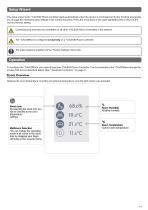
Setup Wizard The setup wizard in the °CALEON Room Controller starts automatically when the device is commissioned for the first time and guides you through the necessary basic settings in the correct sequence. Press the arrow keys in the upper right/left corner to return to the next or previous setting. Commissioning must also be completed on all other °CALEON Room Controllers in the network. The °CALEONbox is configured exclusively on a °CALEON Room Controller. The setup wizard is restarted via the "Factory settings" menu item. Operation To configure the °CALEONbox, you need at least one °CALEON...
Open the catalog to page 14All SOREL GmbH Mikroelektronik catalogs and technical brochures
 Catalogue 2021
72 Pages
 BA CALEONbox
32 Pages
 SOREL CATALOGUE 2013
56 Pages
 wpc
wpc40 Pages
 FWC
FWC32 Pages
 hcc
hcc4 Pages
 TDC
TDC8 Pages
