


I-SERIES

I-SERIES
This manual provides comprehensive guidance on the installation, use, and maintenance of the SGM i-2 Series lighting fixtures, suitable for professional use in both standard and Permanent Outdoor Installation (POI) versions.
Key safety measures include disconnecting power before servicing, ensuring electrical grounding, avoiding damaged cables, installing in ventilated areas away from flammable materials, using safety cables for elevated installations, and adhering to local building codes and safety standards.
The i-2 Series is a compact, high-output LED wash light with features such as IP65/IP66 rating for outdoor use, 69 high-power LEDs with a 50,000-hour lifespan, RGBW color mixing, adjustable color temperature, built-in wireless DMX for POI models, and optional light control accessories.
Installation requires the use of the supplied Omega bracket, secure fastening, and safety wires. POI installations need corrosion-resistant hardware, with specific instructions for temporary and permanent setups.
The fixture operates on 100–277 V, 50/60 Hz AC power, requiring proper grounding and suitable fuses or circuit breakers. Outdoor installations need connectors rated for exterior use.
Advanced lighting control is achieved through DMX devices, with settings configurable via the control menu or standalone operation. The system is RDM compliant for remote management.
Regular inspection and cleaning are essential for optimal performance, following manufacturer guidelines for maintenance and repairs.
SGM provides support and the product complies with relevant safety and performance standards.
The fixture requires grounding and should not be connected to an electrical dimmer system. It features an OLED panel for operational mode display, with RDM used for POI versions.
The i-2 Series supports DMX control via cable or built-in CRMX wireless receiver, with up to 32 fixtures on the same DMX link and a maximum cable length of 300 meters.
The fixture can run standalone programs with customizable scenes, enabled through the control panel.
Restoring factory defaults sets the DMX address to 1 and mode to 6-channel. Features include high-power LEDs, color temperature correction, and strobe effects.
Settings include dimming curves, display flipping, and fan modes, with the OLED display adjustable to prevent deterioration.
The menu allows mode selection, product information viewing, startup mode setting, and manual color configuration.
The i-2 Series supports RDM functions for configuration and management, including temperature and humidity sensors and LED on-time tracking.
Includes self-test and color test, installation and configuration for POI versions, wireless connection management, and tilt adjustment.
Common issues involve power supply, DMX cable problems, and fixture malfunctions, with solutions including power connection checks and SGM support contact.
Various accessories like barndoors and anti-glare shields enhance light control but are not for permanent outdoor use.
Regular cleaning of the front lens and exterior housing is recommended, with the SGM Vacuum Test Kit advised for IP validity testing.
Updates are performed using an SGM USB to DMX cable and software, ensuring optimal performance.
The i-2 Series is compatible with various accessories, with specific models and part numbers listed for different configurations.
Part numbers are provided for ordering models and accessories, including brackets, cables, stands, and shields.
SGM offers 24/7 technical support with contact numbers and an email address for inquiries.
The products conform to directives and standards such as the Low Voltage Directive, EMC Directive, RoHS2 Directive, ANSI/UL Std. 1573, and CSA certifications.
SGM Light A/S is located in Aarhus, Denmark, with contact details provided for further inquiries.
Catalog excerpts

USER MANUAL
Open the catalog to page 1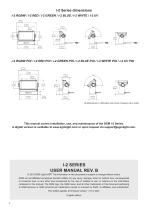
i-2 Series dimensions i-2 RGBW / i-2 RED / i-2 GREEN / i-2 BLUE / i-2 WHITE / i-2 UV i-2 RGBW POI / i-2 RED POI / i-2 GREEN POI / i-2 BLUE POI / i-2 WHITE POI / i-2 UV POI All dimensions in millimeters and inches. Drawing not to scale. This manual covers installation, use, and maintenance of the SGM i-2 Series. A digital version is available at www.sgmlight.com or upon request via [email protected]. I-2 SERIES USER MANUAL REV. B © 2018 SGM Light A/S®. The information in this document is subject to change without notice. SGM and all affiliated companies disclaim liability for any injury, damage,...
Open the catalog to page 2
Safety information Read the following safety precautions carefully before unpacking, installing, powering, or operating the device. SGM luminaries are intended for professional use only. They are not suitable for household use. Les luminaires SGM sont impropre à l’usage domestique. Uniquement à usage professionnel. This product must be installed in accordance with the applicable installation code by a person familiar with the construction and operation of the product and the hazards involved. Ce produit doit être installé selon le code d’installation pertinent, par une personne qui connaît bien...
Open the catalog to page 4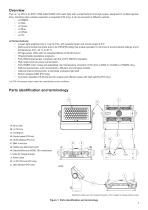
Overview The i-2 / i-2 POI is an IP65 / IP66-rated RGBW LED wash light with a small footprint and high output, designed for multiple applications, including when wireless operation is essential (POI only). It can be acquired in different variants: • i-2 RGBW. i-2 Series features: • A wash light weighing only 6.1 kg/13.4 lbs, with powerful beam and narrow angle of 8.5°. • Multi-environmental luminaire due to its IP65/IP66-rating that enable operation in all kinds of environmental settings and in temperatures from -40 °C to 50 °C. • 69 high-power LEDs with an expected lifetime of 50,000 hours*....
Open the catalog to page 5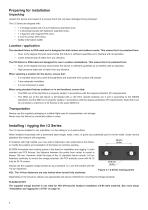
Preparing for installation Unpacking Unpack the device and inspect it to ensure that it has not been damaged during transport. The i-2 Series are shipped with: • • • • • 1 x Omega bracket with 1/4-turn fasteners (standard only). 1 x Mounting bracket with fasteners (standard only). 1 x Spanner with magnet (POI only). 2 x M-10 screws (POI Only). Safety information leaflet Location / application The standard fixture is IP65-rated and is designed for both indoor and outdoor events. This means that it is protected from: • Dust, to the degree that dust cannot enter the fixture in sufficient quantities...
Open the catalog to page 6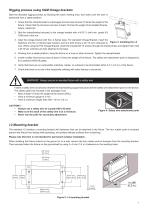
Rigging process using SGM Omega brackets Start the standard rigging process by blocking the lower working area, and make sure the work is performed from a stable platform. 1. Check that the clamp/bracket is undamaged and can bear at least 10 times the weight of the fixture. Check that the structure can bear at least 10 times the weight of all installed fixtures, lamps, cables etc. 2. Bolt the clamp/bracket securely to the omega bracket with a M12/ ½ bolt (min. grade 8.8 C5M) and a lock nut. 3. Align the omega bracket with the i-2 Series base. For standard Omega Bracket, insert the fasteners into...
Open the catalog to page 7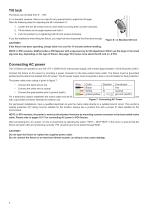
Tilt lock The fixture can be tilted from 0° - 180°. In i-2 standard versions, there is no need for any special tools to adjust the tilt angle. Take the following steps for adjusting the tilt in standard i-2: 1. Loosen the two tilt screws (one on each side) by turning them counter-clockwise. 2. Tilt the fixture to the angle desired and hold it. 3. Lock the position by re-tightening both tilt lock screws clockwise. If you feel resistance when tilting the fixture, you might not have loosened the tilt screws enough. CAUTION!! If the fixture has been operating, always allow it to cool for 15 minutes...
Open the catalog to page 8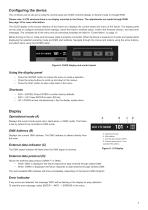
Configuring the device The i-2 Series can be set up by using the control panel and OLED multi-line display on fixture’s head or through RDM. Please note: In POI versions there is no display mounted in the fixture. The adjustments are made through RDM. See page 15 for more information. The OLED display is the human interface of the fixture as it displays the current status and menu of the fixture. The display panel can be used to configure individual fixture settings, check the fixture’s wireless status, confirm the firmware version, and read error messages. The complete list of the menu and all...
Open the catalog to page 9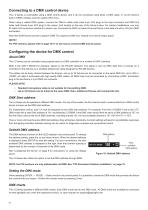
Connecting to a DMX control device The i-2 Series is controllable using a DMX control device, and it can be connected using either a DMX cable, or via the fixture’s built-in CRMX wireless receiver system (POI only). When using a cabled DMX system, connect the DMX-In cable (with male 5-pin XLR plug) to the input connector and DMX-Out cable (with female 5-pin XLR plug) to the output, both located on the rear of the fixture’s base. For outdoor installations, use only IP-rated XLR connectors suitable for outdoor use. Terminate the DMX out cable of the last fixture in the data link with a 120 ohm...
Open the catalog to page 10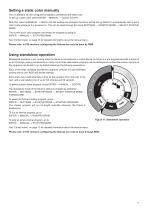
Setting a static color manually The i-2 standard can be configured to display a predefined and static color. To set up a static color select ENTER → MANUAL → QUICK COLOR. Note that, once the MANUAL → QUICK COLOR settings are changed, the fixture will be set, by default, to automatically start in quick color mode whenever it is powered on. This can be reset through the menu SETTINGS → STARTUP MODE → SELECT STARTUP MODE. The current quick color program can always be stopped by going to: ENTER → MANUAL → STOP PROGRAM See “Control menu” on page 13 for detailed information about the manual menu. Please...
Open the catalog to page 11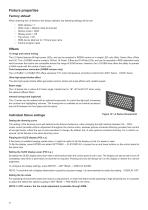
Fixture properties Factory default When restoring the i-2 Series to the factory defaults, the following settings will be set: • • • • • • • DMX address = 1 DMX mode = Default mode (6 channel) Startup mode = DMX Display saver = Off Flip screen = Off RDM device label set to = Fixture type name Internal program reset Effects i-2 range and colors mixing The i-2 Series features 69 high-power LEDs, and can be acquired in RGBW version or in single LED color (Red, Green, Blue, White and UV). The i-2 RGBW version contains 18 Red, 18 Green, 9 Blue and 24 White LEDs, and can be operated in RGB calibrated...
Open the catalog to page 12All SGM Light catalogs and technical brochures
 G·4 Wash-Beam
6 Pages
 i·5 RGBW POI
7 Pages
 i·5 UV POI
6 Pages
 Q·7 W POI
6 Pages
 Q-SERIES
26 Pages
 P-SERIES
24 Pages
 SGM SAFETY INFORMATION
8 Pages
 G‐WASH MOVING HEAD
68 Pages
Archived catalogs
 IDEA MOVING LED 300
22 Pages
 P-5
P-544 Pages
 Studio 12 scan control
62 Pages
 X-5 / XC-5 LED Strobe
28 Pages
 PILOT 3000
116 Pages
- Light fixture
- Industrial LED light
- Commercial light fixture
- Dimmable light fixture
- Linear light fixture
- Surface-mounted light fixture
- Outdoor light fixture
- Plastic light fixture
- LED floodlight
- Outdoor projector
- Commercial floodlight
- IP65 light fixture
- Public space light fixture
- Flexible LED light strip
- IP66 floodlight
- IP65 floodlight
- Indoor projector
- Industrial management software
- Moving head spot
- Industrial strip light