- Catalogs
- Routon Electronic Co.,Ltd.
- Operations Management Manual


Operations Management Manual
Operations Management Manual
The manual provides comprehensive guidance on managing the Exquisite Intelligent Short Track Speed Gate using both the Operation Management PC client and mobile app. It is compatible with Windows, MacOS, Linux, Android, and iOS. Key management functions include user authorization, speed gate control, whitelist management, access management, parameter configuration, pass record inquiry, and visitor management.
All rights are reserved by Exquisite Electronics Co., Ltd. Unauthorized reproduction or modification of the manual is prohibited. The manual is provided "as is" without warranties, and the company is not liable for any damages resulting from its use.
Personal data collected during product use is protected. Users must adhere to data protection laws, ensuring data security through permission management and security assessments.
- Download the management client from the specified webpage.
- Install the client on MacOS via the App Store, on Windows by following installation prompts, and on Linux using the command line.
Users can configure personal settings, set the client language, scale the interface, and change login passwords.
The manual details roles such as Super Admin and Ordinary Administrator, and provides instructions for adding, deleting, and querying admin users.
Instructions are provided for configuring temporary and default working modes, adding and modifying time period policies, and deleting period policies.
Covers gate configuration, parameter settings, network configuration, upgrade policies, log queries, and firmware upgrades.
Includes face configuration, whitelist and blacklist management, personnel information handling, and access permission views.
Details visitor configuration, new visitor entries, information modification, QR code authorization, and access record viewing.
Provide additional details on speed gate parameter configuration and Bluetooth remote control functions.
Users can download the app by scanning a QR code. iPhone users are redirected to the App Store, while Android users download the installation package directly.
To log in, open the PC Client, select the server type, and enter account credentials. Super administrator accounts are created during installation, while normal accounts are created by super administrators.
Users can access the Personal Center to modify personal information and change passwords. The client language and interface scaling can also be adjusted.
Super administrators are automatically generated, while ordinary administrators are created by those with user management privileges. Admin users can be added, modified, or deleted, and user permissions can be managed.
Various working modes are available, including validation, free passage, and fire mode. Users can configure default and time period working modes.
Includes network configuration, parameter settings, log queries, and firmware upgrades. Users can manage speed gate groups and import upgrade packages.
Manage blacklists and whitelists, add or delete personnel, and configure non-inductive face collection. Personnel information can be imported or exported in bulk.
The document outlines the process for viewing and managing employee access permissions. It highlights the ability to view associated access permissions through a whitelist employee row and warns about the absence of access permissions.
This section details the management of access permission policies for whitelisted personnel. It includes instructions for adding, modifying, and deleting pass permission policies. Users can define traffic policies, execution periods, authorized times, and speedgate groups. The document also explains how to authorize a whitelist and view authorized personnel.
The manual provides guidance on querying pass records for whitelisted personnel and visitors. It includes filters for traffic time, direction, speed gate group, and personnel type. The section also explains how to manage unverified traffic records.
This section covers the registration and management of visitor information, including generating QR codes for passes. It describes the basic configuration for visitor management, including client entry, invitation methods, and automatic recording through ID card swiping. The document also explains how to add, modify, and delete visitor information and view authorized QR codes and access records.
The manual describes the installation and login process for the Sesame Open App, which facilitates visitor invitations and mobile phone remote control of speed gates. It includes instructions for Bluetooth identification and remote control functions, such as opening doors and setting passage states.
This section outlines the process for collecting and entering identity information, including facial recognition, NFC card information, and ID card data. It provides detailed steps for using information collection terminals and emphasizes security considerations for data collection.
The document explains the process for collecting NFC employee card or ID card information using a card information collection terminal. It includes steps for connecting the terminal and swiping cards to automatically fill in necessary information.
Transit Identity Verification
- Authentication Method: Options include face recognition, mobile phone Bluetooth, QR code, RFID card, and ID number. The 6 series allows multi-selection, while the 7 series offers a subset of these methods.
- Recommended Authentication Methods: If face recognition is selected, it is the default and cannot be modified.
- Validation Intervals: Configurable between 0 to 30 seconds.
- Validation Failure Alarm: Configurable between 0 to 30 times.
- Timeout for Witness Comparison: Configurable between 0 to 60 seconds.
- WAN Card Reader Server: Options include Production or Test server.
- Cache Card Information: Options to cache or not cache.
- Witness Comparison Result Display Time: Configurable between 0 to 3000 milliseconds.
- Waiting Time After Authentication: Configurable between 1500 to 7000 milliseconds.
- Opening and Closing Speed: Options range from Slowest to Fastest.
- Verify Traffic Mode: Options to hide or show various personal information.
- Welcome Message: Customizable text up to 10 words.
- Boot Picture: Can upload a local image of 720x720 pixels.
- Clutch Mode: Options include Clutch Off, Auto Response, or Active Defense.
- Automatic Door Opening: Configurable for power outage scenarios.
- Sound Settings: Includes master switch, welcome message, voice style, speed, and volume.
- Passage Tips: Customizable text for various passage scenarios.
- Safety Tips: Customizable text for alarms and emergency situations.
- Similarity Precision: Options range from Low to High Precision.
- Recognition Distance: Configurable between 50 to 200 cm.
- Live Test Detection: Options to detect or not detect live organisms.
- Mask Wearing Identification: Options to support or not support.
- Time Zone and Language: Selectable time zones and languages including English, French, Spanish, etc.
- Weather Forecast Service: Option to turn on or off.
- Indicator Light Brightness: Configurable from Off to Brightest.
- Error Code Display: Option to show or not show.
- Location: Input latitude and longitude data.
- Activation and Pairing: Requires charging and pairing with speed gates.
- Working Modes: Default and Minimalist modes with different operation methods.
- Functions: Includes single aisle open door, normally open, and cancel normally open functions.
Catalog excerpts
Operation Management Manual Compact Speed Gate Operation management manual V1.3
Open the catalog to page 1
Operation Management Manual Legal Notice All copyrights of this manual belong to © Exquisite Electronics Co., Ltd. (hereinafter referred to as "Exquisite Electronics"), and Exquisite Electronics reserves all rights. Without the express written permission of Exquisite Electronics Co., Ltd., you may not copy, excerpt, translate or modify part or all of the content of this manual for any purpose, in any form or by any means. Unless otherwise agreed, Exquisite Electronics does not provide any express or implied representations or warranties for this manual. Clarity About this manual This manual is...
Open the catalog to page 2
Operation Management Manual Nor shall we compensate for any special, incidental, incidental or indirect damages arising from the use of this manual or the use of Exquisite electronic products, including but not limited to losses arising from loss of business profits, system failure, loss of data or documents. ● You know the open nature of the Internet, and there may be risks such as network attacks, hacker attacks, virus infections, etc. when you connect your products to the Internet, and Exquisite Electronics is not responsible for the abnormal work of the product, information leakage and other...
Open the catalog to page 3
^ Operation Management Manual 4 7.5 Delete the period polio i 23
Open the catalog to page 4
^ Operation Management Manual 5
Open the catalog to page 5
^ Operation Management Manual 6 13.3 Bluetooth identification for mobile phones
Open the catalog to page 6
Operation Management Manual
Open the catalog to page 7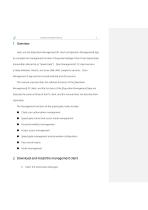
Operation Management Manual 8 Users use the [Operation Management] PC client or [Operation Management] App to complete the management function of Exquisite Intelligent Short Track Speed Gate (hereinafter referred to as "Speed Gate"). [Run Management] PC client versions include Windows, MacOS, and Linux (X86, ARM, LongArch) versions; [ Run Management] App versions include Android and iOS versions. This manual only describes the software functions of the [Operation Management] PC client, and the functions of the [Operation Management] App are basically the same as those of the PC client, and this...
Open the catalog to page 8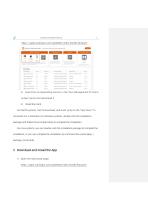
Operation Management Manual Select the corresponding version in the "Run Management PC Client For MacOS systems, click to download, and it will jump to the "App Store" to complete the installation.For Windows systems, double-click the installation package and follow the prompted steps to complete the installation. For Linux systems, you can double-click the installation package to complete the installation, or you can complete the installation by command line (sudo dpkg -i package_name.deb). 3 Download and install the App 1) Open the download page: https://gate.wanlogin.com/GateWeb/index.html#/?lang=en...
Open the catalog to page 9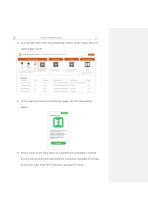
Operation Management Manual 2) Scan the QR code in the "App Download" section of the "Gates Mana PC Client & App" panel; 3) On the App download and installation page, click the [Download] button; 4) iPhone jumps to the "App Store" to complete the installation; Android phones will automatically download the installation package of the app to the local area, select the installation package to install.
Open the catalog to page 10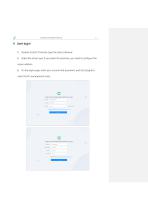
Operation Management Manual 4 User login 1) Double-click [PC Client] to open the client software; 2) Select the server type. If you select On-premises, you need to configure the server address. 3) On the login page, enter your account and password, and click [Login] to enter the PC management client.
Open the catalog to page 11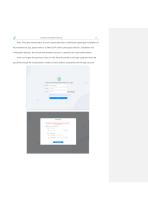
Operation Management Manual Note: The super administrator account is generated when installing the speed gate installation of the maintenance app, please refer to "E246X/E247X Series speed gate selection, installation and initialization settings", the normal administrator account is created by the super administrator. If the user forgets the password, they can click Reset Password on the login page and reset the password through the mobile phone number or email address associated with the login account.
Open the catalog to page 12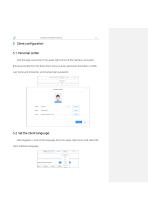
Operation Management Manual 5 Client configuration 5.1 Personal center Click the login username in the upper right corner of the interface, and select [Personal Center] from the drop-down menu to query personal information, modify user name and nickname, and change login password. 5.2 Set the client language After logging in, click on the language list in the upper right corner and select the client interface language.
Open the catalog to page 13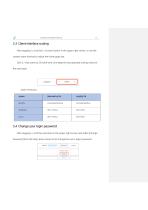
Operation Management Manual ling After logging in, click the [-/+] zoom button in the upper right corner, or use the system zoom shortcut to adjust the client page size. Click [-/+] to zoom by 5% each time, and keep the last adjusted scaling value for the next login.
Open the catalog to page 14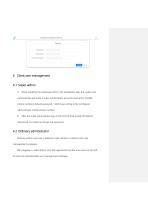
Operation Management Manual 15 * New password: Please Input New password * Confirm new password: Please input new password again 1) When installing the speedway door in the installation app, the system will automatically generate a super administrator account (username: [mobile phone number], default password: 123456) according to the configured administrator mobile phone number; 2) After the super administrator logs in for the first time (using the default password), he needs to change the password. Ordinary admin users are created by super admins or admins with user management privileges. After...
Open the catalog to page 15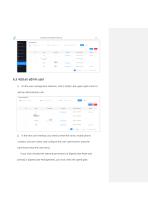
Operation Management Manual On the user management interface, click [+ Add] in the upper right corner to In the new user interface, you need to enter the name, mobile phone number, and user name, and configure the user's permissions (only the permissions that the user owns). If you have checked the relevant permissions of [Speed Gate Mode and Control] or [Speed Gate Management], you must check the speed gate.
Open the catalog to page 16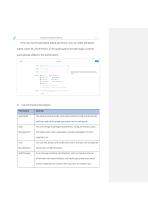
Operation Management Manual If the user has the [All Speed Gates] permission, you can select [All Speed Gates], select All, and if there is a new speed gate in the later stage, it will be automatically added to the authorization. 3) User Permissions Description:
Open the catalog to page 17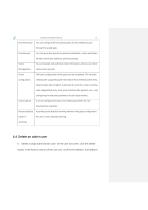
Operation Management Manual 18
Open the catalog to page 18All Routon Electronic Co.,Ltd. catalogs and technical brochures
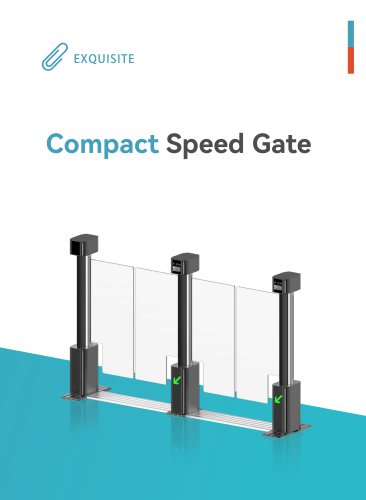
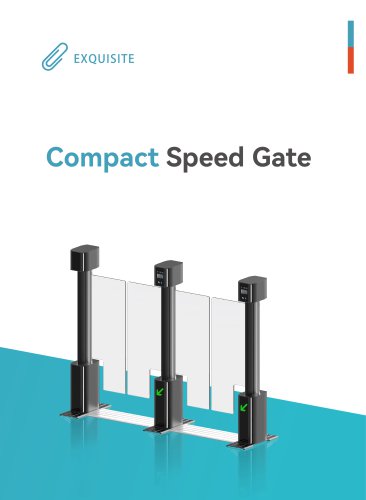 Compact Speed Gate
20 Pages
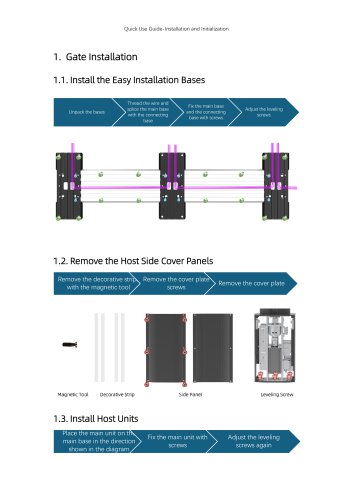 Quick Use Guide
7 Pages
Archived catalogs
 Product Introduction
20 Pages