
- Catalogs
- PortaPivot
- HOW TO MEASURE & ORDER ONLINE


HOW TO MEASURE & ORDER ONLINE

HOW TO MEASURE & ORDER ONLINE
Use an electronic laser to measure the finished wall opening. For accurate results, use the smallest dimensions to calculate the maximum possible rectangle. Consider constant and non-constant joints for left/right and top/bottom measurements.
Calculate the maximum rectangular surface that fits within the wall opening. Example dimensions provided: Height = 2697 mm, Width = 1496 mm.
Input the correct dimensions at www.portapivot.com. Ensure no surface-mounted skirting board is in the doorway for pivot doors without door jambs. Use built-in skirting boards for frameless setups.
Check available space in the rotation area and ceiling obstructions such as lights or detectors. Solid construction is essential; mounting on expansion joints is not possible.
Ensure proper mounting precautions for both ceiling and floor installations. Portapivot calculates the correct joints based on door choice and setup; only wall opening dimensions are needed for online orders.
Various standard joint dimensions are provided for different setups, including without door jambs, with door jambs, and for glass installations. Portapivot calculates these based on your setup.
Details on pivot positions for different door widths and types (NL Pivot, XL Pivot, Minimax, Glass) are provided. Examples illustrate the minimum axis position (Xmin) relative to door width.
Catalog excerpts

HOW TO MEASURE & ORDER ONLINE
Open the catalog to page 1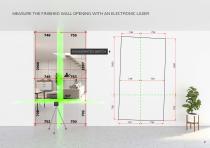
EXAGGERATED SKETCH
Open the catalog to page 2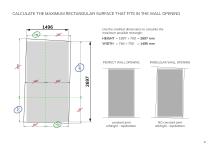
CALCULATE THE MAXIMUM RECTANGULAR SURFACE THAT FITS IN THE WALL OPENING Use the smallest dimensions to calculate the maximum possible rectangle: PERFECT WALL OPENING IRREGULAR WALL OPENING constant joint left/right - top/bottom NO constant joint left/right - top/bottom
Open the catalog to page 3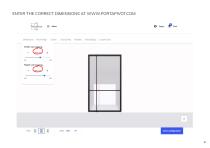
ENTER THE CORRECT DIMENSIONS AT WWW.PORTAPIVOT.COM
Open the catalog to page 4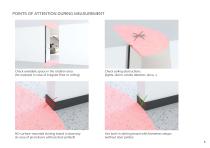
POINTS OF ATTENTION DURING MEASUREMENT Check available space in the rotation area (for example in case of irregular floor or ceiling) Check ceiling obstructions (lights, alarm, smoke detector, airco,...) NO surface-mounted skirting board in doorway (in case of pivot doors without door jambs!!) Use built-in skirting board with frameless setups (without door jambs) 5
Open the catalog to page 5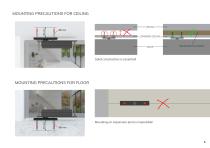
MOUNTING PRECAUTIONS FOR CEILING CEILING LOWERED CEILING REINFORCED ELEMENT Solid construction is essential! MOUNTING PRECAUTIONS FOR FLOOR Mounting on expansion joint is impossible! Ø8 mm
Open the catalog to page 6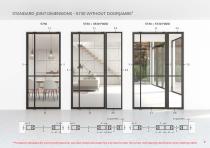
STANDARD JOINT DIMENSIONS - 5730 WITHOUT DOORJAMBS1 Portapivot calculates the correct joints based on your door choice and setup! You only have to enter the correct 'wall opening' dimensions when ordering online!
Open the catalog to page 7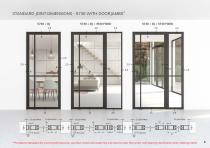
STANDARD JOINT DIMENSIONS - 5730 WITH DOORJAMBS* 5730 + DJ * Portapivot calculates the correct joints based on your door choice and setup! You only have to enter the correct 'wall opening' dimensions when ordering o
Open the catalog to page 8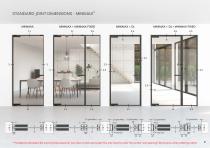
STANDARD JOINT DIMENSIONS - MINIMAX* MINIMAX MINIMAX + MINIMAX FIXED MINIMAX + DJ + MINIMAX FIXED 2.5 * Portapivot calculates the correct joints based on your door choice and setup! You only have to enter the correct 'wall opening' dimensions when ordering onl
Open the catalog to page 9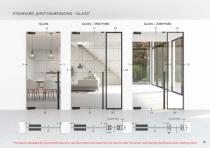
STANDARD JOINT DIMENSIONS - GLASS* GLASS * Portapivot calculates the correct joints based on your door choice and setup! You only have to enter the correct 'wall opening' dimensions when ordering online!
Open the catalog to page 10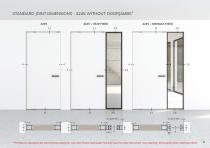
STANDARD JOINT DIMENSIONS - 4245 WITHOUT DOORJAMBS* 4245 * Portapivot calculates the correct joints based on your door choice and setup! You only have to enter the correct 'wall opening' dimensions when ordering online!
Open the catalog to page 11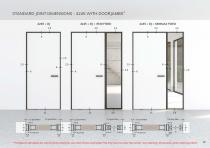
STANDARD JOINT DIMENSIONS - 4245 WITH DOORJAMBS* 4245 + DJ * Portapivot calculates the correct joints based on your door choice and setup! You only have to enter the correct 'wall opening' dimensions when ordering on
Open the catalog to page 12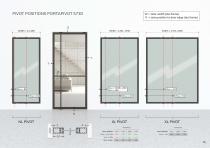
PIVOT POSITIONS PORTAPIVOT 5730 11I t11 W = door width (alu frame)X = axis position to door edge (alu frame) I Door WIDTH ► 1251 Xmin = W-1150 ► 101 Xmin > 185 ► no *Xmin result 185 Door WIDTH ► 1751 | 1800 | 2100 Xmin = 1/3 ► 584 | 600 | 700
Open the catalog to page 13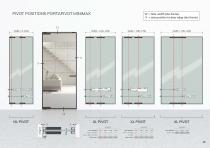
W - door width (alu frame) X - axis position to door edge (alu frame) Door WIDTH ► 1751 | 1800 | 2100 Xmin - 1/3 ► 584 I 600 I 700
Open the catalog to page 14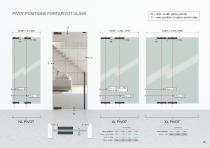
11 W = door width (glass panel)X = axis position to glass panel edge Width = 1251-1750 <-> Width = 1751-2250 NL PIVOT XL PIVOT XL PIVOT ____EXAMPLES EXAMPLES *Xmin results
Open the catalog to page 15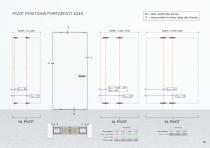
Door WIDTH ► 1751 | 1800 | 2100 Xmin = 1/3 ► 584 | 600 | 700
Open the catalog to page 16All PortaPivot catalogs and technical brochures
 Slideways
12 Pages
 Portapivot_catalogue_2025
25 Pages
 Portapivot
27 Pages
Archived catalogs
 Stealthpivot catalogue
13 Pages
- PortaPivot interior door
- PortaPivot wooden door
- PortaPivot contemporary door
- PortaPivot door without glazing
- PortaPivot 1 leaf door
- PortaPivot metal door
- PortaPivot custom door
- PortaPivot glazed door
- Industrial hinge
- Lacquered door
- Contemporary hinge
- Door hinge
- Sliding door
- Partition
- PortaPivot glass door
- PortaPivot double leaf door
- Customizable color door
- Gray door
- PortaPivot clear glass door