
- Catalogs
- Port-A-Cool
- Portacool-510-Owners-Manual-EN

Portacool-510-Owners-Manual-EN

Portacool-510-Owners-Manual-EN
Catalog excerpts

* Applies to all 120 and 240V products for global configurations
Open the catalog to page 1
Position product on level surface Plug into appropriate outlet For setup, Kuul ComfortTM evaporative media should appear wet before starting the fan. Be sure to turn the pump on before starting the fan. Check the water gauge to monitor water level in tank. Once product is plugged in and filled, turn on the pump switch and the fan Your Portacool portable evaporative cooler is meant to be used in an open-air environment, such as a patio. If you plan to use your evaporative cooler in a more closed environment – such as a garage, sunroom or barn – you must provide adequate ambient airflow to ensure...
Open the catalog to page 2
SAFETY OPERATION WARNINGS 1) Not for use by children 2) Not for use by persons with reduced physical, sensory or mental capabilities 3) Not for use by persons who have not reviewed the owner’s manual and familiarized themselves with the operation of the product SAFE OPERATION To reduce the risk of electric shock, fire or injury: • Do not operate any evaporative cooler with a damaged cord or plug. • Do not run power cord under carpeting or cover with throwrugs, runners or similar coverings. Arrange power cord away from traffic areas to avoid tripping hazards. • Read the evaporative cooler’s instructions,...
Open the catalog to page 3
Control panel* Oscillating louvers Kuul Comfort MicroTech™ evaporative media Serial plate Water Level Indicator Fill door located behind logo plate Tilt-and-roll casters Power cord with GFCI Drain located in back *Red light on control panel only illuminates when reservoir is empty and pump has shutoff due to low water. **Use caution when moving product filled with water.
Open the catalog to page 4
GFCI The Portacool® 510 utilizes a GFCI (Grounded Fault Circuit Interrupter) to help protect users against ground electrical faults, which prevent some fire and electrical shock hazards. These devices are intended to trip at very low leakage currents. The Portacool 510 model (PAC5101A1) uses a GFCI, which is built into the power cord. The GFCI on these models will automatically reset when the evaporative cooler is plugged into an electrical outlet. If the GFCI is tripped and a simple “reset” will not work, please contact the Portacool Customer Service at (936) 598-5651 or (800) 695-2942 for more...
Open the catalog to page 5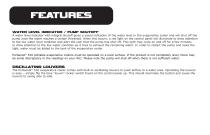
FEATURES WATER LEVEL INDICATOR / PUMP SHUTOFF A water level indicator with integral shutoff gives a visual indication of the water level in the evaporative cooler and will shut off the pump once the water reaches a certain threshold. When this occurs, a red light on the control panel will illuminate to draw attention to the low water level condition and alert the user that the pump has shut off. This light may cycle on and off for a few minutes to draw attention to the low water condition as it tries to exhaust the remaining water. In order to restart the pump and reset the light, water must...
Open the catalog to page 6
1) Make sure there is a clear, unobstructed path in front of the evaporative cooler to provide maximum airflow. 2) If the evaporative cooler is positioned on a raised platform, ensure the platform is stable, well constructed and will not allow the evaporative cooler to tip over. Ensure it allows for the full weight of the evaporative cooler, including a tank full of water. The evaporative cooler must be level and in the upright position to prevent movement. 3) If placed near a wall or other obstruction, position the evaporative cooler a minimum of 3 feet (0.9 meters) from the wall or obstruction...
Open the catalog to page 7
MAINTENANCE While the rugged, corrosion-resistant construction ensures low maintenance will be required, keeping your evaporative cooler clean will ensure it stays in peak operating condition. DAILY MAINTENANCE The pump should be turned off approximately 15 minutes before the fan is turned off, which allows the Kuul® evaporative media to dry. Ensuring your Kuul evaporative media is dry at the end of the day not only extends its life, it also helps control the growth of mildew, mold, bacteria and other odor-causing elements. WEEKLY MAINTENANCE Your Portacool portable evaporative cooler should...
Open the catalog to page 8
TROUBLESHOOT Turn off all power to your evaporative cooler before attempting to troubleshoot any of the following symptoms. For problems not listed, please contact Customer Service. POSSIBLE CAUSES Evaporative cooler fails to start or deliver air 1. No electricity to the evaporative cooler A. Circuit breaker tripped B. GFCI tripped C. Power cord unplugged or damaged 2. Motor overheated and/or frozen 1. Kuul evaporative media side of the evaporative cooler is too close to a wall 1. Move evaporative cooler at least three feet from the wall Water draining from the evaporative cooler 1. Seam in float...
Open the catalog to page 9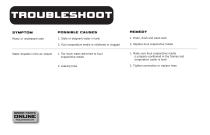
TROUBLESHOOT SYMPTOM POSSIBLE CAUSES Musty or unpleasant odor 1. Stale or stagnant water in tank 2. Kuul evaporative media is mildewed or clogged 1. Drain, flush and clean tank 2. Replace Kuul evaporative media ORDER PARTS ONLINE shop.portacool.com 1. Too much water delivered to Kuul evaporative media 1. Make sure Kuul evaporative media is properly positioned in the frames and evaporative cooler is level Water droplets in the air stream 2. Tighten connection or replace hose
Open the catalog to page 10
WARRANTY TECHNICAL SUPPORT Technical support and service is available directly from your distributor or call Portacool, LLC Customer Service at (800) 695-2942 for the distributor nearest you. You may also contact Support for consultation on troubleshooting and parts replacement. Please have serial number and model number of evaporative cooler available. WARRANTY AND REPLACEMENT PARTS PORTACOOL EVAPORATIVE COOLER LIMITED WARRANTY ® For one (1) year from date of purchase, Portacool, LLC (hereafter “Portacool”) warrants any original component part or parts of its Portacool™ portable evaporative...
Open the catalog to page 11
PORTACOOL PROTECT Portacool, LLC is proud to provide world-class service and support. Portacool Protect™ brings together our commitment to service and support in the form of best-in-class warranties, service programs, technical support and live customer service to provide our customers with an ownership experience that is second to none. Each of the following components are included with your Portacool® 510 product: Year warranty on Portacool 510 motor and electrical components Lifetime warranty on all molded housings Live, U.S.-based Customer Service For complete warranty information and limitations,...
Open the catalog to page 12All Port-A-Cool catalogs and technical brochures
 2013 Port-A-Cool, LLC, Catalog
20 Pages
 2014 Port-A-Cool catalog
12 Pages
 Port-A-Cool Islander
1 Page


Archived catalogs
 Kuul Pads Brochure
2 Pages
 Port-A-Cool Cyclone 3000
1 Page
 36? High Performance
1 Page
 PANELB2012
2 Pages
 24?
24?1 Page
 2012.
2012.8 Pages