
- Catalogs
- Multitek Electronics
- RL-B17M

RL-B17M

RL-B17M
- Indoor Unit: Mount the bracket on the wall, hang the unit, and connect the adapter. Ensure the power plug is accessible.
- Outdoor Unit: Install 1.4m to 1.7m above ground, avoiding direct sunlight. Use the enclosed screws and follow the wiring diagram for connections.
- Indoor Unit: Adjust melody, brightness, chroma, and volume. Use the monitor, unlock, and talk functions as needed.
- Outdoor Unit: Press the call button to initiate communication. Use the unlock and monitor functions for security.
- Indoor Unit: Screen size is 7" with a resolution of 800x480. Operating temperature is -10℃ to +40℃, with a power consumption of <8W.
- Outdoor Unit: Features a 60° wide-angle camera with a working temperature of -15℃ to 50℃.
Catalog excerpts
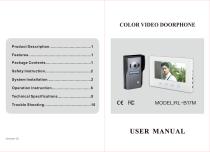
COLOR VIDEO DOORPHONE USER MANUAL Version 1.0
Open the catalog to page 1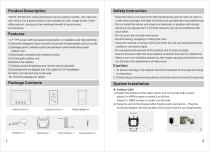
Product Description Safety Instruction The RL-B17M color video doorphone can be used to monitor, call, intercom and unlock.It is a product that is very suitable for villa, single house, hotel, office and etc, giving you the combined benefit of security and convenience. ·Keep the indoor unit away from high temperature such as near an oven or under direct sunlight, and high humidity such as bathroom and greenhouse. ·Do not install the indoor unit close to a television or position with strong jamming- the signals the TV and the intercom use can be interfered with each other. ·Do not touch the unit...
Open the catalog to page 2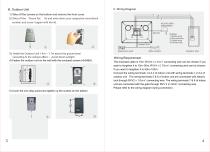
1) Take off the screws on the bottom and remove the front cover. 2) Take off the ‘Room No,’ lid and write down your respective room/block number and cover it again with the lid. Indoor Unit Electronic-lock 3) Install the Outdoor Unit 1.4m ~ 1.7m above the ground level (according to the camera effect ).Avoid direct sunlight. 4) Fasten the outdoor unit on the wall with the enclosed screws (4x30BA). Gate Unlock Cables: 1.Audio wire 2.Ground wire 3.Video wire 4.Power wire Outdoor Unit Wiring Requirement The enclosed cable is 15m, RVV4 x 0.5mm2 connecting wire can be chosen if you want to lengthen...
Open the catalog to page 3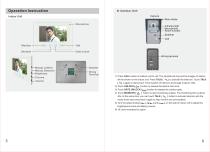
Operation Instruction B. Outdoor Unit Camera Indoor Unit Rain shade Microphone Infrared light Microphone Room number Speaker Call Gate Unlock Wiring terminal Melody (L/M/H) Melody Selection Brightness Chroma Volume Speaker Wiring Terminal 1) Press CALL button of outdoor unit to call. The doorbell will ring and the images of visitors will be shown on the indoor unit. Press TALK ( ) to activate the intercom. Touch TALK ( ) again to disconnect. Time duration of intercom and image is about 120s. 2) Touch UNLOCK ( ) button to release the electric door lock. 3) Touch GATE UNLOCK ( ) button to release...
Open the catalog to page 4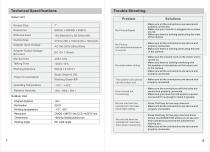
Technical Specifications Trouble Shooting Indoor Unit Effective Area No Picture, but intercommunication is normal ·Make sure all the connections are secure and properly connected. ·Make sure there is nothing obstructing the view of the camera. ·Make sure the volume noch on the indoor unit is turned up. ·Make sure there is nothing interfering with the speaker or microphone on the indoor unit or the camera. ·Make sure all the connections are secure and properly connected. The outdoor unit cannot call the indoor one ·Make sure all the connections are secure and properly connected. Door Unlock not...
Open the catalog to page 5All Multitek Electronics catalogs and technical brochures
 ALARM FEATURES of IP MONITORS
11 Pages
 IP Intercom Brochure
4 Pages
 Multibus One-Pager
2 Pages
 Multitek presentation
19 Pages

- Door intercom
- Metal door intercom
- Video intercom
- White door intercom
- Door intercom with screen
- Interior digital door viewer
- IP door intercom
- Door station
- Exterior door station
- Access control digital door viewer
- Video door intercom with screen
- Metal door station
- Video intercom with color screen
- Black door intercom
- White video door intercom
- Access control door station
- Door station with camera
- Built-in video door intercom
- Black digital door viewer
- Residential video door intercom