


Z8

Z8
- Milk System Cleaning: Connect the milk pipe to the container, slide the dual spout down, and initiate cleaning. The system cleans automatically and displays a completion message.
- Daily Cleaning: Dismantle and rinse the dual spout and milk system parts under running water. Use a cleaning solution for stubborn residues.
- Filter Cartridge: Insert or change the CLARIS Smart filter cartridge as needed. The machine detects the cartridge and rinses it automatically.
- Machine Cleaning: Use JURA cleaning tablets and follow the on-screen prompts to clean the machine.
- Descaling: Use JURA descaling tablets and follow the on-screen instructions.
Catalog excerpts

8 Transport and environmentally friendly disposal 45 11 JURA contact details / Legal information 52 Symbol description Warnings J WARNING Always take note of any information marked with the words CAUTION or J CAUTION WARNING and a warning sign. The signal word WARNING draws your attention to potential serious injury, and the signal word CAUTION to potential minor injury. CAUTION CAUTION draws your attention to potential damage to the machine. Symbols used ► Prompt to take action. This symbol means that you are being prompted to perform some action. E Information and tips to make it...
Open the catalog to page 3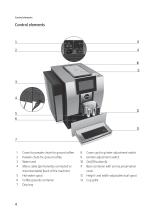
Control elements Control elements 10 11 12 13 1 Cover for powder chute for ground coffee 2 Powder chute for ground coffee 3 Water tank 4 Mains cable (permanently connected or disconnectable) (back of the machine) 5 Hot-water spout 6 Coffee grounds container 7 Drip tray 8 Cover cap for grinder adjustment switch 9 Grinder adjustment switch 10 On/Off button Q 11 Bean container with aroma preservation cover 12 Height- and width-adjustable dual spout 13 Cup grille
Open the catalog to page 4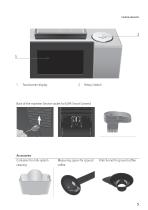
Control elements Touchscreen display Rotary Switch Back of the machine: Service socket for JURA Smart Connect Accessories Container for milk system cleaning Measuring spoon for ground coffee Filler funnel for ground coffee
Open the catalog to page 5
Important information Proper use The machine is designed and intended for private domestic use. It should only be used for coffee preparation and to heat milk and water. Use for any other purpose will be deemed improper. JURA Elektroapparate AG cannot accept any responsibility for the consequences of improper use. Before using the machine read these instructions for use thoroughly and completely and comply with the instructions they contain. A warranty service is not applicable for damage or defects caused by non-compliance with the instructions for use. Keep these instructions for use close...
Open the catalog to page 6
Important information which is available directly from JURA or from authorised JURA service centres. ■ Make sure that the Z8 and the mains cable are not located close to hot surfaces. ■ Be careful to ensure that the mains cable is not trapped and does not rub against sharp edges. ■ Never open and repair the machine yourself. Do not modify the machine in any way that is not described in these instructions for use. The machine contains live parts. If opened, there is a danger of potentially fatal injury. Repairs may only be carried out by authorised JURA service centres, using original spare parts...
Open the catalog to page 7
Important information ■ Protect the Z8 from environmental influences such as rain, frost and direct sunlight. ■ Do not immerse the Z8, mains cable or connections in water. ■ Do not put the Z8 or any individual parts in the dishwasher. ■ On models with glass cup grille: Do not subject the glass cup grille to shock or impact. ■ Before cleaning, switch the Z8 off with the On/ Off button. Always wipe the Z8 with a damp cloth rather than a wet one, and protect it from prolonged exposure to water splash. ■ Only connect the machine to the mains voltage in accordance with the information on the rating...
Open the catalog to page 8
Important information ■ Children may not clean or service the machine unless supervised by a responsible person. ■ Do not allow children to play with the machine. ■ Keep children under the age of 8 away from the machine, or supervise them constantly. ■ Children aged 8 and over may only operate the machine without supervision if they have been instructed in how to use it safely. Children must be able to recognise and understand the potential dangers arising from incorrect use. People, including children, who ■ do not have the physical, sensory or mental capabilities to use the machine safely or ■...
Open the catalog to page 9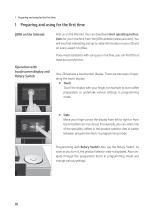
1 Preparing and using for the first time 1 Preparing and using for the first time JURA on the Internet Visit us on the Internet. You can download short operating instructions for your machine from the JURA website (www.jura.com). You will also find interesting and up-to-date information on your Z8 and on every aspect of coffee. If you need assistance with using your machine, you can find this at www.jura.com/service. Operation with touchscreen display and Rotary Switch Your Z8 features a touchscreen display. There are two ways of operating the touch display: Touch Touch the display with your...
Open the catalog to page 10
1 Preparing and using for the first time When setting up your Z8, please note the following: Place the Z8 on a horizontal surface that is not sensitive to water. Choose a spot for your Z8 which protects the machine against overheating. Ensure that the ventilation slots are not covered. Filling the bean container The bean container has an aroma preservation cover. This will ensure that your coffee beans retain their aroma for longer. Coffee beans which have been treated with additives (e.g. sugar), ground coffee or freeze-dried coffee will damage the grinder. T Only use roasted, untreated coffee...
Open the catalog to page 11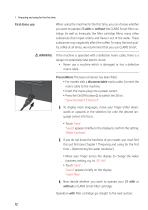
1 Preparing and using for the first time When using the machine for the first time, you can choose whether you want to operate Z8 with or without the CLARIS Smart filter cartridge. As well as limescale, the filter cartridge filters many other substances that impair aroma and flavour out of the water. These substances may negatively affect the coffee. To enjoy the best quality coffee at all times, we recommend that you use CLARIS Smart. If the machine is operated with a defective mains cable, there is a danger of potentially fatal electric shock. ► Never use a machine which is damaged or has a...
Open the catalog to page 12
First-time use with filter cartridge activation CAUTION 1 Preparing and using for the first time Operation without filter cartridge: see Chapter 1 ‘Preparing and using for the first time - First-time use without filter cartridge activation’. Milk, sparkling mineral water or other liquids can damage the water tank or the machine. ► Only fill the water tank with fresh, cold water. ► Place a receptacle under the dual spout and the hot-water spout. ► Remove the water tank and rinse it with cold water. ► Fit the filter cartridge extension supplied on top of a CLARIS Smart filter cartridge . ► Insert...
Open the catalog to page 13
Archived catalogs
 COOL CONTROL 600ML
9 Pages
 E8/E80
44 Pages
 S8/S80
48 Pages
 Z6
Z652 Pages
 X8
X848 Pages
 GIGA X8c Professional
60 Pages
 X6
X62 Pages
 ENA 8
ENA 831 Pages
 GIGA X3c
60 Pages
 MANUAL_ENA4_COFFEE MACHINE
30 Pages
 J6/J600
48 Pages
 AUTOMATIC MILK FROTHER
9 Pages
 MANUAL_JOE_ANDRIOD
13 Pages
 MANUAL_JOE_IOS
14 Pages
 GIGA X9c Professional
60 Pages
 ENA Micro 90
29 Pages
 GIGA X7 Professional
2 Pages
 IMPRESSA X9 Win
2 Pages
 GIGA X9 Professional
2 Pages
 Coffee to Go - Options
1 Page
 IMPRESSA X9 Platinum
2 Pages
 IMPRESSA Xf50 Classic
2 Pages
- Commercial coffee brewer
- Industrial espresso machine
- Automatic coffee machine
- Cutlery
- Hot water coffee maker
- Black coffee maker
- Milk coffee machine
- Cappuccino coffee machine
- Food dispenser
- Commercial food dispenser
- Silver-colored coffee machine
- Stainless steel cutlery
- 2-cup coffee machine
- 2-group coffee machine
- 1-cup coffee machine
- Pump coffee machine
- Coffee machine with touch screen
- Industrial management software