
- Catalogs
- Intelligent Lectern Systems
- ILS 27 Pro User Manual


- Company
- Products
- Catalogs
- News & Trends
- Exhibitions
ILS 27 Pro User Manual
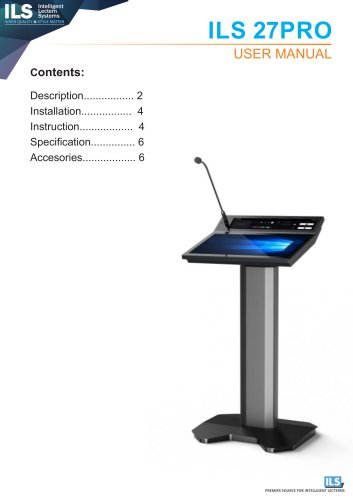
ILS 27 Pro User Manual
The ILS 27PRO is an intelligent lectern system designed for quality and style. It features a 23.8-inch writing screen, a 19.1-inch control screen, and various interfaces including a Type-C fast charging port, microphone interface, USB3.0 ports, and HDMI connection. The lectern also includes a capacitive pen with an adjustable card slot and a WIFI antenna.
Installation
Ensure the HDMI output cable is within 12 meters of the display device, or use an HDMI signal amplifier or optical fiber HDMI cable for longer distances. The power supply should be connected using the C14 male plug and must be reliably grounded, sharing the same grounding line with the display device and power amplifier to maintain audio and video quality.
Instruction
To power on the computer, press the start button on the control screen. To shut down, use the close button on the control panel and ensure the computer is turned off before disconnecting the power. The lectern allows for screen angle and podium height adjustments, volume control, and screen annotation. It also features a spotlight tool for presentations and a stopwatch/countdown function.
Multi-screen Smart Sharing Software
This software allows content to be dragged onto the writing screen for display on the big screen, with the control screen providing a preview. Users can prioritize display content and close it by dragging it out or clicking the close icon.
Specification
The lectern operates on an input voltage of 100-240VAC at 50/60Hz, with an input current of 1.5A and a rated power of 150W.
Accessories
The package includes one podium, a power cable, a manual, a certificate, and an inspection report.
Catalog excerpts
Intelligent Lectern Systems WHEN QUALITY & STYLE MATTER PREMIER SOURCE FOR INTELLIGENT LECTERNS
Open the catalog to page 1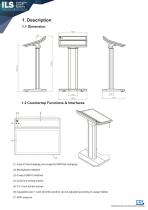
Intelligent Lectern Systems WHEN QUALITY & STYLE MATTER 1.2 Countertop Functions & Interfaces (1) Type-C fast charging port (supports 60W fast charging) (2) Microphone interface (3) 2-way USB3.0 interface (4) 23.8-inch writing screen (5) 19.1-inch control screen (6) Capacitive pen + card slot (the position can be adjusted according to usage habits) (7) WIFI antenna PREMIER SOURCE FOR INTELLIGENT LECTERNS
Open the catalog to page 2
1.3 Podium Wiring Instructions (1) Microphone output three-pin XLR male plug - connect to power amplifier (requires 48V phantom power) and mixer (2) 3.5 audio cable - connect to power amplifier and mixer (4) USB--Android connected to central control (5) HDMl--connect display device (6) Power input C14 male plug--AC100-240V power supply PREMIER SOURCE FOR INTELLIGENT LECTERNS
Open the catalog to page 3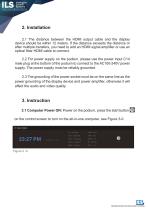
2.1 The distance between the HDMI output cable and the display device should be within 12 meters. If the distance exceeds the distance or after multiple transfers, you need to add an HDMI signal amplifier or use an optical fiber HDMI cable to connect. 2.2 For power supply on the podium, please use the power input C14 male plug at the bottom of the podium to connect to the AC100-240V power supply. The power supply must be reliably grounded. 2.3 The grounding of the power socket must be on the same line as the power grounding of the display device and power amplifier, otherwise it will affect the...
Open the catalog to page 4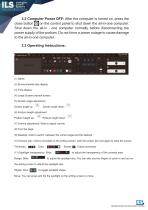
3.2 Computer Power OFF: After the computer is turned on, press the close button^on the control panel to shut down the all-in-one computer. Shut down the all-in - one computer normally before disconnecting the power supply of the podium. Do not force a power outage to cause damage to the all-in-one computer. Indoia Podiumj 2^0, CH,0: TVOC: T3(jfl/m3 FW2.5: PM10 rEMP:2A*C HUM: 35% SMELL; 20 BP: IIHkSa ASL ■7 m (2) Environmental data display (4) Large Screen preview screen (5) Screen angle adjustment Screen angle down: (6) Podium height adjustment Podium height up: * Podium height down: (7) Volume...
Open the catalog to page 5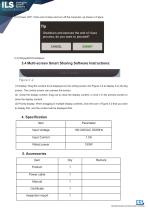
12) Power OFF: Click end of class and turn off the computer, as shown in Figure Shutdown and execute the end of class process, do you want to proceed? 3.4 Multi-screen Smart Sharing Software Instructions: (1) Display: Drag the content to be displayed on the writing screen into Figure 3-2 to display it on the big screen. The control screen can preview the screen. (2) Close the display content: drag out to close the display content, or click x in the preview screen to close the display content. (3) Priority display: When dragging in multiple display contents, click the icon in Figure 3-2 that you...
Open the catalog to page 6All Intelligent Lectern Systems catalogs and technical brochures
 ILS Navigator ST
2 Pages
 ILS Navigator AC
1 Page
 ILS Navigator SC
1 Page
 ILS Synergy AC
1 Page
 ILS Synergy AK
1 Page
 ILS Synergy AT
1 Page
 ILS Synergy ST
2 Pages
 ILS Synergy WW
1 Page
 ILS Synergy QT
1 Page
 ILS Synergy AW
1 Page
 ILS Synergy QK
1 Page
 SYNERGY GW-MS
1 Page
 ILS Synergy DT
1 Page
 ILS Synergy SC
1 Page
 ILS Synergy GW-MS
2 Pages
 ILS 24B
1 Page
 ILS Synergy DW
1 Page
 ILS Synergy GW-W
1 Page
 ILS Synergy HT
1 Page
 ILS Synergy QC
1 Page
 ILS Synergy SW
1 Page
 ILS Synergy GC
1 Page
 ILS Synergy GK
1 Page
 ILS Synergy SK
1 Page
 ILS Synergy QW
1 Page
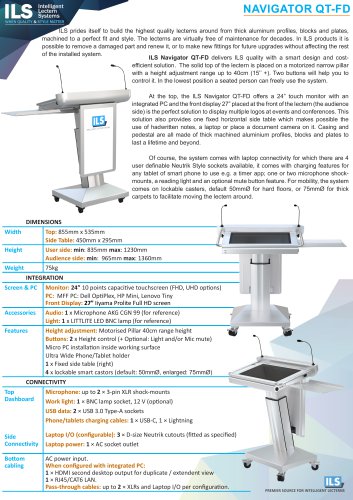 Navigator QT-FD
1 Page
 ILS Navigator AT
2 Pages
Archived catalogs
 ILS Synergy UT
1 Page
 ILS Synergy UC
1 Page
 Intelligent Lectern Systems
5 Pages
 RICH MEDIA PLATFORMS
4 Pages
 ILS22M
2 Pages
 ILS21
ILS211 Page
 ILS24H
4 Pages
 ILS12
ILS122 Pages
 ILS21R
1 Page
 ILS Product Catalogue
6 Pages

