


TIMOR

TIMOR
- Purpose: The "Timor" is a universal refrigeration unit for storing and displaying pre-cooled food items, maintaining an internal temperature of +2ºC to +8ºC.
- Description: Features dynamic cooling, automatic defrosting, and an optional electronic thermostat with temperature recording capabilities. Available in versions with internal or central aggregates, equipped with adjustable shelves, optional meat hooks, or baskets for fruits and vegetables.
- Technical Data: Various models with specifications such as nominal voltage, current, lighting power, energy consumption, and weight are detailed in Table 1.
- Installation Requirements: Ensure appropriate power supply and avoid using extension cords. Connect to a dedicated circuit with a protective grounding pin.
- Connection and Startup: Unpack, level the device, remove protective films, and follow specific assembly instructions if partially disassembled. Initial cleaning should be done with water and neutral detergents, avoiding chlorine and sodium-based products.
- Cleaning: Disconnect from power before cleaning. Use a damp cloth and avoid water streams. Regularly clean the condenser to prevent overheating and potential damage.
- Service: Follow troubleshooting steps for common issues like non-operation, water leakage, or lighting failures. Ensure proper leveling and check drainage systems.
- Device Components: Describes various parts such as meat hook rails, fruit and vegetable baskets, and control panels. Each component is labeled and explained with reference to figures in the manual.
- Exploitation: Provides guidelines for optimal device placement and operation, emphasizing the importance of maintaining appropriate temperature and ventilation. It includes recommendations for leveling the rack, waiting after transportation, and ensuring even load distribution.
- Temperature Regulation: Discusses the use of thermostats (Igloo and Carel) to control and maintain the desired temperature. It warns against tampering with thermostat settings to avoid damage.
- Maintenance: Outlines cleaning procedures, emphasizing the need to disconnect the device from power before maintenance. It advises against using water streams or sharp objects and highlights the importance of keeping the condenser clean to prevent overheating.
- Service and Troubleshooting: Offers solutions for common issues such as device not working, lighting problems, and temperature discrepancies. It provides contact information for technical support and instructions for reporting issues.
- Thermostat Service: Details the operation of Igloo and Carel thermostats, including temperature adjustment and manual defrosting procedures. It explains the significance of control panel diodes and provides steps for setting desired temperatures.
The document outlines the specifications for the "Timor" cooling units, which are equipped with dynamic cooling, automatic condensate damping, and defrosting features. They include an electronic thermostat that works with a module for temperature registration and alerts for temperature deviations. The units can be connected in series and powered by internal or external aggregates. Technical specifications include nominal voltage, current, lighting power, energy consumption, cooling capacity, and weight for various models.
Before installation, ensure the power supply is suitable and avoid using extension cords. The unit should be placed on a stable surface and adjusted using its legs. Remove protective films and ensure proper ventilation. Initial cleaning should be done with neutral detergents, avoiding corrosive substances. Allow the unit to stabilize for at least 2 hours before operation.
The unit should be placed in a dry, well-ventilated area away from heat sources. Proper adjustment prevents noise and ensures effective condensate drainage. Avoid overloading shelves and ensure even distribution of weight. The thermostat settings should not be altered as they are pre-set by the manufacturer.
Maintenance should be performed with the unit powered off. Regular cleaning of the condenser is crucial to prevent overheating and ensure efficient operation. Avoid using sharp tools or water jets for cleaning. Monthly cleaning of the interior and defrosting is recommended.
If issues arise, check the power connection, ensure the main switch and thermostat are on, and verify the temperature settings. For water leakage, check the unit's leveling and drainage. If the lighting fails, check the lamp and starter.
Catalog excerpts

£3 IGLOO Instrukcja obstugi TIMOR 1. ROZLADUNEK Urzqdzenie powinno bye transportowane w pozycji pionowej, odpowiednio zabezpieczone i spakowane. Producent wysy-ta urzqdzenie na specjalnym podescie drewnianym, zabezpieczone tekturowymi kqtownikami oraz foliq. 2. CHARAKTERYSTYKA WYROBU 2.1. Przeznaczenie „Timor” jest uniwersalnym urzqdzeniem chtodniczym przeznaczonym do przechowywania i eksponowania szerokiego asortymentu artykutow spozywczych uprzednio wychtodzonych do temperatury przechowywania. Gwarantowana tem-peratura wewnqtrz regatu +2°C/+8°C przy temperaturze otoczenia +15°C /+25°C i wilgotnosci wzgl. powietrza do 60%. 2.2. Opis urzqdzenia Regaty „Timor” posiadajq chtodzenie dynamiczne. Wszystkie typy wyposazone sq w odszranianie automatyczne i elek-troniczny termostat opcjonalnie wspotpracujqcy z modutem do rejestracji temperatury pozwalajqcym na rejestracjq i sy-gnalizacjq za wysokiej i za niskiej temperatury w urzqdzeniu. W opcji mogq rowniez posiadac automatyczne odparowanie kondensatu. Przystosowane sq do tqczenia w ciqgi w wersji z agregatem wewnqtrznym (mod/A) lub na agregat centralny (mod/C). Regaty wyposazone sq w 4 lub 5 potek ekspozycyjnych (w zaleznosci od typu urzqdzenia, mod/C - 5 potek), posiadajqcych mozliwosc zmiany wysokosci oraz kqta zawieszenia. W opcji mozna zamowic haki miqsne lub kosze na warzywa i owoce. Wnqtrze regatu jest podswietlane. Istnieje mozliwosc zatozenia dodatkowego podswietlenia kazdej potki. Urzqdzenia JGLOO” wykonywane sq w/g nowoczesnych technologii i posiadajq wymagane prawem certyfikaty. Spis tresci Spis rysunkow Spis tabel Tym znakiem oznaczone sq informacje o szczegolnym znaczeniu dla bezpieczenstwa uzytkownika oraz do prawidtowej eksploatacji urzqdzenia Instrukcja obstugi Timor | 1
Open the catalog to page 1
Rys.1 Budowa urządzenia 1 - Pleksi panelu górnego 2 - Sito regału (NIE BLOKOWAĆ OTWORÓW wentylacyjnych zapewniających cyrkulację schłodzonego powietrza!!!) 3 – Ekran frontowy 4 - Panel frontowy 5 – Wiatrownica górna (po ściągnięciu dostęp do lamel skraplacza) – NIE BLOKOWAĆ OTWORÓW!!! 6 - Wiatrownica dolna lewa (po ściągnięciu dostęp do pojemnika na skropliny – wersja bez wyparki!) 7 – Podest drewniany zakładany do transportu urządzenia 8 - Nóżki służące do wypoziomowania urządzenia 9 - Tabliczka znamionowa 10 - Panel sterowania (termostat/wyłączniki) 11 – Wiatrownica dolna prawa (po ściągnięciu...
Open the catalog to page 2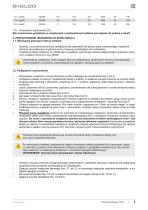
* To – Temperatura odparowania [ºC] Moc znamionowa oswietlenia w urządzeniach z podświetlanymi półkami jest większa niż podana w tabeli! 3. PRZYGOTOWANIE URZĄDZENIA DO EKSPLOATACJI 3.1. Wymagania dotyczące miejsca instalacji • • • Sprawdź, czy przekrój przewodów zasilających jest odpowiedni dla poboru prądu instalowanego urządzenia Zabrania się podłączania urządzenia przez przewody przedłużające lub rozdzielacze Urządzenie należy podłączyć do oddzielnego, prawidłowo wykonanego obwodu elektrycznego z gniazdem wtykowym z kołkiem ochronnym (w/g PBUE) Uruchomienie urządzenia, może nastąpić tylko...
Open the catalog to page 3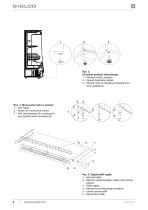
Rys. 2. Usuwanie podestu drewnianego 1 – Wykręcić nóżki z podestu 2 – Usunąć drewniany podest 3 – Wkręcić nóżki w nakrętki przyspawane do ramy urządzenia Rys. 3. Mocowanie haka w stelażu 1 – Sito regału 2 – Stelaż do mocowania haków 3 – Hak (dostosowany do trzystopniowej regulacji kąta zawieszenia) 4 Rys. 4. Zespół półki regału 1 – Hak pod półkę 2 – Element zabezpieczający półkę przed przesuwaniem 3 – Półka regału 4 – Kierownica schłodzonego powietrza 5 – Listwa cenowa półki 6 – Ogra
Open the catalog to page 4
Rys. 5. Listwa z hakami mięsnymi 1 - Hak pod listwę z hakami mięsnymi 2 - Listwa pod haki mięsne 3 – Haki mięsne Rys. 6. Kosze na owoce i warzywa 1 – Hak pod kosz 2 – Kosz na owoce i warzywa 3 – Profil stalowy zamknięty 20x20x2 łączący kosze (dotyczy regałów 1.3 i 2.5) Rys. 7. Panel sterowania 1 – Wyłącznik główny (załącza/wyłącza agregat urządzenia) 2 – Wyłącznik oświetlenia 3 – Panel termostatu (szczegóły obsługi w Rozdziale nr 7 str.10 i 11) 4. EKSPLOATACJA Temperatura chłodzonej przestrzeni i cykl pracy agregatu mogą ulegać wahaniom. Zależą one od wielu czynników m. in. od ilości i temperatury...
Open the catalog to page 5
Uwagi i wskazówki • Należy prawidłowo wypoziomować witrynę, co zapobiegnie hałaśliwej pracy urządzenia i zapewni prawidłowy odpływ wody (kondensatu) podczas odszraniania. • Po transporcie urządzenia odczekać ok. 2 godzin przed jego uruchomieniem. • Pierwsze zapełnienie przestrzeni chłodniczej dokonywać po uprzednim jej wychłodzeniu do temperatury pracy. Zasada ta powinna być także przestrzegana po dłuższej przerwie w eksploatacji. • Nie blokować żadnych otworów wentylacyjnych, co mogłoby utrudnić cyrkulację schłodzonego powietrza. Należy zapewnić również prawidłowy obieg powietrza wokół urządzenia...
Open the catalog to page 6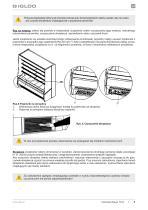
Podczas eksploatacji witryny jak również podczas prac konserwatorskich należy uważać, aby nie uszkodzić czujnika temperatury znajdującej się w przysłonce parownika! Raz na miesiąc zaleca się przerwę w eksploatacji urządzenia celem oczyszczenia jego wnętrza, naturalnego odszronienia parownika, oczyszczenia skraplacza i sprawdzeniu stanu uszczelek drzwi. Jeżeli urządzenie nie posiada automatycznego odparowania kondensatu (wyparki) należy usuwać kondensat z pojemnika w przypadku jego napełnienia Rys.8/2 (str.7). Ilość (częstotliwość) usuwania kondensatu zależy od warunków eksploatacji urządzenia...
Open the catalog to page 7
Rys.10 Wymiana świetlówki 1 – Płyta pleksi panelu górnego 2 – Uchwyty mocujące płytę pleksi 3 - Uchwyt świetlówki (podświetlenie panelu górnego) 4 – Uchwyt świetlówki (oświetlenie górne, wewnętrzne) 5 - Świetlówka 6 – Oprawa świetlówki i zapłonnika 7 – Zapłonnik świetlówki 8 – Oprawa świetlówki Elementy urządzenia mogą korodować przy niewłaściwym użytkowaniu i konserwacji. Należy przestrzegać zasad: • Nie dopuszczać do kontaktu powierzchni urządzenia z środkami zawierającymi chlor i/lub sodę w różnych odmianach, które niszczą ich warstwę ochronną i elementy składowe urządzenia (dotyczy również...
Open the catalog to page 8All IGLOO catalogs and technical brochures
 Product catalogue 2024
137 Pages
 firtella-w
3 Pages
 proxima-slim-open
2 Pages
 luna
luna2 Pages
 variant-70-l
3 Pages
 basia-neo-EN
8 Pages
 CUBE 2 DEEP ICE MOD C
2 Pages
 CUBE 2 DEEP ICE
2 Pages
 CUBE 2 ICE MOD C
2 Pages
 CUBE 2 ICE
2 Pages
 CUBE 2 BAKE
2 Pages
 CUBE 2 OPEN
2 Pages
 CUBE 2
2 Pages
 INNOVA
43 Pages
 KASIA
KASIA44 Pages
 IBIZA
IBIZA40 Pages
 GASTROLINE
36 Pages
 IMPULS
7 Pages
 RODOS
RODOS44 Pages
 BALI
BALI43 Pages
 VARIO
VARIO29 Pages
 IGLOO PRODUCT CATALOG
187 Pages
 Catalogue IGLOO 2013
144 Pages
 Catalog Gastronomia
96 Pages
 GASTROO SERVERY LINES
19 Pages
Archived catalogs
 IGLOO - refrigeration equipment
242 Pages
 IGLOO - New products 2011
40 Pages
- Refrigerated display case
- Shop refrigerated display case
- Display case
- Refrigerated display case with light
- Glass display case
- Contemporary display case
- Counter refrigerated display case
- Commercial display case
- Metal refrigerated display case
- Wooden display case
- Refrigerated display case with door
- Straight refrigerated display case
- Commercial display rack
- Stainless steel refrigerated display case
- Custom-made refrigerated display case
- Illuminated display case
- Viewable display case
- Refrigerated display case with LED light
- Refrigerated pastry display case