
- Catalogs
- Hyundai Telecom
- HAS-R3071

HAS-R3071

HAS-R3071
This section highlights essential safety measures to prevent injury or death. Users should avoid using water or chemicals for cleaning, disassembling the product, or exposing it to extreme conditions. Installation should be away from strong magnetic fields, direct sunlight, and high humidity.
Installation and Wiring
The installation involves burying the back box at a specified height and securing the main unit with screws. It is crucial to avoid dirt, sunlight, or moisture exposure and to choose a location near an AC outlet.
External Structure and Description
The product features a video phone system with capabilities for door monitoring, answering calls, and door opening, operated via touch buttons on the LCD.
How to Use
- Screen Construction: Users can adjust display settings like brightness and contrast.
- Sound Settings: Allows for door phone volume adjustment and ringtone selection.
- Settings: Users can change passwords, set language preferences, and view product information.
- Admin Functions: Includes call end time settings and factory reset options.
Modes
- Away Mode: Activated before leaving home, requiring a password to arm or disarm.
- Emergency Mode: Triggered if away mode is not disarmed, requiring a password to deactivate.
Specifications
The main unit operates on AC 100~240V with a 7-inch TFT-LCD display. It functions in environmental conditions ranging from 0℃ to +40℃. Door phones have specific power consumption and resolution details.
Product Warranty
The warranty covers repair or replacement for a specified period, applicable only to the original purchaser. Unauthorized repairs or modifications void the warranty.
Catalog excerpts

HYUNDAI TELECOM
Open the catalog to page 1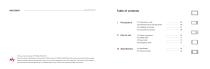
VIDEO DOOR PHONE Table of contents I Precautions 01 Precauti°ns °n use 02 External structure and description 03 Installation and wiring 04 Composition of product 02 Calling option 03 Away mode 04 Emergency mode III Specification 01 Specification 02 Product warranty Thank you for purchasing of HYUNDAI TELECOM. Since this system is developed and produced by a R&D center of HYUNDAI TELECOM and has various convenient functions, please read this Instruction Manual carefully before use so you can fully understand the use of the equipment. The functions of this product or the content of the Instruction...
Open the catalog to page 2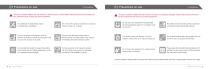
This part contains matters that can result in a serious injury or even death. Please read and be fully aware of the contents for the correct use of the equipment. This part contains matters that can result in an injury or a property damage. Please read and be fully aware of the contents for the correct use of the equipment. Any attempts of disassembly, repair, remodeling are prohibited. Do not have the product exposed to a physical impact, smoke, oil, or water. Do not place any equipments that generate strong magnetism(a large TV or speaker) near the product. Be careful not to have water get...
Open the catalog to page 3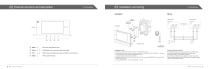
Ⅰ Precautions Wiring VIDEO PHONE 1 WALL BRACKET 02 External structure and description Able/disable door monitoring and away mode. Call Open Instruction Manual Able to press the button to answer a call from a door phone. Able to open the door. Enter the configuration menu. Installation Order 1. he back box is buried at a height of 1400mm ~ 1500mm from the bottom. T 2. rrange the wires so that they can be connected to the SET, and then fix the WALL BRACKET to the back A box by adjusting the angle using the SCREW(M4X25, 4EA). 3. omplete the internal wiring of the HAS-R3071 C 4. ang MAIN UNIT on...
Open the catalog to page 4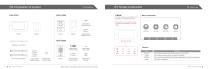
1. MAIN The touch buttons on the bottom of the LCD allow you to operate the machine. * During setup, you can operate with the LCD bottom buttons(Return, Left, Right, Select). | Menu Composition i O Q QDISPLAY SOUND SETTING ADMIN Product Bracket fix Screw Product fix Screw Product fix screw Wall use | Function Menu Function DISPLAY Able to adjust the screen color,contrast, saturation, screen off time. SOUND Able to select the ringer volume, call volume, and ringtone. SETTING Able to view Password Settings, Time Out Mode, Language Setup, Time Setup, and Information. ADMIN Call end time / initialization....
Open the catalog to page 5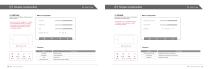
II How to use 01 Screen construction I How to use 2. DISPLAY Able to set the brightness, contrast, hue and screen off time. * Each menu can be changed in 1 ~ 4 steps. * The initial settings are set in two steps. * During setup, you can operate with the LCD bottom buttons(Return, Left/Up, Down/Right, Select). | Menu Composition Contrast rn 3. SOUND Able to set door phone volume, door phone call volume and melody type. * During setup, you can operate with the LCD bottom buttons(Return, Left/Up, Down/Right, Select). | Menu Composition ■ Door Phone Volume ^■ Menu Function Contrast Adjust contrast....
Open the catalog to page 6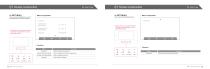
Able to change the password, go out, set the release time, and set the language. Menu Composition Able to check the product information. Menu Composition Information In Delay Time [Away Mode] During setup, you can operate with the * LCD bottom buttons(Return, Left/Up, Down/Right, Select). Out Delay Time [Away Mode] During setup, you can operate with the * LCD bottom buttons(Return, Left/Up, Down/Right, Select). Function Menu Password In Delay Time [Away Mode] Out Delay Time [Away Mode] Language Return Instruction Manual Able to change your password. Able to change the time set for outing mode....
Open the catalog to page 7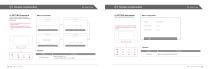
01 Screen construction 4. SETTING-Password This is a menu to change the user's password when setting or canceling the outing mode. Menu Composition Able to check the product information. Menu Composition Enter current password. E * nter current password once and new password twice W * hen entering a password, 4 touch buttons at the bottom of the LCD enable 1~4 During setup, you can operate with the * LCD bottom buttons(Return, Left, Right, Select). Password confirm new password. The password has been successfully changed. Function Menu Instruction Manual Menu Function Function Able to check the...
Open the catalog to page 8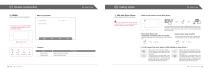
II How to use 02 Calling option II How to use 5. ADMIN Able to reset the end time and product. | Menu Composition Call End Time ◄ 60s ►Factory Reset 1. Talk with Door Phone | When a call comes from the door phone Able to answer a call from a door phone. * During setup, you can operate with the LCD bottom buttons(Return, Left/Up, Down/Right, Select). | Function Menu Function Call End Time Able to set the call end time. Factory Reset Able to do factory reset. A Please be careful when using the door open function as it may cause a security problem caused by a user's mistake. The door phone icon...
Open the catalog to page 9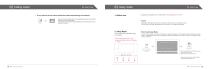
If user want to see the video outside the entrance(monitoring the entrance) A password is required to turn on / off the mode.(* The initial password is "1234") User can monitor the door phone 1 by pressing the go button once and the door phone 2 by pressing it again. If user press the call button during monitoring, the call starts and you can talk up to 2 minutes. Terms Delay time: The time from when user set outing, until user return or leave user’s home. See In Delay Time [Away Mode] setup menu on page 13 to change the delay time.. You can set an away mode before going out to interutor How...
Open the catalog to page 10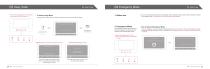
To disarm Away Mode If you can not disarm the away mode, an emergency mode is activated and you need to enter a password to disarm the emergency mode.(* the password is the same with away mode password) W * hen entering a password, 4 touch buttons at the bottom of the LCD enable 1 - 4 How to disarm Emergency Mode During the away mode, enter your home and disarm the away model quickly as follows. Enter a password to disarm an away mode. Away Mode is deactivated Push away button for approximately 1.5 seconds. If an emergency mode is not disarmed or an intrusion is detected, the video door phone...
Open the catalog to page 11All Hyundai Telecom catalogs and technical brochures
 ADVANTAGE ALL IN ONE CAMERA
125 Pages
 HAC-E70BA
28 Pages
 HAS-R1041
28 Pages
 Smart Home Camera
2 Pages
 Air-Tune
1 Page
 HYUNDAI TELECOM CCTV catalog
30 Pages
 Hyundai Telecom Catalog
16 Pages
 Hyundai Telecom reflet
2 Pages
 Smart security
30 Pages
- Door intercom
- Surface-mounted detector
- Security camera
- White detector
- Commercial detector
- Surface-mounted security camera
- Outdoor security camera
- Metal door intercom
- IP security camera
- Infrared detector
- Video intercom
- White door intercom
- Dome security camera
- Door intercom with screen
- Interior digital door viewer
- IP door intercom
- Indoor control module
- Access control digital door viewer
- Digital door viewer with camera
- Color security camera