
- Catalogs
- Hyundai Telecom
- HAC-E70BA

HAC-E70BA

HAC-E70BA
The HAC-E70BA is a smart home system by Hyundai Telecom aimed at improving home security and communication. This manual offers comprehensive guidance on installation, usage, and safety measures.
Precautions
Handle the equipment with care to avoid injury or damage. Ensure secure mounting and avoid exposure to extreme conditions or unauthorized modifications. Electrical setups should include a bipolar main power switch.
External Structure and Description
The system comprises components like a talk lamp, speaker, power lamp, and TFT LCD. It supports functions such as emergency calls, door opening, and activating Away Mode.
Installation and Wiring
Installation requires mounting the camera and monitor at eye level, securing the monitor to a wall bracket, and connecting the power supply. Wiring diagrams are provided for accurate setup.
Product Composition
The package includes a monitor, mounting bracket, screws, and an instruction manual.
How to Use
Screen Construction: The menu offers options for volume, video settings, delay time, and user password. The administrator menu is restricted to authorized users.
Calling Options: Users can make calls via door phones, lobby phones, and guard phones. The system supports automatic call termination and door opening.
Security Options: Features an Empty House Mode for security monitoring. Users can activate or deactivate security modes using a password.
Size and Specification
The main unit operates on DC 24V with a maximum power consumption of 18W. It features a 7-inch color TFT LCD and is designed for surface mounting.
Product Warranty
The product includes a one-year warranty for repairs or replacements. The warranty is void if unauthorized repairs are made or if the product is misused.
Environmental Considerations
Users are encouraged to recycle the product responsibly at the end of its life to reduce environmental impact.
Catalog excerpts
HYUNDAI TELECOM
Open the catalog to page 1
HAPPY TOGETHER, HAPPY TOMORROW
Open the catalog to page 2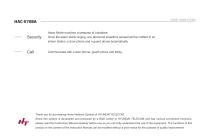
SMART HOME SYSTEM Away Mode monitors a trespass of outsiders. Once the alarm starts ringing, any abnormal situations sensed will be notified to an indoor station, a door phone and a guard phone automatically. Communicate with a door phone, guard phone and lobby. Thank you for purchasing Home Network System of HYUNDAI TELECOM. Since this system is developed and produced by a R&D center of HYUNDAI TELECOM and has various convenient functions, please read this Instruction Manual carefully before use so you can fully understand the use of the equipment. The functions of this product or the content...
Open the catalog to page 3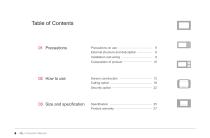
External structure and description - 8 02 How to use Screen construction Calling option Security option 03 Size and specification Specification — Product warranty
Open the catalog to page 4
External structure and description If a power plug or an equipment connector applies as a blocking device, such device has to be in a location where it can be manipulated easily. prevent injury, this apparatus must be securely attached to To The floor/wall in accordance with the installation instructions.
Open the catalog to page 5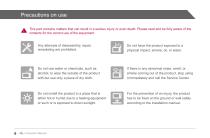
This part contains matters that can result in a serious injury or even death. Please read and be fully aware of the contents for the correct use of the equipment. Any attempts of disassembly, repair, remodeling are prohibited. Do not use water or chemicals, such as alcohol, to wipe the outside of the product with but use only a piece of dry cloth. If there is any abnormal noise, smell, or smoke coming out of the product, stop using it immediately and call the Service Center. Do not install the product in a place that is either hot or humid due to a heating equipment or such or is exposed to direct...
Open the catalog to page 6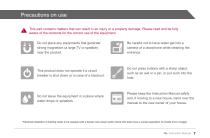
This part contains matters that can result in an injury or a property damage. Please read and be fully aware of the contents for the correct use of the equipment. Do not place any equipments that generate strong magnetism (a large TV or speaker) near the product. Be careful not to have water get into a camera of a doorphone while cleaning the entrance. This product does not operate if a circuit breaker is shut down or in case of a blackout. Do not press buttons with a sharp object, such as an awl or a pin, or put such into the hole. Do not leave the equipment in a place where water drops or splashes....
Open the catalog to page 7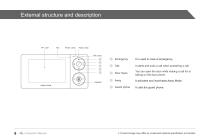
External structure and description Power Lamp Away Lamp Talk Lamp It is used in case of emergency. It starts and ends a call when answering a call. Door Open You can open the door while making a call for or talking on the door phone. It activates and inactivates Away Mode. Guard phone It calls the guard phone. Instruction Manual ※ Product image may differ by model and optional specification is included.
Open the catalog to page 8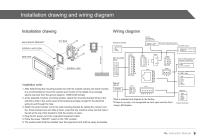
Installation drawing and wiring diagram Installation drawing Wiring diagram 75 ohm Terminating resistance SW WALL MOUNT BRACKET Unit Door Camera 1 direction: 75 ohm 2 direction: Open Setting of the last household only as 75 ohm when calling the lobby phone. 1. Contact signal - Normal Close 2. COMMON 3. Contact signal - Normal Open CN701 MAIN UNIT Installation order 1. fter determining the mounting location for both the outside camera and inside monitor, A It is recommended to mount the camera and monitor to the height of an average adult’s eye level from the ground.(Approx, 1499mm/59 inches)...
Open the catalog to page 9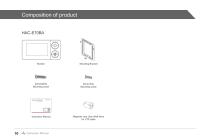
Mounting Bracket Instruction Manual Instruction Manual Magnetic core Use rolled twice for UTP cable
Open the catalog to page 10
Screen construction Calling option - Security option -
Open the catalog to page 11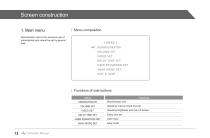
Administrator menu is for exclusive use of administrator and cannot be set by general user. [MENU ] nr ADMINISTRATOR VOLUME SET VIDEO SET DELAY TIME SET USER PASSWORD SET AWAY MODE SET EXIT & SAVE Menu Function ADMINISTRATOR Administrator only VOLUME SET Adjusting volume of bell and call VIDEO SET Adjusting brightness and color of screen DELAY TIME SET Delay time set USER PASSWORD SET User menu AWAY MODE SET Away mode
Open the catalog to page 12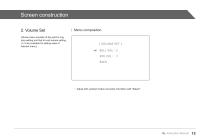
Screen construction2. Volume Set I Menu composition Volume menu consists of the part for ring tone setting and that for call volume setting. (1~3 are available for setting value of relevant menu) [ VOLUME SET ] «- BELL VOL : 2 SPKVOL : 2 BACK - Adjust with up/down button and enter into Menu with "Select".
Open the catalog to page 13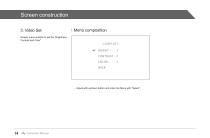
3. Video Set Display menu enables to set the "Brightness, Contrast and Color". Menu composition - Adjust with up/down button and enter into Menu with "Select".
Open the catalog to page 14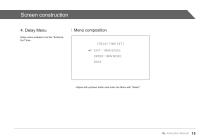
Screen construction4. Delay Menu I Menu composition Delay menu enables to set the "Entrance, Exit" time. [ DELAY TIME SET ] EXIT : 1 MIN 00SEC ENTER:1MIN00SEC BACK - Adjust with up/down button and enter into Menu with "Select".
Open the catalog to page 15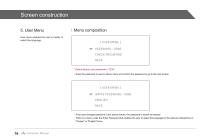
Screen construction 5. User Menu User menu enables the user to modify or select the language. Menu composition [ USER MENU ] PASSWORD : 0000 CHECK PASSWORD BACK *Default factory user password is "1234". - Enter the password of user in above menu and confirm the password to go to the next screen. [ USER MENU ] WRITE PASSWORD : 0000 ENGLISH BACK - If the user changes password in the above screen, the password is saved as entered. - here is a menu under the Enter Password that enables the user to select the language for the relevant videophone in T "Korean" or "English"menu. Instruction Manual
Open the catalog to page 16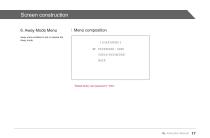
6. Away Mode Menu Away menu enables to set or release the Away mode. I Menu composition [USER MENU] «- PASSWORD : 0000 CHECK PASSWORD BACK *Default factory user password is "1234".
Open the catalog to page 17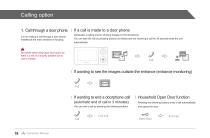
Calling option 1. Call through a door phone It is for making a call through a door phone installed at the main entrance of housing. Be careful while using Open Door option as there is a risk of a security problem due to user's mistake. If a call is made to a door phone G enerates a calling sound, showing images on the doorphone.. You can take the call by pressing buttons as follows and not receiving a call for 30 seconds ends the call automatically. If wanting to see the images outside the entrance (entrance monitoring) f wanting to end a doorphone call I (automatic end of call in 3 minutes)...
Open the catalog to page 18All Hyundai Telecom catalogs and technical brochures
 ADVANTAGE ALL IN ONE CAMERA
125 Pages
 HAS-R3071
28 Pages
 HAS-R1041
28 Pages
 Smart Home Camera
2 Pages
 Air-Tune
1 Page
 HYUNDAI TELECOM CCTV catalog
30 Pages
 Hyundai Telecom Catalog
16 Pages
 Hyundai Telecom reflet
2 Pages
 Smart security
30 Pages
- Door intercom
- Surface-mounted detector
- Security camera
- White detector
- Commercial detector
- Surface-mounted security camera
- Outdoor security camera
- Metal door intercom
- IP security camera
- Infrared detector
- Video intercom
- White door intercom
- Dome security camera
- Door intercom with screen
- Interior digital door viewer
- IP door intercom
- Indoor control module
- Access control digital door viewer
- Digital door viewer with camera
- Color security camera