
- Catalogs
- Honeywell Security
- MAXPRO® VIEWER


MAXPRO® VIEWER

MAXPRO® VIEWER
- Integration with Pro-Watch for superior access control.
- Logical site management and user privilege customization.
- Auto-discovery of cameras connected to various Honeywell recorders.
- Support for multiple monitors and simultaneous alarm video viewing.
- Intuitive video rendering engine for optimized CPU utilization.
- Event and timeline-based video search capabilities.
- Recommended: Intel Core®2 Extreme 3.00 GHz, 4 GB RAM, 100 GB hard disk, Direct X 9 compatible graphics adapter.
- Operating Systems: Windows XP Professional SP2, Windows 7 Pro, Server 2003, Server 2008 R2.
- Database: Microsoft SQL Express 2008.
Catalog excerpts

MAXPRO® VIEWER MULTI-SITE VIEW SOFTWARE MAXPRO® Viewer is Honeywell's latest addition to the MAXPRO family. MAXPRO Viewer is a freeware software application that allows multi-site viewing of Honeywell recorders including MAXPRO® NVR, Rapid Eye™, Fusion, HRXD/SD and HRDP series. These recorders may be grouped into sites and viewed simultaneously through salvos and on multiple monitors. This creates a single command point where video and events can be viewed from a single user interface through the range of Honeywell recorders. MAXPRO Viewer also provides integration of Honeywell recorders to the Pro-Watch® security management system. Access control events can trigger camera displays or saved salvo camera displays, resulting in a tightly-integrated video and access system. MAXPRO Viewer software is built on the powerful MAXPRO® VMS video management system platform. This further embodies Honeywell's "Learn One, Know Them All" commitment, provides an economical introduction to MAXPRO VMS and allows upgrading to MAXPRO VMS through simple license upgrades. Market Opportunities MAXPRO Viewer is ideal for facilities requiring monitoring of video from multiple Honeywell recorders through a single software interface. It is also ideal for applications that require integration to Pro-Watch, where access control and video are integrated seamlessly. It offers one command point with access control and video clients working together. • Feature-rich and user-friendly interface to view search and create clips from a single point • Integrates with Pro-Watch to enable superior access control with a wide range of video capabilities • Manage recorders into logical sites with partition management and customization of user privileges • Create and save salvos that can be shared with other users and controlled by access control events • Surrounding Cameras feature provides easier tracking of subjects between cameras for better efficiency of your video system • Auto-discovery of cameras connected to MAXPRO NVR, Rapid Eye, Fusion, HRXD/SD and HRDP • Supports multiple monitors on the same PC by allowing the application to be run multiple times on the same machine • Investigate events and alarms by simultaneously viewing alarm video at various stages. For every alarm, users can view the video captured during pre-alarm, on-alarm, post-alarm, and also view live video from the camera which triggered the alarm. Enriched video viewing experience through the intuitive video rendering engine that optimizes CPU utilization by altering the video frame rate Search and find video through event view or timeline. Preview search allows viewing a snapshot at various times to quickly narrow the scene of interest.
Open the catalog to page 1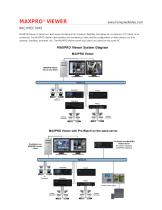
MAXPRO® VIEWER ARCHITECTURE MAXPRO Viewer is based on client-server architecture for maximum flexibility, and allows for a maximum of 5 clients to be connected. The MAXPRO Viewer client enables the monitoring of sites and the configuration of video devices such as cameras, monitors, recorders, etc. The MAXPRO Viewer server and client can coexist on the same PC. MAXPRO Viewer System Diagram MAXPRO Viewer MAXPRO Viewer Server and Client RapidEye HRXD Analog Cameras Analog Cameras MAXPRO Viewer with Pro-Watch® on the same server Pro-Watch and MAXPRO Viewer Server Pro-Watch database MAXPRO Database...
Open the catalog to page 2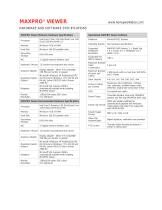
MAXPRO® VIEWER www.honeywellvideo.com Operational MAXPRO Viewer Software
Open the catalog to page 3
MAXPRO® VIEWER www.honeywellvideo.com MAXPRO Viewer - Part Numbers MAXPRO Viewer - Base Software and Licenses MAXPRO Viewer software for viewing multiple Honeywell recorders and integration to Pro-Watch®. Supports HNMVIEWER 5 clients and MAXPRO NVR, Rapid Eye, Fusion, HRXD/SD and HRDP. L/MAXPRVWRD/D November 2012 © 2012 Honeywell International Inc. Automation and Control Solutions Honeywell Security Products Americas 2700 Blankenbaker Pkwy, Suite 150 Louisville, KY 40299 1.800.323.4576 www.honeywell.com
Open the catalog to page 4All Honeywell Security catalogs and technical brochures
Archived catalogs
 V-PLEX MOTION SENSORS
4 Pages
 DF8M
DF8M2 Pages
 5800
58002 Pages
 H2W2GR1
2 Pages
 6160
61601 Page
 Datasheet HD4MWIH
4 Pages
 Datasheet HD4HDIH
4 Pages
 Datasheet HD44IP
4 Pages
 Datasheet HD45IP
4 Pages
 Datasheet HD4MDIP
4 Pages
 Datasheet HD3MDIH
4 Pages
 Datasheet HD3MWIH
4 Pages
 Data sheet HD3MDIP
4 Pages
 Datasheet HD4DIP
4 Pages
 Datasheet HD4MDIH
4 Pages
 ACUIX PTZs Brochure
8 Pages
 ACUIX IP PTZ Dome Datasheet
6 Pages
 IP Security Solutions Brochure
16 Pages
 MAXPRO® Cloud Data sheet
6 Pages
 Commercial Solutions Guide
260 Pages
 MAXPRO VMS
8 Pages
 Commercial Security
40 Pages
 IP Video Surveillance Systems
13 Pages
 HCL2G/HCW2G/HCW4G
4 Pages
 HBD8GR1
4 Pages
 HFD6GR1
4 Pages
 Honeywell Video Analytics
8 Pages
 SmartPIT™
4 Pages
 INTEGRATED DATA MANAGER
4 Pages
 HJC4000
4 Pages
 FUSION IV REV B
6 Pages
 ULTRAKEY LITE
4 Pages
 HVB16VDA3
2 Pages
 MEGAPIT™
2 Pages
 LOITERTRACE™
2 Pages
 5817CBXT
2 Pages
 5806W3
2 Pages
 MAXPRO® CMS
4 Pages
 H4W2GR1V_H4L2GR1V_H4W4GR1V
3 Pages
 CO8M
CO8M2 Pages
 Datasheet HCD554IP
4 Pages
 Datasheet HCD5HIH
4 Pages
 Datasheet HD55IP
4 Pages
 Datasheet HD54IP
4 Pages
 Datasheet HCD5MIH
4 Pages
 equIP Series Cameras
2 Pages
 Datasheet HCD5WIH
4 Pages
 Data sheet HD3HDIH
4 Pages
 TVC-2066
2 Pages
 HAT2100
1 Page
 TVC-2100ATM
1 Page
 MPT400N
2 Pages
 MPT400
2 Pages
 5232MP
2 Pages
 HAIDMEE / HAIDMPROE
2 Pages
 HTGPS Receiver
2 Pages
 HTC29 Series
2 Pages
 HTC70 Series
2 Pages
 HTCD52 Series
2 Pages
 FareView®
2 Pages
 HTR62
HTR622 Pages
 HTRD100 Series
2 Pages
 HTRD400 Series
2 Pages
 HJZTP / HJZTPX
2 Pages
 ULTRAKey
2 Pages
 HEGS5BLX
32 Pages
 VideoBloX Lite
4 Pages
 MAX1000
6 Pages
 MAXPRO-Net
2 Pages
 HNVE130A
2 Pages
 Digital Video Manager
4 Pages
 HRDE 4x4
4 Pages
 Rapid Eye™ Multi-Media DSP
6 Pages
 Rapid Eye Multi-Media LT
6 Pages
 Fusion Streamer
4 Pages
 HR30
HR302 Pages
 HMM17
HMM172 Pages
 HMC14
HMC142 Pages
 HMC10
HMC102 Pages
 HMM12
HMM122 Pages
 HMM9
HMM92 Pages
 HMC9
HMC92 Pages
 HMLCD19S
2 Pages
 HMLCD19e
2 Pages
 HMLCD17S
2 Pages
 HMLCD17e
2 Pages
 HXCT16
6 Pages
 HXCT9
HXCT96 Pages
 HXCT4
HXCT46 Pages
 HXMT16
6 Pages
 HXMT9
HXMT96 Pages
 HXMT4
HXMT46 Pages
 HDSP1
HDSP12 Pages
 HCSP1
HCSP12 Pages
 HPTV24WP Series
4 Pages
 HPTV24UL Series
4 Pages
 HPTV24 Series
4 Pages
 HPTV09
2 Pages
 KZ1624AW
3 Pages
 KZ0824AW
3 Pages
 KZ0424AW
3 Pages
 RapidDome Gold - Outdoor
4 Pages
 RapidDome Gold - Indoor
4 Pages
 HD6 Mounts and Adapters
4 Pages
 HD8EXGCM18W
2 Pages
 ACUIX™ PTZ Dome
6 Pages
 HD6 Series
4 Pages
 V25 ArmorDome
2 Pages
 PrimaView® HD16
4 Pages
 PrimaView® Series
4 Pages
 MagnaView® Series
4 Pages
 Modular Camera System
4 Pages
 HD4VC4HR
2 Pages
 Quick Change Lenses
1 Page
 HD14 Series
2 Pages
 HD28
HD282 Pages
 KD5 Series
2 Pages
 HD2FM1
2 Pages
 HD2FC1
2 Pages
 HD3VM4A
2 Pages
 HD3VC4A
2 Pages
 HD3VC4HR
2 Pages
 HD3VC4SHR / HD3VC4SA
2 Pages
 The Puck
2 Pages
 LumaView SWX200
2 Pages
 LumaView SWX75
2 Pages
 SnapPak
2 Pages
 HBC5 Series
2 Pages
 HHM Series Housing Mounts
2 Pages
 HHC12 Series Housings
2 Pages
 ExitView
2 Pages
 V100
V1002 Pages
 V60N
V60N2 Pages
 V60A
V60A2 Pages
 V60 Complete
2 Pages
 V50 WedgeView
2 Pages
 Duracam VK74W
2 Pages
 MID Quad
4 Pages
 MID Pinhole
4 Pages
 Duracam VK74C
2 Pages
 Duracam VK74A
2 Pages
 MID MiniCam
8 Pages
 HCBWD Series
2 Pages
 HCD82 Series
2 Pages
 HCD80 Series
2 Pages
 HCC80 Series
2 Pages
 HCD81 Series
2 Pages
 HCC474M
2 Pages
 HCCM474M
2 Pages
 HCM574L
2 Pages
 HCD484L
2 Pages
 HCC484L
2 Pages
 HCC334L
2 Pages
 HCC484TP
2 Pages
 HCU484
2 Pages
 HD3VC4HR
2 Pages
 camera HCC484TP HCC484TPX
196 Pages
 Camera HCC484TP HCC484TPX
28 Pages


- Light fixture
- Industrial LED light
- Metal light fixture
- Commercial light fixture
- Contemporary light fixture
- Dimmable light fixture
- Linear light fixture
- White light fixture
- Hanging light fixture
- Surface-mounted light fixture
- Plastic light fixture
- Industrial lock
- Single light fixture
- Mechanical lock
- Industrial light switch
- 1 point lock
- Commercial lock
- Contemporary switch
- Recessed switch
- Door lock