

impression FR1

impression FR1
- Pan and Tilt: Channels 1-4 control the pan and tilt movements with coarse and fine adjustments, allowing for precise positioning in 1.2° increments.
- Color Control: Channel 5 offers a virtual color wheel with presets ranging from red to pink, including white and rainbow effects. Channels 6-9 provide RGBW color mixing capabilities.
- Shutter/Strobe: Channel 10 manages shutter effects, including various strobe patterns and speeds.
- Dimmer: Channels 11 and 12 control the intensity of the light output, with coarse and fine adjustments.
- CTC (Color Temperature Correction): Channel 13 adjusts the color temperature from 2500 K to 10,000 K.
- Settings: Channel 14 includes various settings such as dimmer curves, display options, DMX behavior, fan control, and PWM frequency adjustments.
- Zoom and Pan Rotation: Channels 15 and 16 control the zoom and endless pan rotation, respectively.
- Percentage values are derived by dividing DMX values by 2.56 and rounding to the nearest 0.1%.
- To apply commands on Channel 14, start at zero, move to the desired value, and hold for at least 3 seconds. For PWM frequency adjustments, hold for at least 5 seconds.
Catalog excerpts

Covers firmware version 012_09_08
Open the catalog to page 1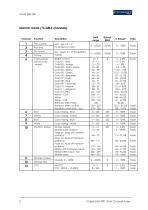
Channel Function Description
Open the catalog to page 2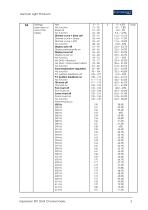
14 Settings (see notes at end of this table) Idle No function Reset all No function Dimmer curve = Extra soft Dimmer curve = Linear Dimmer curve = Soft No function Display auto-off Display permanently on Display invert off Display invert on No function No DMX = Blackout No DMX = Hold current effect impression FR1 DMX Channel Index
Open the catalog to page 3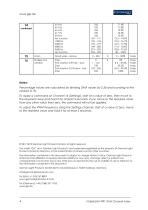
Notes: Percentage values are calculated by dividing DMX values by 2.56 and rounding to the nearest 0.1 %. To apply a command on Channel 14 (Settings), start at a value of zero, then move to the required value and hold it for at least 3 seconds. If you move to the required value from any other value than zero, the command will not be applied. To adjust the PWM frequency using the Settings channel, start at a value of zero, move to the required value and hold it for at least 5 seconds. © 2017-2018 German Light Products GmbH. All rights reserved. The marks ‘GLP' and ‘German Light Products' are trademarks...
Open the catalog to page 4All GLP catalogs and technical brochures
 impression X4 BAR 20
22 Pages
 Hallenleuchte
2 Pages
 Lucidus 2014 - A01
2 Pages
 STAGE EFFECTS
20 Pages
 Solaris+
4 Pages
 Phantom 30 SMD
4 Pages
 impression S350
9 Pages
 JDC1
JDC126 Pages
 GT-1
GT-130 Pages
 Impression Spot One
34 Pages
 Impression X4 Bar
30 Pages
 Impression X1
8 Pages
Archived catalogs
 Impression Spot One DMX V1.4
9 Pages
 Let There Be Light
68 Pages

- Light fixture
- Industrial LED light
- Metal light fixture
- Commercial light fixture
- Contemporary light fixture
- Recessed light fixture
- Dimmable light fixture
- Linear light fixture
- White light fixture
- Hanging light fixture
- Surface-mounted light fixture
- Aluminum light fixture
- Outdoor light fixture
- Round light fixture
- Single light fixture
- Black light fixture
- LED floodlight
- Outdoor projector
- Commercial floodlight
- Glass light fixture