
- Catalogs
- Frigidaire
- All about the Use & Care of your Built-In Range

All about the Use & Care of your Built-In Range

All about the Use & Care of your Built-In Range
Congratulations on purchasing an Electrolux appliance. It's important to read and save the manual for future reference, register the product, and locate the serial plate.
This section provides critical safety instructions, including compliance with FCC rules, cautions for pacemaker users, and general safety measures like proper installation and not modifying the appliance. Specific warnings cover risks like tipping, flammable materials, and using the appliance as a space heater. Safety instructions for the cooktop and oven include proper utensil use, handling hot surfaces, and precautions during power failures.
An overview of the appliance's features is provided, including electronic oven control, keep warm zone, self-cleaning oven, and induction and radiant elements.
Instructions for setting radiant and induction surface controls, warm zone controls, and oven controls, including various cooking modes and temperature settings, are detailed.
A cleaning chart and instructions emphasize regular cleaning to prevent grease buildup and fire hazards.
This section likely includes troubleshooting tips for common appliance issues.
Details on the warranty coverage and limitations are provided.
- Avoid using oven cleaners or protective coatings.
- Remove oven racks during self-cleaning.
- Relocate birds during self-cleaning cycles.
- Warnings about substances that may cause cancer or reproductive harm.
- Cooler cooktop surface and magnetic pan recognition for efficient energy use.
- Radiant elements cycle to maintain temperature; use flat-bottom cookware.
- Induction elements require magnetic cookware.
- Use flat-bottom cookware of appropriate size; test induction cookware with a magnet.
- Power Boost for rapid heating, High for boiling, Medium for simmering, Low for keeping warm.
- Hot Element message indicates a hot surface; avoid touching until cool.
- Error message "Er" appears if control knobs are left on during power-up.
- Use correctly sized cookware to avoid overheating.
- Suitable for rectangular or oval cookware; can be used for simultaneous cooking and warming.
- Equipped with Power Boost for rapid heating; power sharing reduces power to one zone when both are used.
- Maintains serving temperature; use oven-safe cookware.
- Multiple rack positions for different cooking needs; specific recommendations for various foods.
Designed for easier access to food items; remove racks before self-cleaning to prevent damage.
- Includes Delay Start, Bake Time, Set Clock, Timer On-Off, My Favorite, Oven Light, Lockout, and various cooking modes.
Allows a range of settings for various cooking modes; temperature display can be set to Fahrenheit or Celsius.
- Continuous Bake, Silent Control Operation, Minute Timer, Lockout Feature, PowerPlus™ Preheat.
Program baking temperatures from 170°F to 550°F; POWERPLUSTM PREHEAT for rapid preheating.
Uses elements and a fan for even heat distribution; allows multiple rack baking and faster cooking.
Automatically adjusts standard recipes for convection baking.
Suitable for thicker cuts of meat; uses broil element and fan for even heat distribution.
Allows cooking for a specified duration and automatic shut-off; Delay Start programs start and stop times.
Maintains food temperature for up to 3 hours after cooking.
Presets for optimal cooking of pizzas and chicken nuggets.
Suitable for meats, fish, and poultry; preheat recommended.
Allows the oven to remain on during the Sabbath without display changes or tones.
Turns on automatically when the door is opened or can be toggled manually.
Allows temperature adjustments if cooking is too hot or too cool.
Operates at high temperatures to eliminate soils; precautions include removing racks and cleaning excessive spillovers.
Maintains food at serving temperature; not for heating cold food.
- Use appropriate cleaners for different surfaces; avoid harsh cleaners on the oven door.
Use non-abrasive cloths and cleaning cream; avoid cleaning a hot cooktop.
Instructions for safe removal and replacement of the oven door.
Avoid using aluminum foil on the cooktop; be cautious with aluminum utensils.
Follow specific instructions to maintain appearance.
Ensure the oven is cool and unplugged before replacing the light bulb.
Instructions for safe removal and replacement of the drawer.
Tips for optimal baking results and solutions to common issues.
Ensure the range is level and check power connections for operational issues.
- Regular cleaning and maintenance are necessary to prevent issues.
- Coverage for defects in materials or workmanship for one year; exclusions apply.
Catalog excerpts
uilt-In Range Setting Keep Warm Drawer Control (If equipped) ..35
Open the catalog to page 1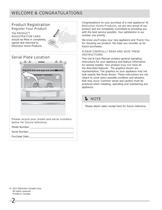
WELCOME & CONGRATULATIONS Congratulations on your purchase of a new appliance! At Electrolux Home Products, we are very proud of our product and are completely committed to providing you with the best service possible. Your satisfaction is our number one priority. Product Registration Register Your Product The PRODUCT REGISTRATION CARD should be lled in completely, signed and returned to Electrolux Home Products. We know you’ll enjoy your new appliance and Thank You for choosing our product. We hope you consider us for future purchases. Serial Plate Location delay start bake time 1 2 4 5 3 keep...
Open the catalog to page 2
IMPORTANT SAFETY INSTRUCTIONS Read all instructions before using this appliance. Save these instructions for future reference. DEFINITIONS This is the safety alert symbol. It is used to alert you to potential personal injury hazards. Obey all safety messages that follow this symbol to avoid possible injury or death. WARNING This symbol will help alert you to situations that may cause serious bodily harm, death or property damage. CAUTION This symbol will help alert you to situations that may cause bodily injury or property damage. IMPORTANT IMPORTANT indicates installation, operation or maintenance...
Open the catalog to page 3
IMPORTANT SAFETY INSTRUCTIONS WARNING Stepping, leaning, sitting or pulling down on the door or the drawer of this appliance can result in serious injuries and also cause damage to the appliance. Do not allow children to climb or play around the appliance. The weight of a child on an open door may cause the appliance to tip, resulting in serious burns or other injury. An open drawer when hot may cause burns. WARNING Do not use the oven or warm & serve drawer (if equipped) for storage. • Storage in or on Appliance. Flammable materials should not be stored in an oven, near surface burners or in...
Open the catalog to page 4
IMPORTANT SAFETY INSTRUCTIONS cover placed on the food. Any other used of protective liners or aluminum foil may result in a risk of electric shock or re or a short circuit. • Glazed Cooking Utensils—Only certain types of glass, glass/ceramic, ceramic, earthenware, or other glazed utensils are suitable for cooktop service without breaking due to the sudden change in temperature. Check the manufacturer’s recommendations for cooktop use. • Ventilating hood. The ventilating hood above your cooking surface should be cleaned frequently, so the grease from cooking vapors does not accumulate on the...
Open the catalog to page 5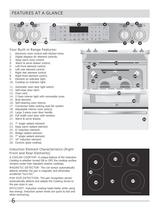
FEATURES AT A GLANCE 2 2 3 keep warm zone bake time 1 2 3 4 5 6 hi set clock bake broil convect preheat keep warm chicken pizza nuggets self clean convect convert add a min powerplus low 5 9 my favorite on·off 6 2 keep warm drawer hi med 2 4 1 delay start 7 8 start 0 med low 9 cancel on·off 10 Your Built-in Range Features: 1. 2. 3. 4. 5. 6. 7. 8. 9. 10. Electronic oven control with kitchen timer. Digital displays for element controls. Keep warm zone control. Warm & serve drawer control. Left front element control. Left rear element control. Right rear element control. Right front element control....
Open the catalog to page 6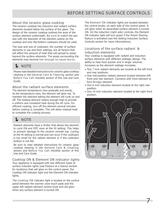
BEFORE SETTING SURFACE CONTROLS About the ceramic glass cooktop The ceramic cooktop has inductors and radiant surface elements located below the surface of the glass. The design of the ceramic cooktop outlines the area of the surface element underneath. Be sure to match the pan size with the diameter of the element outline on the cooktop and only at-bottom cookware should be used. The type and size of cookware, the number of surface elements in use and their settings, are all factors that will affect the amount of heat that will spread to areas beyond the surface elements. The areas surrounding...
Open the catalog to page 7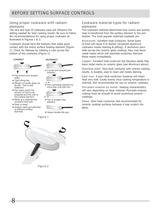
The size and type of cookware used will influence the setting needed for best cooking results. Be sure to follow the recommendations for using proper cookware as Cookware should have flat bottoms that make good contact with the entire surface heating element (Figure 1). Check for flatness by rotating a ruler across the bottom of the cookware (Figure 2). • Flat bottom and straight • Tight fitting lids. • Weight of handle does not • Made of a material that conducts heat well. • Always match pot diameter more than one-half inch. • Heavy handle tilts pan. The cookware material determines how evenly...
Open the catalog to page 8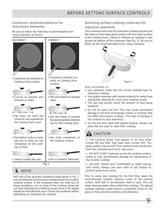
Be sure to follow the following recommendations for using cookware as shown: Cooking Zone surface. H-Min. size-H minimum size required for the Cooking Zone used. Pan bottom rests on cook- top trim or does not rest Heavy handle tilts pan. rectly on Cooking Zone Flat pan bottom & straight H—Min. size—H • Pan size meets or exceeds size for the Cooking Zone. ANY one of the incorrect conditions listed above in Fig. 1 may be detected by the sensors located below the ceramic cooktop surface. If the cookware does not meet any of these conditions, one or more of the Cooking Zones will not heat indicated...
Open the catalog to page 9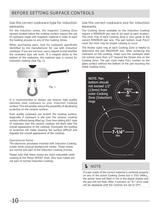
For the induction zones, the magnetic Cooking Zone sensors located below the cooktop surface require the use of cookware made with magnetic material in order to start the heating process on any of the Cooking Zones. When purchasing pans, look for cookware specifically identified by the manufacturer for use with Induction cooktops. If you are not sure, use a magnet to test whether the cookware type will work. If a magnet sticks to the bottom of the cookware, the material type is correct for It is recommended to always use heavier high quality stainless steel cookware on your Induction Cooktop...
Open the catalog to page 10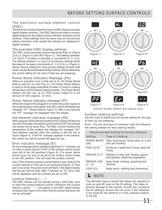
BEFORE SETTING SURFACE CONTROLS The electronic surface element control (ESEC) The Electronic Surface Element Control (ESEC) feature includes digital display windows. The ESEC feature provides a numeric digital setting for the radiant surface element positions on the cooktop. These settings work the same way as normal knob setting indicators work except the settings are displayed in digital windows. Fig. 2 The available ESEC display settings The ESEC control provides various heat levels from Hi (Figure 2) to Lo (Figure 5) and OFF (Figure 1). The settings between 3.0 and 9.5 increase or decrease...
Open the catalog to page 11All Frigidaire catalogs and technical brochures



- Electric oven
- Extractor hood
- Range hood with built-in lighting
- Industrial range cooker
- Hob with front controls
- Built-in hob
- Industrial dishwasher
- Built-in oven
- Gas range cooker
- Industrial refrigerator
- Electric range cooker
- Ducted range hood
- Standalone refrigerator
- Cooktop with touch controls
- Industrial freezer
- Refrigerator-freezer
- Front-loading dishwasher