


- Company
- Products
- Catalogs
- News & Trends
- Exhibitions
STEKGD2DL1L01_EN
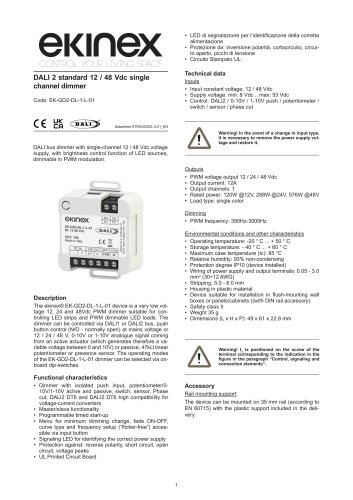
STEKGD2DL1L01_EN
- Input Voltage: 12/48 Vdc
- Supply Voltage: 8 Vdc to 53 Vdc
- Output Current: 12A
- Rated Power: 120W @12V, 288W @24V, 576W @48V
- PWM Frequency: 390Hz-3000Hz
- Operating Temperature: -20°C to +50°C
- Protection Degree: IP10
- Isolated push input and compatibility with various control signals
- Master/slave functionality
- Programmable timed start-up and dimming settings
- Signaling LED for power supply identification
- Protection against reverse polarity, short circuit, open circuit, and voltage peaks
- Mountable on 35 mm rail (EN 60715)
- Setup involves setting dip-switches for desired mode and PWM frequency
- Connection of LEDs and power supply to specified terminals
- Ensure proper ventilation and separation of high and low voltage circuits
- Screw terminal for power supply and output connections
- Signaling LED and DALI2/PUSH input terminal
- Dip-switches for installation type and PWM frequency settings
- Installation must be performed with power off and by qualified personnel
- Ensure correct cable insertion to avoid overheating or malfunctions
- Use shielded and twisted cables for connections
- PUSH mode: Allows control via mains voltage or power supply voltage
- DALI DT6 mode: Offers high compatibility for voltage-current converters and full DALI 2 standard compatibility
- Configuration menu accessible via control button
- Parameters include minimum brightness level, Fade ON/OFF times, and dimming curve
- Reset to factory settings available
- DALI Mode: Configure the dimmer in DALI mode to manage short and open circuit flags. The default power-on level is set to 255.
- Phase Cutting Modes: For two-pole and one-pole phase cutting, set the dip-switches and connect the appropriate terminals. The system supports leading and trailing edge phase cuts.
- 0-10V/1-10V Mode: Connect the control signal to the specified terminals. The dimming curve is linear, and the system defaults to maximum output if the signal is disconnected.
- Potentiometer Mode: Connect a 47kW linear potentiometer for control. The system defaults to maximum brightness if disconnected.
- Dimming on Power Cut: Use a switch to control dimming. The system saves the brightness level automatically.
- Timed Switch-off Mode: Set the dip-switches for timed control using a button or sensor. The system supports various timing intervals.
- Slave Mode: Configure the dimmer to receive synchronization signals from another dimmer.
- Ensure resistors used as dummy loads are placed away from dimmers to prevent overheating.
- Phase-cut dimmers must handle a minimum current of 2mA to avoid flickering.
- Use good quality potentiometers to prevent output instability.
Catalog excerpts
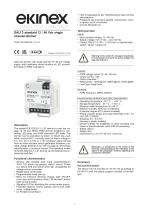
• LED di segnalazione per l'identificazione della corretta alimentazione • Protezione da: inversione polarita, cortocircuito, circui-to aperto, picchi di tensione Technical data Inputs • Input constant voltage: 12 / 48 Vdc • Control: DALI2 / 0-10V / 1-10V push / potentiometer / switch / sensor / phase cut DALI bus dimmer with single-channel 12 / 48 Vdc voltage supply, with brightness control function of LED sources, dimmable in PWM modulation. A Warning! In the event of a change in input type, it is necessary to remove the power supply voltage and restore it. The ekinex® EK-GD2-DL-1-L-01 device is a very low voltage 12, 24 and 48Vdc PWM dimmer suitable for controlling Led strips and PWM dimmable LED loads. The dimmer can be controlled via DALI1 or DALI2 bus, push button control (N/O - normally open) at mains voltage or 12 / 24 / 48 V, 0-10V or 1-10V analogue signal coming from an active actuator (which generates therefore a variable voltage between 0 and 10V) or passive, 47kW linear potentiometer or presence sensor. The operating modes of the EK-GD2-DL-1-L-01 dimmer can be selected via onboard dip-switches. • Load type: single color Environmental conditions and other characteristics • Maximum case temperature (tc): 85 °C • Relative humidity: 93% non-condensing • Protection degree IP10 (device installed) • Wiring of power supply and output terminals: 0.05 - 3.0 mm2 (30-12 AWG) • Housing in plastic material • Device suitable for installation in flush-mounting wall boxes or panels/cabinets ((with DIN rail accessory) !Warning! tc is positioned on the screw of the terminal corresponding to the indication in the figure in the paragraph “Control, signaling and connection elements”. Functional characteristics • Dimmer with isolated push input, potentiometer/010V/1-10V active and passive, switch, sensor, Phase cut, DALI2 DT6 and DALI2 dT6 high compatibility for voltage-current converters • Master/slave functionality • Programmable timed start-up • Menu for minimum dimming change, fade ON-OFF, curve type and frequency setup (“flicker-free”) accessible via input button • Signaling LED for identifying the correct power supply • Protection against: reverse polarity, short circuit, open circuit, voltage peaks • UL Printed Circuit Board Accessory Rail mounting support The device can be mounted on 35 mm rail (according to EN 60715) with the plastic support included in the delivery.
Open the catalog to page 1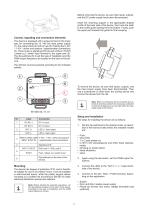
Before removing the device, be sure that inputs, outputs, and the DC power supply have been disconnected. Insert the mounting support in the appropriate shaped profile of the back side of the device, then hook the teeth to the profile guide starting from the bottom. Finally, push the upper part towards the guide for final coupling. Control, signaling and connection elements The device is equipped with a screw terminal in the lower part, for connecting the 12 / 48 Vdc input power supply (1), the output loads (2) and an input for making the 0-10V / 1-10V / active and passive / potentiometer connections...
Open the catalog to page 2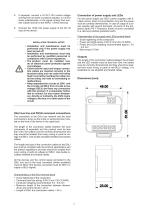
5. If expected, connect a 0-10V/1-10V control voltage coming from an active or passive actuator, or a 47kW linear potentiometer, or the signal coming from another master dimmer to the INPUT / SYNC terminal 6. Connect the 12/48 Vdc power supply to the DC IN input of the device. INSTALLATION TECHNICAL NOTES • Installation and maintenance must be performed only if the power supply has been turned off. • Installation and maintenance must only be performed by qualified personnel in compliance with current regulations. • The product must be installed inside an electrical panel protected against overvoltages....
Open the catalog to page 3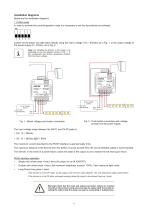
Installation diagrams Below are the installation diagrams. 1. PUSH mode In order to activate this control/operation mode it is necessary to set the dip-switches as indicated. ON Control via the button can take place directly using the mains voltage (110 ÷ 230Vac) as in Fig. 1, or the output voltage of the power supply (8 ÷ 53Vdc), as in Fig. 2. Note. For installing the dimmer in the system, it is 1 5 4 5 2 use 3 the preferable to diagram shown in Fig. 1. In ON this configuration the dimmer guarantees isolation from the mains voltage. L AC-DC POWER SUPPLY IN LINE IN NEUTRAL AC-DC POWER SUPPLY...
Open the catalog to page 4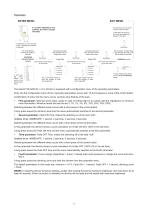
ENTER MENU EXIT MENU N° 15 SHORT PRESSES OF THE CONTROL BUTTON TO ACCESS THE MENU the dimming curve is saved and the menu is exited confirmation of exit from the menu is signaled by 3 flashes of the load long press Confirmation of entry into the menu is signaled by 3 flashes of the load The animation corresponding to the selected dimming curve will be visible on the load the set brightness level will be visible on the load a corresponding fade ON animation will be visible on the load a corresponding fade OFF animation will be visible on the load long press save minimum level and to next menu...
Open the catalog to page 5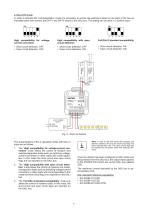
In order to activate this control/operation mode it is necessary to set the dip-switches located on the back of the box as indicated below and connect the DA P1 and DA P2 inputs to the DALI bus. The setting can be done in 3 distinct ways: High compatibility for voltage-current converters. • Short circuit detection: OFF • Short circuit detection: OFF • Open circuit detection: ON Full DALI 2 standard compatibility • Short circuit detection: ON • Open circuit detection: ON The characteristics of the 3 operating modes with DALI 2 1. The “High compatibility for voltage-current converters” mode allows...
Open the catalog to page 6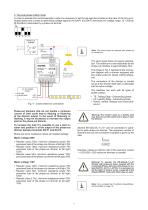
3. Two-pole phase cutting mode In order to activate this control/operation mode it is necessary to set the dip-switches located on the back of the box as indicated below and connect an alternating voltage signal to the DA P1 and DA P2 terminals (AC voltage range: 12 ÷ 265Vac @1 50÷65Hz) dimmer. 1 4 interrupted 5 4 5 2 3 2 by3a phase-cut PHASE-CUT DIMMER Leading Edge Trailing Edge Note. The control input can operate with phase cut or neutral cut. The input signal does not require polarization. The maximum current absorbed by the phase-cut interface is approximately 2mA. 2 The image in Fig. 4 represents...
Open the catalog to page 7All Ekinex® catalogs and technical brochures
 STEKBU1485TCP_EN
5 Pages
 R series
6 Pages
 Q series
12 Pages
 Folder Hospitality
2 Pages
 Folder One Brand Solution
2 Pages
 Hospitality Solution
38 Pages
 10 Reasons
13 Pages
 ERA by Michael Vincent UY
17 Pages
 Who We Are Tech
51 Pages
 ERA
ERA17 Pages
 Technical Catalogue 2025
247 Pages
 Smart Interiors
77 Pages
 Who We Are
27 Pages
Archived catalogs
 Invisible Player
36 Pages
 Proxima
35 Pages
 Dico
Dico32 Pages
 Revélo
35 Pages
 Sentio
44 Pages
 Signum
25 Pages
 20VENTI
28 Pages
 Delégo
43 Pages
 Who We Are Tech
33 Pages
- Interior speaker
- Home speaker
- Ekinex contemporary switch
- Recessed switch
- Industrial socket
- Ekinex square switch
- Contemporary socket
- Industrial plug socket
- Door intercom
- Ekinex metal switch
- Industrial thermostat
- Ekinex push-button switch
- Wall-mounted socket
- Recessed socket
- Multiple socket
- White thermostat
- Ekinex white switch
- Programmable thermostat
- Black socket