
- Catalogs
- Dassault Systèmes SolidWorks Corp
- SOLIDWORKS ENTERPRISE PDM

SOLIDWORKS ENTERPRISE PDM

SOLIDWORKS ENTERPRISE PDM
SolidWorks Enterprise PDM (EPDM) is a data management solution designed to enhance collaboration and innovation within product development teams. It integrates seamlessly with SolidWorks applications, providing a centralized system for managing design data across various stages of product development.
- Data Management: Centralized storage for engineering data with secure, indexed repositories for fast retrieval and version control to prevent data loss.
- Workflow Automation: Integrated workflows automate design and approval processes, improving efficiency in reviewing and releasing final designs.
- Scalability: EPDM can be implemented quickly and scaled from small workgroups to large teams across multiple locations.
- Search and Access: Advanced search capabilities allow users to find data using various parameters, with secure login to protect data from unauthorized access.
- Customization: The system can be tailored to specific business needs through a comprehensive API, allowing for custom applications and configurations.
- EPDM can be deployed rapidly, with the Quick Start Program enabling setup within five days.
- The system integrates with Windows Explorer, providing a familiar interface that reduces the learning curve and enhances productivity.
- Customizable menus and personal preferences further streamline user experience.
- EPDM supports global collaboration by providing quick access to designs and documentation through Vault replication and remote-access portals.
- Automated tracking of approvals and sign-offs ensures compliance with internal and external reporting requirements.
- CAD Editor: Requires Windows 7 or 8, 2 GB RAM, 5 GB disk space, and a certified video board.
- Contributor PDM: Requires Windows 7 or 8, 1 GB RAM, 2 GB disk space, and a certified video board.
- Servers: Archive and Database Servers require Windows Server 2008 or higher, with specific RAM and disk space requirements.
SolidWorks EPDM is a robust solution for managing product data, enhancing collaboration, and streamlining workflows. Its integration with SolidWorks and customizable features make it a valuable tool for organizations looking to improve their design processes and product development efficiency.
Catalog excerpts

TAKE CONTROL OF YOUR DATA TO ENHANCE COLLABORATION AND INNOVATION ACCELERATE DESIGN SolidWorks® Enterprise PDM manages and synchronizes design data across your product development team with a single, easily deployable solution tightly integrated with SolidWorks applications. You extend the reach of your 3DEXPERIENCE environment—locally or remotely, from engineering through manufacturing— to share information, collaborate on designs, and automatically protect design data with integrated tracking and version control. SolidWorks EPDM takes care of your data SolidWorks Enterprise Product Data Management (EPDM) centralizes the storage of all your engineering data and related files to give you these benefits: • Secure, indexed repository for fast information retrieval • Version control for both minor changes and major revisions to prevent data loss • Integrated workflows that automate your design and approval process for more efficient review and release of final designs With SolidWorks EPDM, you can dramatically reduce the time you spend searching for parts, assemblies, and drawings. Part of the SolidWorks product development solution covering design, simulation, sustainable design, technical communication, and data management, SolidWorks EPDM will help you drive design reuse and manage your overall 3DEXPERIENCE product development environment. Implemented in a fraction of the time required by other data management solutions, SolidWorks EPDM can scale from small workgroups to hundreds of designers located in offices anywhere in the world.
Open the catalog to page 1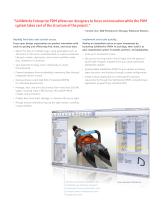
“SolidWorks Enterprise PDM allows our designers to focus on innovation while the PDM system takes care of the structure of the project.” — Vincent Clerc, R&D Mechatronics Manager, Aldebaran Robotics Rapidly find data and control access Implement and scale quickly Focus your design organization on product innovation with tools to quickly and efficiently find, share, and reuse data. Realize an immediate return on your investment by launching SolidWorks EPDM in just days, then scale it as your organization grows in people, partners, and geography. • Search for data in multiple ways, using parameters...
Open the catalog to page 2
The integrated Windows Explorer search tool makes it easy to quickly find information and take action. Full integration of SolidWorks EPDM with Windows Explorer provides a familiar environment and unparalleled ease of use. The short learning curve also leads to higher productivity and a faster return on investment. Collaborate without boundaries Immediately get up to speed through a fully integrated bundle that includes database software, CAD connectors, replicated servers, and an API for customization. Product development organizations can span continents and time zones. • Engage new users quickly...
Open the catalog to page 3
SYSTEM REQUIREMENTS SolidWorks Enterprise PDM CAD Editor • Windows 7 (32- or 64-bit) or Windows 8 (64-bit only) • 2 GB RAM (minimum) • 5 GB disk space free (minimum) • Video board (certified recommended) FPO • Intel® or AMD® processor • DVD or broadband Internet connection • Internet Explorer 8 or later SolidWorks Contributor PDM • Windows 7 or 8 (32- or 64-bit) • 1 GB RAM (minimum) • 2 GB disk space free (minimum) • Video board (certified) SOLIDWORKS PRODUCT DEVELOPMENT SOLUTION SolidWorks software creates an intuitive 3DEXPERIENCE development environment that maximizes the productivity of your...
Open the catalog to page 4All Dassault Systèmes SolidWorks Corp catalogs and technical brochures
 Electrical Design
4 Pages
 CIRCUITWORKS
4 Pages
 SOLIDWORKS FLOW SIMULATION
4 Pages
 SOLIDWORKS SIMULATION
6 Pages
 SOLIDWORKS PREMIUM
8 Pages
 SolidWorks EPDM
4 Pages
 SolidWorks Composer
4 Pages
 SolidWorks Plastics_2014
4 Pages
 SOLIDWORKS ELECTRICAL
4 Pages
 SOLIDWORKS SIMULATION 2013
6 Pages
 SW 2014 Datasheet Premium
8 Pages
 SolidWorks Electrical 2013
4 Pages
 SolidWorks Premium 2013
8 Pages
 white paper
14 Pages
 SOLIDWORKS SIMULATION 2012
6 Pages
Archived catalogs
 SOLIDWORKS PLASTICS
4 Pages

- SolidWorks design software
- SolidWorks 3D software
- Industrial management software
- Analysis software
- SolidWorks concrete structure software
- 2D software
- Industrial calculation software
- Architecture software
- Building automation system software
- Drawing software
- Data management software
- Electrical installation software
- Simulation software
- Project simulation software
- Sustainable design software
- Energy analysis software
- Tutorial software