
- Catalogs
- ALBRECHT JUNG GMBH & CO. KG
- Smart Panel 8

- Company
- Products
- Catalogs
- News & Trends
- Exhibitions
Smart Panel 8
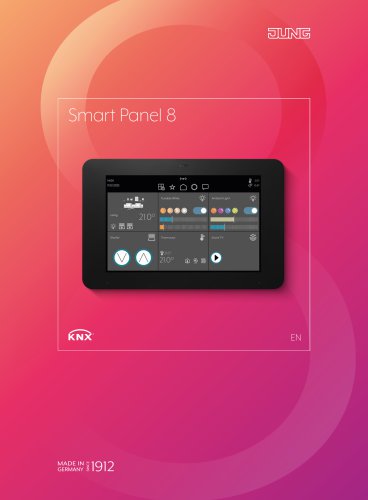
Smart Panel 8
The JUNG KNX Smart Panel 8 is a touch display solution for visualizing and operating KNX systems without the need for an additional server. It can be centrally mounted on a wall or accessed via a smartphone or tablet using the JUNG Smart Vision app, which is available for download in app stores. The system offers remote access through the myJUNG Cloud.
User Interface
The Smart Vision app provides a graphical user interface for operating KNX devices. It features both light and dark layouts and supports portrait and landscape orientations. The main menu displays rooms in a grid format, allowing users to navigate and control various functions such as lighting, heating, and blinds.
Functionality
The Smart Panel 8 supports up to 300 elements or rooms, offering intuitive control over lighting, temperature, shading, and more. It includes sensors for proximity and brightness, and can send notifications via email or push messages. Automated sequences and time schedules can be configured for various functions.
Technical Specifications
The device runs on an Android operating system with a Cortex-A53 processor, 2 GB RAM, and 16 GB flash storage. It features an 8.0-inch HD display with WXGA resolution, and supports KNX, LAN/Ethernet, and USB interfaces. The panel is designed for easy installation and retrofitting, compatible with standard device housings.
Applications
The Smart Panel 8 is suitable for both residential and commercial spaces, offering energy-saving automation and enhanced comfort. It can control lighting, climate, and security systems, and is compatible with KNX Secure for enhanced security.
Installation and Integration
Installation is simplified with an adapter for retrofitting existing systems. The device is programmed using the ETS software, allowing for easy integration of KNX communication objects and group addresses.
KNX Standard
KNX is a global standard for building automation, ensuring compatibility and security across products from different manufacturers. JUNG has been a pioneer in this field, contributing to the development of the KNX standard.
Contact Information
For more information, contact Albrecht JUNG GmbH & Co. KG in Germany or visit their website for international sales contacts.
Catalog excerpts
MADE IN ulQl'-) GERMANY I I Zs I Z.
Open the catalog to page 1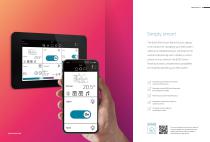
Simply smart The JUNG KNX Smart Panel 8 touch display is the solution for visualising your KNX system – without an additional server. Centrally on the wall and decentrally with a tablet or smartphone in your network: the JUNG Smart Panel 8 provides comprehensive possibilities, for intuitively operating your KNX system. Graphical user interface Smart Vision to o perate KNX devices. Operation via the JUNG Smart Vision app for smartphone or tablet. Remote access via the myJUNG Cloud. Standalone-solution that needs no additional server. Complete and cost-efficient visualisation of KNX. The user interface...
Open the catalog to page 2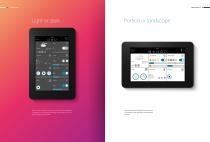
Light or dark Portrait or landscape QOP 4- 22 y Smart Vision has both a light and a dark layout integrated Completely to your taste and fitting to the interior, you can alter the layout at any time.
Open the catalog to page 3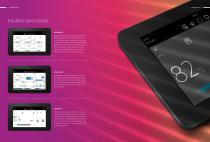
Intuitive and smart MAIN MENU JUNG Smart Vision is the app interface for the KNX visualisation of the Smart Panel 8. The first level is the room level. It displays up to six rooms in a grid. More rooms can be displayed by scrolling vertically, with horizontal scrolling showing the first or last room. You can naturally also select a room directly. There you can see the elements and functions set up in this area. ROOM VIEW In the room view you can see functions such as dimming lights, switching on heating, lowering blinds and much more. The first tile shows the room itself together with its name...
Open the catalog to page 4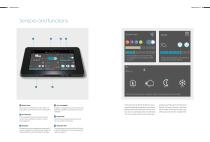
Switching lights on and off, dimming or changing the colour: lighting control is intuitive. Always ideal conditions: control shade as needed with the Smart Panel 8. Optimum control: thanks to different options, the temperature is always right. ROOM VIEW Clear display in the JUNG Smart Vision app: it displays rooms and elements in the form of large tiles. 2 STAY INFORMED In addition, messages can be sent to stored e-mail addresses or directly to the smartphone via push notification. In the navigation bar you have quick access to the room view, settings, favourites or the last event registered....
Open the catalog to page 5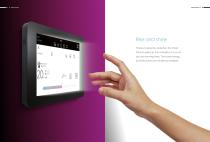
Rise and shine Thanks to proximity detection, the Smart Panel 8 wakes up from standby as soon as you are standing there. That saves energy, but all functions are still directly available.
Open the catalog to page 6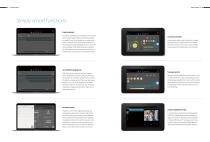
Simply smart functions TIME SCHEDULE Easy and uncomplicated: schedules run functions such as switching on lights or lowering shutters at specific times. For example, every morning at 8 am, the shutters are raised and at 7.30 pm in the evening the exterior lighting turns on. You can find schedules in the detail views of an element. Up to 125 elements with a maximum of ten commands each can be stored in the Smart Panel 8. COLOUR CONTROL Intuitive light colour control thanks to a simple selection with the colour picker: the control element in the form of a colour circle enables a quick selection...
Open the catalog to page 7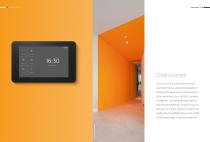
Control centre The heart of the Smart Panel 8 is the Launcher. Here you have the possibility of starting other apps such as QuickSupport, Door communication or JUNG Camera. In addition, you install updates here or call the panel settings using the logo at top right. To call the Launcher at any time, briefly press the HOME button in the middle on the lower edge of the Smart Panel
Open the catalog to page 8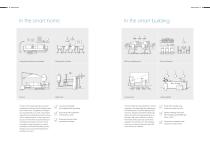
Living room, playroom or bedroom Dining room or kitchen Office or meeting room Boiler room Lecture room Hotel reception Thanks to the simple operation and clear visualisation, the Smart Panel 8 is ideally suited to the smart home. Completely according to your requirements you can set up the widest range of rooms and equip them with functions (the so-called elements). In the living room, do you want the blinds to be lowered automatically and the lights turned on? That is no problem using a sequence or a scene. In addition, the Smart Panel 8 helps to save energy by only running the heating when...
Open the catalog to page 9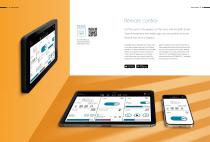
Remote control Scan the QR code and download the JUNG Smart Vision. On the couch, in the garden, on the move: with the JUNG Smart Vision smartphoneand tablet app, you can control the Smart Panel 8 even from a distance. Messages about important information such as an open window right up to controlling functions. The app is optimised for your mobile device and supports vertical and portrait mode. Up to ten app users can be stored for WLAN access to the Smart Panel 8. By default, the connection between the smart- phone or tablet and the Smart Panel 8 is initially established locally. With remote...
Open the catalog to page 10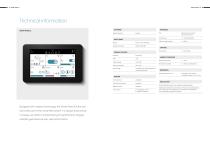
SOFTWARE INTERFACES Operating system Android KNX KNX connection terminal FRONT PANEL Display 203 mm / 8.0" HD display Resolution (in pixels) WXGA (1280 x 800) Mass storage 16 GB flash (free storage depends on Proximity sensor integrated G sensor for orientation integrated Brightness sensor integrated Input / output 2 x loudspeakers (1.5 W) Home button 1 x Home button Atmospheric humidity 5 ... 80 % (no condensation) Overall dimensions (W x H) Smart Panel: 225 x 145 mm Simple installation thanks to the installation adapter supplied Installation horizontally (recommended) or vertically in flush...
Open the catalog to page 11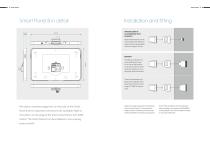
Smart Panel 8 in detailInstallation and fitting 16 mm APPLIANCE BOX IN ACCCORDANCE WITH EN 60670-1 Deep standard boxes are ideal for installing the KNX Smart Panel 8. Recommended depth of the box: approx. 60 mm. The EBG 24 installation box of the JUNG Smart Panel 5.1 as well as older devices and products with the same shape are suitable for retrofitting with the Smart Panel 8. Thanks to the adapter supplied, flush installation housings from the Smart-Control range SC 7 EBG can also be used. Flat device, extensive equipment: on the back of the Smart Panel 8 all the important connections are available....
Open the catalog to page 12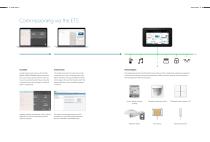
PLANNING Installers plan Smart Vision with the KNX SMART PANEL DESIGNER Windows software. This can be done jointly with the owner as they can see directly what they will be able to operate on the Smart Panel 8. At the end there is a project file. INTEGRATION The installer imports this project file quickly and easily with a device configuration app (DCA) to the ETS. The required KNX communication objects that will then be linked with the group addresses of the installation appear as normal. The programming of the Smart Panel 8 comes at the end. The installer then programs visualisation, communication...
Open the catalog to page 13All ALBRECHT JUNG GMBH & CO. KG catalogs and technical brochures
 British range
81 Pages
 KNX Secure
19 Pages
 LS 990 – The Classic Switch
46 Pages
 LS ZERO
13 Pages
 Makes Casambi Shine
27 Pages
 Yachts and passenger ships
25 Pages
 Hospitality
60 Pages
 Worldwide connection
5 Pages
 Full power with USB port
32 Pages
 Les Couleurs® Le Corbusier®
44 Pages
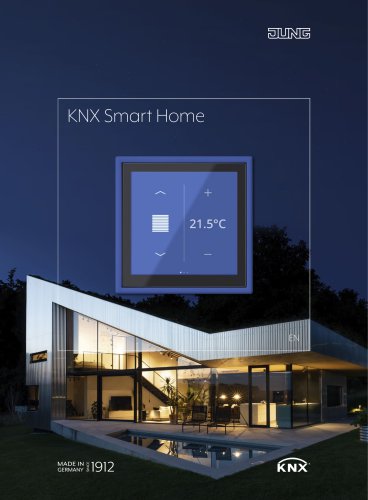 KNX Smart Home
29 Pages
 Hygiene
19 Pages
 JUNG HOME. JUST SMART.
100 Pages
 Living inspiration
61 Pages
- JUNG switch
- JUNG contemporary switch
- JUNG recessed switch
- JUNG socket
- JUNG square switch
- JUNG contemporary socket
- JUNG power socket
- Metal switch
- JUNG push-button switch
- JUNG wall-mounted socket
- JUNG recessed socket
- JUNG multiple socket
- JUNG white switch
- JUNG white socket
- JUNG black socket
- Multimedia socket
- Metal socket
- JUNG commercial switch
- JUNG commercial socket
- JUNG black switch
- VirtualExpo Group
- Our Partners
- Careers
- Testimonials