
- Catalogs
- Siemens Home Appliances
- 90007104181

- Products
- Catalogs
- News & Trends
- Exhibitions
90007104181
1 /40Pages

90007104181
1 /40Pages
Catalog excerpts
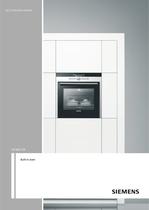
[en] Instruction manual HB78GB.70B Built-in oven
Open the catalog to page 1
: Important safety information Read these instructions carefully. Only then will you be able to operate your appliance safely and correctly. Retain the instruction manual and installation instructions for future use or for subsequent owners. This appliance is only intended to be fully fitted in a kitchen. Observe the special installation instructions. Check the appliance for damage after unpacking it. Do not connect the appliance if it has been damaged in transport. Only a licensed professional may connect appliances without plugs. Damage caused by incorrect connection is not covered under warranty....
Open the catalog to page 4
The cable insulation on electrical appliances may melt when touching hot parts of the appliance. Never bring electrical appliance cables into contact with hot parts of the appliance. ■ Penetrating moisture may cause an electric shock. Do not use any highpressure cleaners or steam cleaners. ■ When replacing the cooking compartment bulb, the bulb socket contacts are live. Before replacing the bulb, unplug the appliance from the mains or switch off the circuit breaker in the fuse box. ■ A defective appliance may cause electric shock. Never switch on a defective appliance. Unplug the appliance from...
Open the catalog to page 5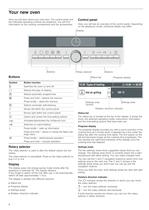
Your new oven Here you will learn about your new oven. The control panel and the individual operating controls are explained. You will find information on the cooking compartment and the accessories. Control panel Here, you will see an overview of the control panel. Depending on the appliance model, individual details may differ. 'LVSOD\ RQ RII 3 VWDUW VWRS 0 %XWWRQV 5RWDU\ VHOHFWRU Buttons %XWWRQV 6WDWXV EDU Symbol Button function ‡ Switches the oven on and off " Selects the type of heating X Selects automatic programmes l 3URJUHVV GLVSOD\ Press and hold = selects the memory Press briefly =...
Open the catalog to page 6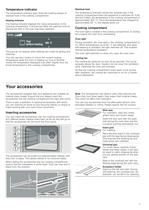
Temperature indicator Residual heat The temperature indicator bars show the heating phases or residual heat in the cooking compartment. The temperature indicator shows the residual heat in the cooking compartment when the appliance is switched off. If the last bar is filled, the temperature in the cooking compartment is approximately 300 °C. Once the temperature has dropped to approximately 60 °C, the display goes out. Heating indicator The heating indicator displays the rising temperature in the cooking compartment. If all bars are filled, the optimum time for placing the dish in the oven has...
Open the catalog to page 7
Optional accessories You can purchase optional accessories from the after-sales service or specialist retailers. You will find a comprehensive range of products for your oven in our brochures and on the Internet. The availability of optional accessories and the option for ordering these online varies from country to country. Please see the sales brochures for more details. Not all optional accessories are suitable for every appliance. When purchasing, please always quote the exact designation (E-no.) of your appliance. Optional accessories HZ number Use Suitable for self-cleaning Wire rack HZ334000...
Open the catalog to page 8
After-sales service products You can obtain suitable care and cleaning agents and other accessories for your domestic appliances from the after-sales service, specialist retailers or (in some countries) online via the eShop. Please specify the relevant product number. Cleaning cloths for stainless-steel surfaces Product no. 311134 Reduces the build-up of dirt. Impregnated with a special oil for perfect maintenance of your appliance's stainless-steel surfaces. Oven and grill cleaning gel For cleaning the cooking compartment. The gel is odourless. Product no. 463582 Microfibre cloth with honeycomb...
Open the catalog to page 9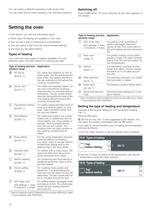
You can select a different operating mode at any time. Switching off You can read how to make settings in the individual sections. Press the‡ button. The oven switches off, the clock appears in the display. Setting the oven In this section, you will find information about ■ which types of heating are available in your oven Type of heating and tem- Application perature range ■ how you set a type of heating and a temperature * Grill, small area ■ how you select a dish from the recommended settings ■ and how you set rapid heating . Slow cook Types of heating Your oven has many types of heating available....
Open the catalog to page 10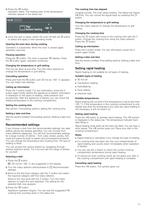
3. Press the † button. Operation starts. The heating bars of the temperature indicator appear in the status bar. 3UHKHDWLQJ 7RS ERWWRP KHDWLQJ & The cooking time has elapsed A signal sounds. The oven stops heating. The status bar shows x 0:00. You can cancel the signal early by pressing the 0 button. Changing the temperature or grill setting Turn the rotary selector to change the temperature or grill setting. Changing the cooking time 4. Once the dish is ready, switch the oven off with the ‡ button or select and apply a new operating mode. Opening the oven door during cooking Operation is suspended....
Open the catalog to page 11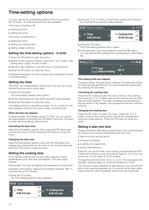
Time-setting options You can call up the time-setting options menu by pressing the 0 button. The following functions are available: 2. Using the ¿ or ¾ button, move to the cooking time and set the cooking time using the rotary selector. If the oven is switched off: ■ ■ 7\SHV RI KHDWLQJ Setting the timer Setting the clock 7LPHU PLQVHF If the oven is switched on: ■ Setting the timer ■ Setting the cooking time ■ Setting a later end time &RRNLQJ WLPH PLQVHF 3. Press the 0 button. The Time-setting options menu closes. 4. If the operation has not yet started, press the † button. Setting the time-setting...
Open the catalog to page 12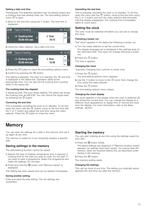
Setting a later end time Cancelling the end time Prerequisite: The selected operation has not already begun and a cooking time has already been set. The time-setting options menu 0 is open. This is possible, providing the oven is on standby. To do this, open the menu with the 0 button, move to the end time using the ¿ or ¾ button and turn the rotary selector anti-clockwise until the display disappears. The cooking time immediately starts to count down. 1. Move to the end time using the ¿ button. The end time is displayed. 7\SHV RI KHDWLQJ &RRNLQJ WLPH PLQVHF (QG &RRNLQJ WLPH PLQVHF The oven must...
Open the catalog to page 13All Siemens Home Appliances catalogs and technical brochures
 Freestanding Appliances
42 Pages
 EZ977KZY1E
3 Pages
 CM678G4S6B
3 Pages
 HB672GBS1B
3 Pages
 HB676GBS6B
3 Pages
 EC9A5SB90
3 Pages
 WM14XEH4GB
3 Pages
 ET875FCP1D
2 Pages
 ET651HE17E
3 Pages
 Built-in Appliances Brochure
111 Pages
 catalog 2016
79 Pages
 Ovens 2009
22 Pages
 Free-standing Appliances
46 Pages
 Built in brochure
74 Pages
 Freestanding Brochure
46 Pages

Archived catalogs
 EX807LX67E
7 Pages
 2014 Built-in Appliances
77 Pages
 2022 Built-in Appliances
109 Pages
 9000371475
24 Pages
 9000443031
14 Pages
 9000455265
148 Pages
 9000523431
32 Pages
 9000538106
31 Pages
 9000644314
36 Pages
 9000644401
40 Pages
 9000645988
24 Pages
 9000646020
24 Pages
 9000650983
8 Pages
 90005263871
140 Pages
 9000731775
23 Pages
 90005805756
30 Pages
 90006317281
28 Pages
 90006502641
30 Pages
 90006944392
30 Pages
 9000755818
64 Pages
 90004930205
36 Pages
 90004930197
32 Pages
 Freestanding Cooling 09
20 Pages
 Freestanding Dishwashers 09
14 Pages
 Freestanding Washing 09
10 Pages
 Hobs 2009
9 Pages
 Cooker Hoods 2009
18 Pages
 Built-in Cooling 2009
20 Pages
 Built-in Laundry 2009
7 Pages
 Built-in Dishwashers 2009
16 Pages
 Tumble Dryers 2009
7 Pages
 Smart Living 2009
16 Pages

- Siemens electric oven
- Siemens range hood
- Range hood with built-in lighting
- Siemens cooktop
- Industrial coffee machine
- Siemens single oven
- Siemens cooktop with front controls
- Siemens wall-mounted range hood
- Siemens built-in cooktop
- Convection oven
- Automatic coffee machine
- Industrial dishwasher
- Siemens built-in oven
- Siemens single-chamber oven
- Siemens ducted range hood
- Industrial wine cellar
- Siemens induction cooktop
- Black coffee maker
- Cappuccino coffee machine