
- Catalogs
- Siemens Home Appliances
- 9000646020

- Products
- Catalogs
- News & Trends
- Exhibitions
9000646020
1 /24Pages

9000646020
1 /24Pages
Catalog excerpts

Built-in oven HB43AB.50B [en] Instruction manual
Open the catalog to page 1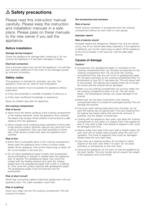
ã=Safety precautions Please read this instruction manual carefully. Please keep the instruction and installation manuals in a safe place. Please pass on these manuals to the new owner if you sell the appliance. Before installation Damage during transport Check the appliance for damage after unpacking it. Do not connect the appliance if it has been damaged in transit. Electrical connection Only a licensed expert may connect the appliance. You will lose your warranty entitlement in the event of any damage caused by incorrect connection. Hot accessories and ovenware Risk of burns! Never remove ovenware...
Open the catalog to page 4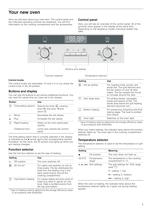
Your new oven Here you will learn about your new oven. The control panel and the individual operating controls are explained. You will find information on the cooking compartment and the accessories. Control panel Here, you will see an overview of the control panel. All of the symbols never appear in the display at the same time. Depending on the appliance model, individual details may differ. & %XWWRQV DQG GLVSOD\ )XQFWLRQ VHOHFWRU Control knobs The control knobs are retractable. To lock it in or out, press the control knob in the off position. 7HPSHUDWXUH VHOHFWRU Setting Use 4 Hot air grilling...
Open the catalog to page 5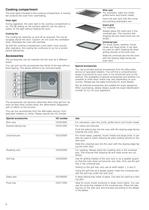
Cooking compartment The oven light is located in the cooking compartment. A cooling fan protects the oven from overheating. Wire rack For ovenware, cake tins, joints, grilled items and frozen meals. Oven light Insert the wire rack with the curvature pointing downward ¾. During operation, the oven light in the cooking compartment is on. The \ setting on the function selector can be used to switch on the light without heating the oven. Insert grid For roasting. Always place the insert grid in the universal pan. This ensures that dripping fat and meat juices are collected. Cooling fan The cooling...
Open the catalog to page 6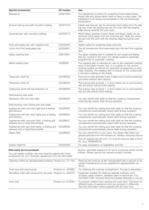
Special accessories HZ number Use Bakestone HZ327000 The bakestone is perfect for preparing home-made bread, bread rolls and pizzas which need to have a crispy base. The bakestone must always be preheated to the recommended temperature. Enamel baking tray with non-stick coating HZ331010 Cakes and biscuits can be removed more easily from the baking tray. Push the baking tray into the oven with the sloping edge facing towards the oven door. Universal pan with non-stick coating HZ332010 Moist cakes, pastries, frozen meals and large roasts can be removed more easily from the universal pan. Slide...
Open the catalog to page 7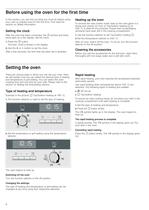
Before using the oven for the first time In this section, you can find out what you must do before using your oven to prepare food for the first time. First read the section on Safety information. Setting the clock Heating up the oven To remove the new cooker smell, heat up the oven when it is empty and closed. An hour of Top/bottom heating % at 240 °C is ideal for this purpose. Ensure that no packaging remnants have been left in the cooking compartment. After the oven has been connected, the 0 symbol and three zeros light up in the display. Set the clock. 1. Use the function selector to set...
Open the catalog to page 8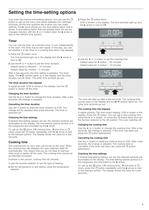
Setting the time-setting options Your oven has various time-setting options. You can use the 0 button to call up the menu and switch between the individual functions. All the time symbols are lit when you can make settings. The N arrow shows you the time-setting option that is active. A time-setting option that has already been set can be changed direction with the @ or A button when the N arrow is next to the relevant time symbol. 3. Press the 0 button twice. 0:00 is shown in the display. The time symbols light up and the N arrow is next to x . Timer You can use the timer as a kitchen timer....
Open the catalog to page 9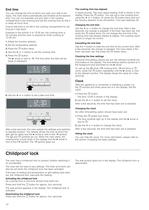
End time The cooking time has elapsed You can change the time at which you wish your dish to be ready. The oven starts automatically and finishes at the desired time. You can, for example, put your dish in the cooking compartment in the morning and set the cooking time so that it is ready at lunch time. A signal sounds. The oven stops heating. 0:00 is shown in the display. Press the 0 button. You can set a new cooking time using the @ or A button. Or press the 0 button twice and turn the function selector to the off position. The oven switches off. Ensure that food is not left in the cooking...
Open the catalog to page 10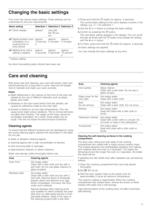
Changing the basic settings Your oven has various basic settings. These settings can be customised to suit your requirements. Basic setting Selection 1 Selection 2 Selection 3 c1 Clock display always* only with the 0 button approx. approx. c2 Signal duration upon approx. 10 second 2 minutes* 5 minutes completion of a s cooking time or timer period c3 Waiting time until a setting is applied approx. approx. approx. 2 seconds 5 seconds* 10 second s 1. Press and hold the 0 button for approx. 4 seconds. The current basic setting for the clock display is shown in the display, e.g. c1 1 for selection...
Open the catalog to page 11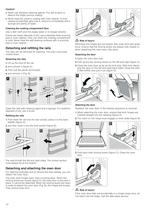
Caution! ■ ■ Never use abrasive cleaning agents. You will scratch or destroy the highly porous coating. $ % Never treat the ceramic coating with oven cleaner. If oven cleaner accidentally gets onto it, remove it immediately with a sponge and plenty of water. Cleaning the cooking compartment floor Use a dish cloth and hot soapy water or a vinegar solution. If there are heavy deposits of dirt, use a stainless steel scouring pad or oven cleaner. Only use when the cooking compartment is cold. Never treat the self-cleaning surfaces with a scouring pad or oven cleaner. Detaching and refitting the rails...
Open the catalog to page 12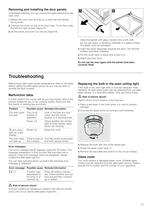
Removing and installing the door panels To facilitate cleaning, you can remove the glass panels from the oven door. $ % 1. Detach the oven door and lay on a cloth with the handle facing down. 2. Unscrew the cover on top of the oven door. To do this, undo the left and right screws (figure A). 3. Lift the panel, and pull it up and out (figure B). Clean the panels with glass cleaner and a soft cloth. Do not use sharp or abrasive materials or a glass scraper. The glass could be damaged. 4. Insert the panel diagonally towards the back. The smooth surface must face outwards. 5. Put the cover back in...
Open the catalog to page 13All Siemens Home Appliances catalogs and technical brochures
 Freestanding Appliances
42 Pages
 EZ977KZY1E
3 Pages
 CM678G4S6B
3 Pages
 HB672GBS1B
3 Pages
 HB676GBS6B
3 Pages
 EC9A5SB90
3 Pages
 WM14XEH4GB
3 Pages
 ET875FCP1D
2 Pages
 ET651HE17E
3 Pages
 Built-in Appliances Brochure
111 Pages
 catalog 2016
79 Pages
 Ovens 2009
22 Pages
 Free-standing Appliances
46 Pages
 Built in brochure
74 Pages
 Freestanding Brochure
46 Pages

Archived catalogs
 EX807LX67E
7 Pages
 2014 Built-in Appliances
77 Pages
 2022 Built-in Appliances
109 Pages
 9000371475
24 Pages
 9000443031
14 Pages
 9000455265
148 Pages
 9000523431
32 Pages
 9000538106
31 Pages
 9000644314
36 Pages
 9000644401
40 Pages
 9000645988
24 Pages
 9000650983
8 Pages
 90005263871
140 Pages
 90007104181
40 Pages
 9000731775
23 Pages
 90005805756
30 Pages
 90006317281
28 Pages
 90006502641
30 Pages
 90006944392
30 Pages
 9000755818
64 Pages
 90004930205
36 Pages
 90004930197
32 Pages
 Freestanding Cooling 09
20 Pages
 Freestanding Dishwashers 09
14 Pages
 Freestanding Washing 09
10 Pages
 Hobs 2009
9 Pages
 Cooker Hoods 2009
18 Pages
 Built-in Cooling 2009
20 Pages
 Built-in Laundry 2009
7 Pages
 Built-in Dishwashers 2009
16 Pages
 Tumble Dryers 2009
7 Pages
 Smart Living 2009
16 Pages

- Siemens electric oven
- Siemens range hood
- Range hood with built-in lighting
- Siemens cooktop
- Industrial coffee machine
- Siemens single oven
- Siemens cooktop with front controls
- Siemens wall-mounted range hood
- Siemens built-in cooktop
- Convection oven
- Automatic coffee machine
- Industrial dishwasher
- Siemens built-in oven
- Siemens single-chamber oven
- Siemens ducted range hood
- Industrial wine cellar
- Siemens induction cooktop
- Cappuccino coffee machine
- Black coffee maker