
- Catalogs
- Frigidaire
- All about the Use & Care of your Wall Oven

All about the Use & Care of your Wall Oven
1 /32Pages

All about the Use & Care of your Wall Oven
1 /32Pages
Catalog excerpts
WELCOME & CONGRATULATIONS Product Registration Register Your Product REGISTRATION CARD should be filled in completely, Electrolux Home Products. Serial Plate Location Please record your model and serial numbers below for future reference. Model Number:_ Serial Number:_ Purchase Date:_ Congratulations on your purchase of a new appliance! At Electrolux Home Products, we are very proud of our product and are completely committed to providing you with the best service possible. Your satisfaction is our We know you'll enjoy your new appliance and Thank You for choosing our product. We hope you consider...
Open the catalog to page 2
IMPORTANT SAFETY INSTRUCTIONS Read all instructions before using this appliance. Save these instructions for future reference. A This is the safety alert symbol. It is used to alert you to potential personal injury hazards. Obey all safety messages that follow this symbol to avoid possible injury This symbol will help alert you to situations that may cause serious bodily harm, death or property This symbol will help alert you to situations that may cause bodily injury or property damage. IMPORTANT indicates installation, operation or maintenance information which is important but not • Remove...
Open the catalog to page 3
IMPORTANT SAFETY INSTRUCTIONS Do not store items of interest to children in the cabinets above the appliance. Children climbing on I the cooktop to reach items could be seriously injured. • Do not leave children alone. Children should not be left alone or unattended in the area where an appliance is in use. They should never be allowed to sit or stand on any part of the appliance. • DO NOT TOUCH INTERIOR OVEN ELEMENTS OR INTERIOR SURFACES OF THE OVEN UNTIL THEY HAVE COOLED. The oven heating elements may be hot even though the elements are dark in color. Areas near the elements may become hot...
Open the catalog to page 4
IMPORTANT SAFETY INSTRUCTIONS IMPORTANT SAFETY INSTRUCTIONS FOR CLEANING YOUR OVEN • Clean the appliance regularly to keep all parts free of grease that could catch fire. Exhaust fan ventilation hoods and grease filters should be kept clean. Do not allow grease to accumulate. Greasy deposits in the fan could catch fire. Refer to the hood manufacturer's instructions for cleaning. • Cleaners/Aerosols—Always follow the manufacturer's recommended directions for use. Be aware that excess residue from cleaners and aerosols may ignite causing damage and/or injury. • Clean in the self-cleaning cycle...
Open the catalog to page 5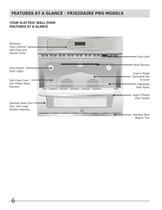
FEATURES AT A GLANCE - FRIGIDAIRE PRO MODELS YOUR ELECTRIC WALL OVEN Oven Controls Kitchen Timer Dual Interior Oven Lights Self-Clean Oven with Hidden Bake Stainless Steel Oven Door with Large Window Opening Oven Vent Broil Element Oven Racks Door Handle Stainless Steel Bottom Trim
Open the catalog to page 6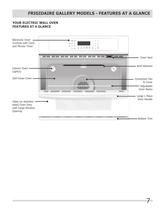
FRIGIDAIRE GALLERY MODELS - FEATURES AT A GLANCE YOUR ELECTRIC WALL OVEN Electronic Oven Controls with Clock Interior Oven Self-Clean Oven steel) Oven Door with Large Window Oven Vent Broil Element Oven Racks Door Handle Bottom Trim
Open the catalog to page 7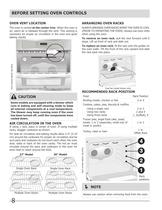
BEFORE SETTING OVEN CONTROLS OVEN VENT LOCATION The oven is vented at the center trim. When the oven is on, warm air is released through the vent. This venting is necessary for proper air circulation in the oven and good baking results. Some models are equipped with a blower which runs in baking and self-cleaning mode to keep all internal components at a cool temperature. The blower may keep running even if the oven has been turned off, until the components have If using 1 rack, place in center of oven. If using multiple racks, stagger cookware as shown. For best air circulation and baking results...
Open the catalog to page 8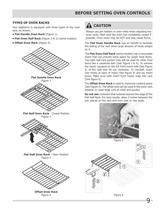
BEFORE SETTING OVEN CONTROLS TYPES OF OVEN RACKS Your appliance is equipped with three types of the oven • Flat Handle Oven Rack (Figure 1). • Flat Oven Half Rack (Figure 2 & 3) (some models). • Offset Oven Rack (Figure 4). Flat Handle Oven Rack Flat Half Oven Rack - Closed Position Flat Half Oven Rack - Open Position Offset Oven Rack Always use pot holders or oven mitts when adjusting the oven racks. Wait until the oven has completely cooled if possible. Oven racks may be HOT and may cause burns. The Flat Oven Handle Rack has an handle to facilitate the sliding of the rack when large amount...
Open the catalog to page 9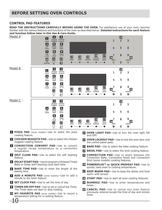
BEFORE SETTING OVEN CONTROLS READ THE INSTRUCTIONS CAREFULLY BEFORE USING THE OVEN. For satisfactory use of your oven, become familiar with the various features and functions of the oven as described below. Detailed instructions for each feature and function follow later in this Use & Care Guide. pizza nuggets convert self delay clean start powerpLus keep convert preheat warm pizza nuggets convert convert preheat warm chicken convert nuggets convert self delay clean start Clock °n-off convert preheat warm start D PIZZA PAD (some models)—Use to select the pizza cooking feature. B CHICKEN NUGGETS...
Open the catalog to page 10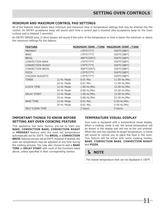
SETTING OVEN CONTROLS MINIMUM AND MAXIMUM CONTROL PAD SETTINGS All of the features listed below have minimum and maximum time or temperature settings that may be entered into the control. An ENTRY acceptance beep will sound each time a control pad is touched (the acceptance beep on the Oven Lockout pad is delayed 3 seconds). An ENTRY ERROR tone (3 short beeps) will sound if the entry of the temperature or time is below the minimum or above the maximum settings for the feature. CONVECTION BAKE CONVECTION ROAST CONVECTION BROIL CHICKEN NUGGETS CLOCK TIME DELAY START BAKE TIME SELF CLEAN TIME MINIMUM...
Open the catalog to page 11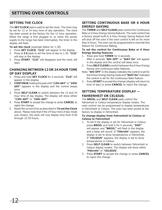
SETTING OVEN CONTROLS The SET CLOCK pad is used to set the clock. The clock may be set for 12 or 24 hour time of day operation. The clock has been preset at the factory for the 12 hour operation. When the range is first plugged in, or when the power supply to the range has been interrupted, the timer in the display will flash. To set the clock (example below for 1:30) 1. Press SET CLOCK. "CLO" will appear in the display. 2. Press 13 0 pads to set the time of day to 1:30. "CLO" will stay in the display. 3. Press START. "CLO" will disappear and the clock will CHANGING BETWEEN 12OR24 HOURTIME 1....
Open the catalog to page 12All Frigidaire catalogs and technical brochures



- Electric oven
- Extractor hood
- Range hood with built-in lighting
- Industrial range cooker
- Hob with front controls
- Built-in hob
- Industrial dishwasher
- Built-in oven
- Gas range cooker
- Electric range cooker
- Industrial refrigerator
- Ducted range hood
- Induction cooktop
- Cooktop with touch controls
- Standalone refrigerator
- Industrial freezer
- Black cooktop
- Refrigerator-freezer